
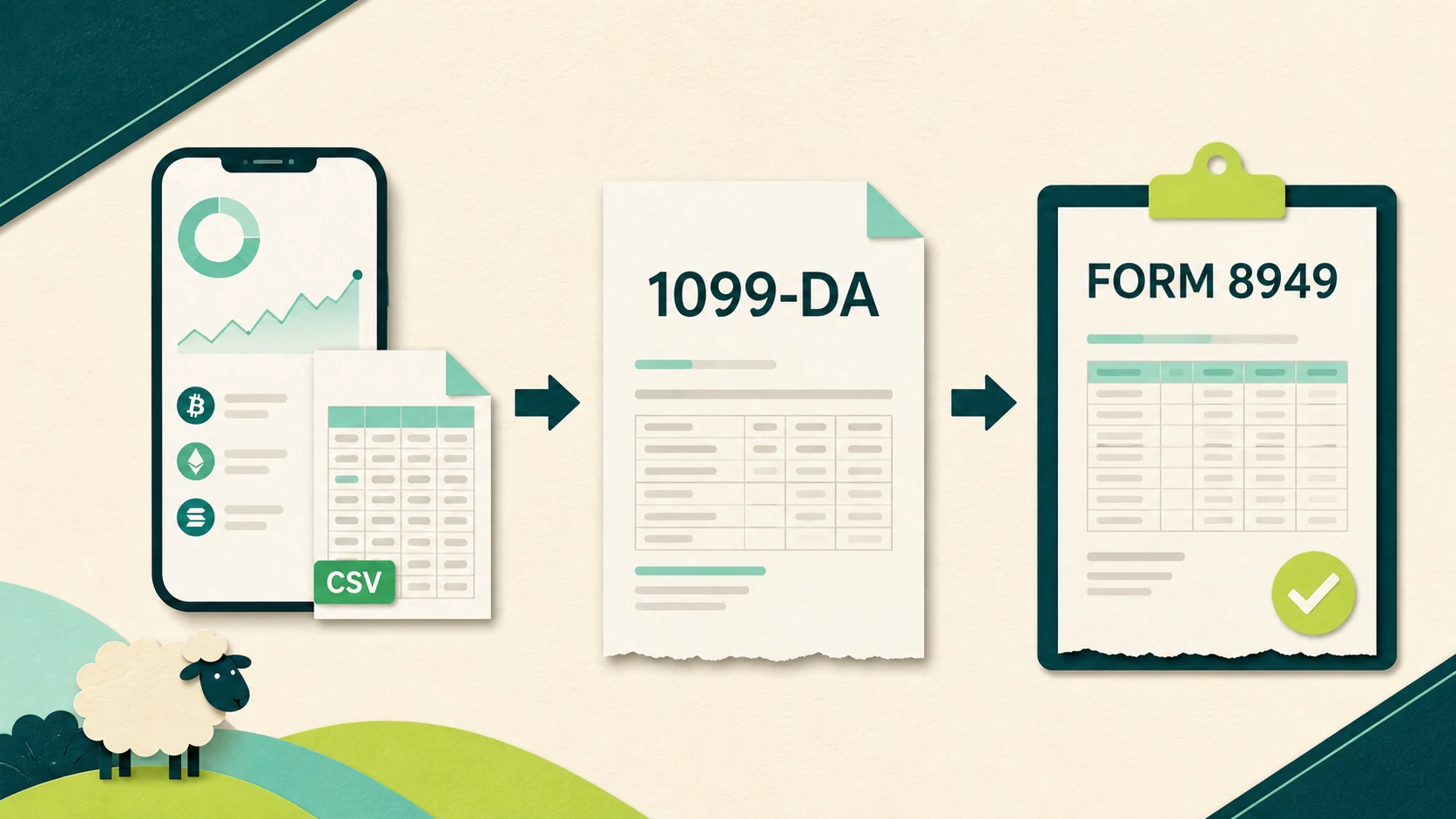
Crypto.com tax documents are only the starting point for a US crypto return. For 2025 activity filed in 2026, Crypto.com may send Form 1099-DA for reportable digital asset dispositions, Form 1099-MISC for qualifying rewards, or Form 1099-B for contract trading. You also need the raw records from every Crypto.com product you used.
That distinction matters. A 1099-DA reports proceeds to you and the IRS. It is not a finished gain and loss report, and Crypto.com intentionally left cost basis off its 2025 Forms 1099-DA. The App, Exchange, and self-custody Onchain wallet also keep different records.
This guide shows you exactly which files to collect, where to find them, and how they flow into Form 8949, Schedule D, and Schedule 1. For the broader tax treatment of trades, Earn, card rewards, staking, NFTs, and Cronos activity, use the complete Crypto.com tax guide.
Which Crypto.com tax forms can US users receive for 2025?
US Crypto.com users can receive Form 1099-DA, Form 1099-MISC, and Form 1099-B, depending on their 2025 activity. Crypto.com does not publish one blanket threshold that guarantees every user a Form 1099-DA.
| Crypto.com document | What it reports | What it does not finish |
|---|---|---|
| Form 1099-DA | Certain digital asset sales, exchanges, and other reportable dispositions | Your actual gain or loss when basis is missing |
| Form 1099-MISC | At least $600 of qualifying 2025 rewards from Lock-Ups, Earn, Referrals, or certain other activities | Every type of crypto income or the final return classification |
| Form 1099-B | Contract activity for users who traded applicable products | Spot digital asset activity reported on Form 1099-DA |
| Transaction CSVs | Buys, sells, transfers, rewards, fees, deposits, withdrawals, and other account events | A reconciled Form 8949 by themselves |
Crypto.com’s official 2025 tax-form FAQ uses careful language: the company “may be required” to issue a form when the relevant activity is reportable. Do not assume that having a Crypto.com account automatically produces all three forms.
Form 1099-DA is the important change for the 2026 filing season. The IRS says brokers generally must report gross proceeds for digital asset transactions effected on or after January 1, 2025. Basis reporting phases in for certain covered assets acquired and sold after 2025.
For Crypto.com users, the 2025 transition is simpler: Crypto.com says it chose not to report cost basis on its 2025 Forms 1099-DA. That means your form can accurately report proceeds while leaving the number needed to calculate gain or loss to you.
How do you download an issued Crypto.com 1099?
Crypto.com sends an email from no-reply@crypto.com to the latest email address on your account. The secure link lets you download any Form 1099-DA, 1099-MISC, or 1099-B Crypto.com issued to you.
Use this order:
- Search your current Crypto.com account email for a message from
no-reply@crypto.com. - Check spam or junk if the message is missing.
- Follow the secure link and confirm that the address belongs to
crypto.com. - Save the PDF with your 2025 tax records.
- If you need a paper copy or believe the form is wrong or missing, contact Crypto.com through In-App Chat.
Crypto.com also maintains an official 1099 form portal. Use the official domain directly rather than a link copied from a forum or an unsolicited message.
How do you export Crypto.com App transaction history?
Export the Crypto.com App Token Wallet CSV from Accounts, History, Export. The App can also produce separate Cash Account and Crypto.com Visa card records.
For the Token Wallet, the current Crypto.com App export instructions are:
- Open the Accounts page.
- Tap the History icon in the top-right corner.
- Tap Export.
- Select Token Wallet.
- Set the start and end dates, including the full tax year and any earlier acquisition history you need.
- Tap Export to CSV.
- Download the report to your phone when it is ready.
The Cash Account export begins on the Cash Account page and uses the same date-range and Export to CSV flow. Card records use Card, More, Settings, and Export Transaction History.
Crypto.com currently allows one App transaction report to cover up to three years. Export History shows the last 30 generated reports, and each download remains available for 30 days. Save a clean copy outside the App before that window closes.
How do you export Crypto.com Exchange transaction history?
Export each relevant Crypto.com Exchange report separately after setting the date range and filters. The Exchange records are not the same file as the Crypto.com App export.
The official Exchange export guide lists these record groups:
- Wallet Transactions History
- Wallet Deposits and Withdrawals
- Order History and Trade History
- Lockup Rewards
- Referral Rewards
- Supercharger Rewards
For each needed report, open its page, enter the date range, select the filters, run the search, and click the Export icon. Wallet transaction, order, and trade exports appear in the Export History tab when they are ready, which can take up to two days. Crypto.com also provides a summary file that tells you whether the query was captured completely.
Watch the limits. Wallet transaction exports cover up to one month per request. Most other reports cover up to six months. A report is capped at 65,000 records. If the summary shows an incomplete export, split the period into smaller ranges and run it again.
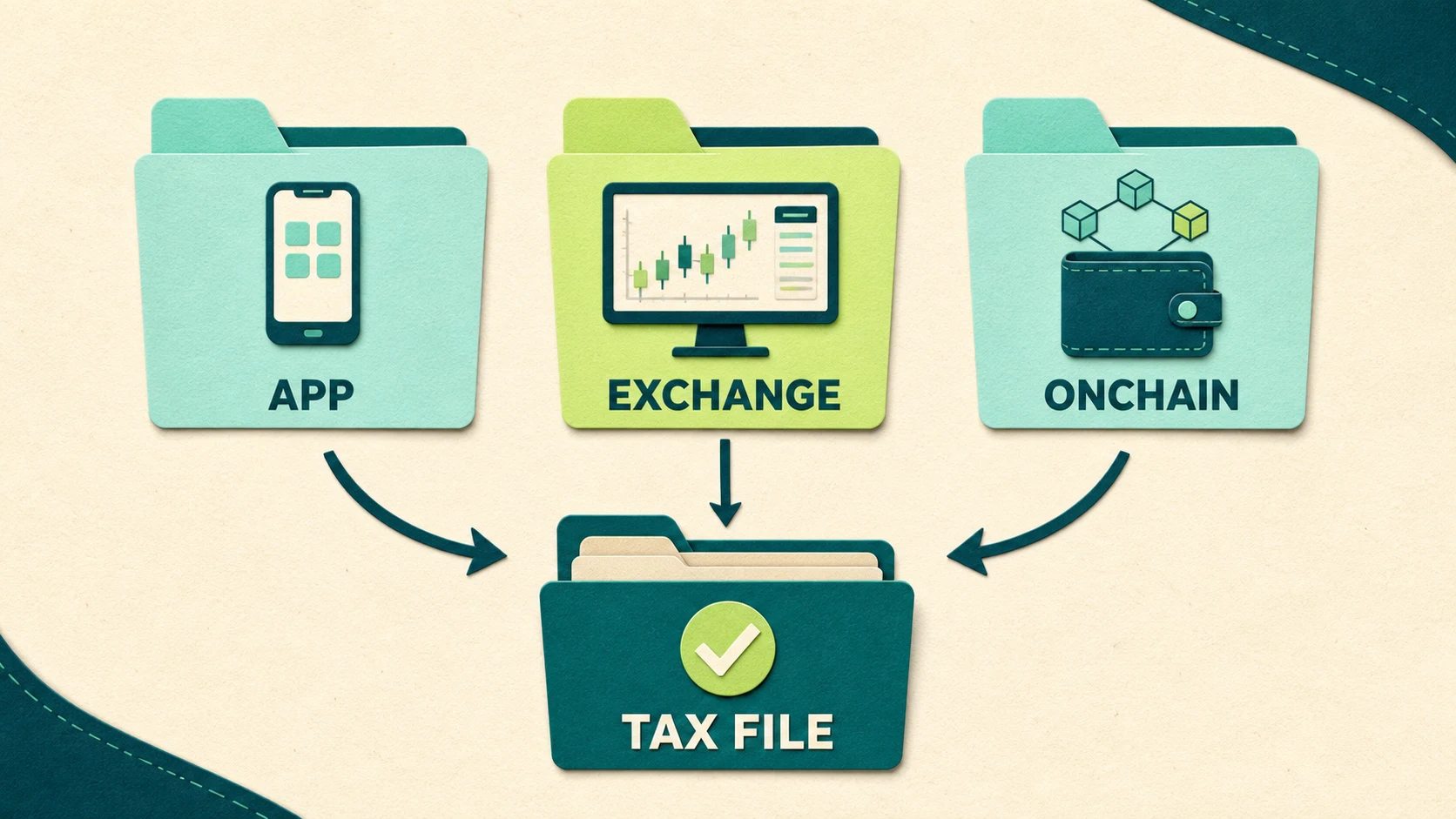
Where do Crypto.com Onchain tax records come from?
Crypto.com Onchain records come from the public transaction history for each wallet address and blockchain you used. Do not expect the centralized Crypto.com 1099 or App CSV to contain a complete Onchain history.
Crypto.com describes Onchain as a separate, user-custodied wallet. You can use it without a Crypto.com App account, and Crypto.com does not hold its private keys. That separation is the reason the record collection process is different.
Build the Onchain portion of your file this way:
- List every network you used, such as Cronos, Cronos PoS, Ethereum, or another supported chain.
- Record the public receiving address for each network and account.
- Export or import the public transaction history from the relevant blockchain explorer or reconciliation software.
- Capture swaps, liquidity activity, staking rewards, bridging, fees, NFT activity, and transfers to or from the Crypto.com App or Exchange.
- Match each transfer across both sides so it is not misclassified as income or a disposal.
Never enter your recovery phrase into tax software, a block explorer, or a support chat. Public wallet addresses are enough for read-only transaction collection.
What does Crypto.com not send you?
Crypto.com does not send a complete federal crypto return. Its information forms and exports must be combined with your own records before you can calculate the final tax result.
If you were looking for a one-click Crypto.com tax report, this is the key distinction: the 1099 is an information return, not a completed capital gain and income calculation.
Specifically, do not expect Crypto.com to supply:
- A finished Form 8949 covering every exchange and wallet you used
- A complete Schedule D with your true portfolio-wide gains and losses
- A complete Schedule 1 with all digital asset income
- Cost basis on Crypto.com’s 2025 Form 1099-DA
- Original purchase records for crypto transferred in from another platform or wallet
- A complete Onchain or Cronos history inside the centralized App CSV
- A form for every taxable event simply because the event is reportable on your return
The last point catches people. The IRS says digital asset income, gains, and losses must be reported whether or not you receive Form 1099-DA. An absent form is not an exemption.
How do you fix missing or wrong Crypto.com 1099-DA basis?
For a 2025 Crypto.com 1099-DA, reconstruct the basis from your records and report the supported amount on Form 8949. Crypto.com intentionally did not report basis for that year, so a blank basis field is expected.
Start by separating three situations:
| What you see | What it usually means | Next step |
|---|---|---|
| Basis is blank | Crypto.com did not report basis for 2025 | Reconstruct basis from your records |
| Basis appears as zero | Confirm whether zero was actually reported or inserted by tax software | Do not approve zero unless the asset truly had zero basis |
| Proceeds, asset, units, or date are wrong | The information return may contain a factual error | Contact Crypto.com through In-App Chat and keep the correspondence |
To rebuild basis, connect each sale to the acquisition that created the tax lot. Keep the original trade confirmation, acquisition date, amount paid, acquisition fees, transfers between accounts, and sale record. The 2025 Form 8949 instructions state that digital asset basis generally includes acquisition costs such as transaction fees and commissions.
If basis was not reported to the IRS, the Form 8949 instructions generally have you enter the correct supported basis in column (e). Column (g) is normally zero unless another adjustment applies. If basis was reported to the IRS but is wrong, the mechanics are different: you generally retain the reported basis in column (e) and calculate an adjustment in column (g) under the IRS worksheet.
For the full repair process, see how to fix wrong or missing 1099-DA cost basis. If you already filed with the wrong numbers, use the amended crypto tax return guide to understand the correction process.
How do Crypto.com documents map to Form 8949, Schedule D, and Schedule 1?
Crypto.com’s 1099s and CSVs are source records. Form 8949, Schedule D, and Schedule 1 are where the reconciled tax results reach the federal return.
| Source record | Federal destination | What you report |
|---|---|---|
| Form 1099-DA plus complete transaction history | Form 8949 | Each reportable sale or exchange, proceeds, supported basis, and resulting gain or loss |
| Form 8949 totals | Schedule D | Short-term and long-term capital gain and loss totals |
| Form 1099-MISC plus reward history | Often Schedule 1, line 8v for 2025 when the digital asset income is not reported elsewhere | Fair market value of rewards when received |
| Form 1099-B for applicable contracts | The form and schedule required for that contract activity | Contract gain or loss without duplicating spot transactions |
The word “often” matters for reward income. The 2025 Schedule 1 has a specific line 8v for digital assets received as ordinary income and not reported elsewhere. Activity conducted as a trade or business, or income that belongs on another schedule, can follow a different route. Classification depends on the facts.
The end-to-end filing workflow is covered in how to report Form 1099-DA on your tax return.
Worked example: from Crypto.com 1099-DA to the return
Suppose Maya bought 0.4 BTC on another exchange for $12,800 and paid a $200 acquisition fee. Her supported basis is $13,000.
She transferred the 0.4 BTC to Crypto.com and sold it in 2025. Crypto.com reported $18,500 of net proceeds on Form 1099-DA and left the basis blank. Maya also earned $850 of qualifying Crypto.com rewards reported on Form 1099-MISC.
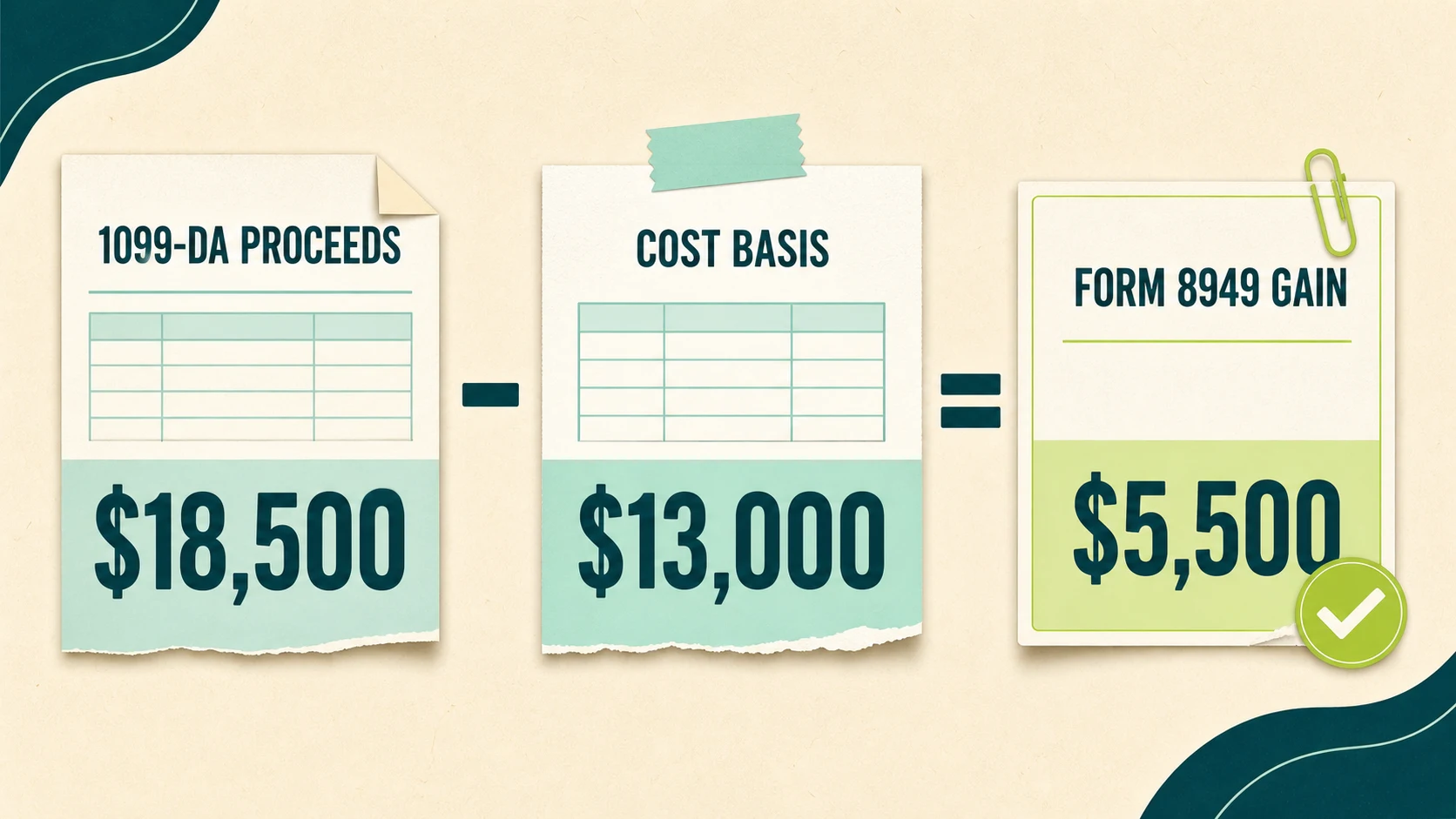
The capital gain calculation is:
$18,500 proceeds minus $13,000 basis equals $5,500 gain.
Maya reports the $18,500 proceeds and $13,000 supported basis on Form 8949. The $5,500 gain flows into the appropriate short-term or long-term total on Schedule D, depending on her holding period.
The $850 of rewards is separate. If it is ordinary digital asset income not reported elsewhere, it goes to 2025 Schedule 1, line 8v. That $850 fair market value also becomes basis in the reward assets. A later sale of those assets creates a separate capital gain or loss.
Why the files must agree
Maya should not report zero basis just because the 1099-DA left it blank. She should also not omit the $18,500 of proceeds because her real gain was only $5,500. The defensible return keeps the reported proceeds visible, supplies the supported basis, and calculates the actual gain.
What should be in your Crypto.com tax document folder?
Your folder should preserve both what Crypto.com reported and the records supporting the figures you put on the return.
Keep the raw files unchanged. If you clean, combine, or label them, save the working copy separately. That makes it possible to trace a final Form 8949 row back to the source record.
Common Crypto.com tax document mistakes
The most expensive mistakes come from treating one partial record as the entire tax picture.
- Filing from 1099-DA proceeds alone: Proceeds are not gain. Basis still has to be established.
- Using only the App CSV: Exchange and Onchain activity can sit outside that file.
- Exporting only January through December 2025: Earlier purchase history may be needed for assets sold in 2025.
- Assuming no 1099 means no tax: Reporting obligations do not depend on receiving a form.
- Counting transfers as sales or income: Match the sending and receiving records before approving the classification.
- Importing a blank basis as zero: Unknown is not the same as zero.
- Forgetting reward basis: Income recognized when rewards are received generally becomes basis for the later sale.
- Ignoring a real form error: Contact Crypto.com when the reported asset, units, proceeds, or account information is factually wrong.
Get a reconciled Crypto.com filing package
If your history spans the Crypto.com App, Exchange, Onchain, Cronos, and other platforms, collecting the files is only step one. The hard part is matching transfers, restoring basis, removing duplicates, and producing a Form 8949 that ties to the reported proceeds without turning missing basis into phantom gain.
Count On Sheep provides done-for-you Digital Asset Reconciliation. We rebuild the transaction history and prepare clean crypto tax outputs for you or your tax professional. Count On Sheep is a reconciliation service, not a CPA firm or tax-return preparer.
Crypto.com tax document FAQs
What tax forms does Crypto.com send for 2025 activity?
For 2025 activity, Crypto.com may send US users Form 1099-DA for reportable digital asset dispositions, Form 1099-MISC for at least $600 of qualifying rewards, or Form 1099-B for applicable contract trading. The form you receive depends on your activity, and no form replaces the need to review your complete transaction history.
Proof: Crypto.com lists all three forms in its official 2025 tax-form guidance. The IRS says broker reporting on Form 1099-DA generally begins with digital asset transactions effected on or after January 1, 2025.
Example: A user who sold crypto and received $850 of qualifying rewards could receive both Form 1099-DA and Form 1099-MISC. Reconcile each form against the raw transaction history before filing.
Exception: Receiving one form does not mean every Crypto.com product or taxable event appears on it. App, Exchange, contract, and Onchain activity can require different records.
How do I get tax documents from Crypto.com?
Get an issued Crypto.com 1099 through the secure link emailed from no-reply@crypto.com, then export your App Token Wallet, Cash Account, card, and Exchange histories separately. Save every file before its download window closes. A 1099 shows reported amounts, but it is not a complete transaction ledger or finished tax return.
Steps:
- Search the email address tied to your account for
no-reply@crypto.com. - Download the 1099 only through Crypto.com’s secure link or official portal.
- Export App, Exchange, card, and Cash Account records for the full period needed.
- Save the original files unchanged and retain any export summary showing completeness.
Exception: Crypto.com Onchain is self-custodied. Collect its history by public wallet address and network because centralized account exports do not provide a complete Onchain ledger.
Why is my Crypto.com 1099-DA missing cost basis?
Your Crypto.com 1099-DA may have blank cost basis because Crypto.com chose not to report basis on its 2025 forms during the first reporting year. Reconstruct basis from purchase, transfer, fee, and wallet records, then report the supported amount on Form 8949. A blank field does not mean your basis is zero.
Proof: Crypto.com’s 2025 guidance confirms that it did not report cost basis for that year. The IRS Form 8949 instructions explain how taxpayers report basis when it was not reported to the IRS.
Example: If your 1099-DA shows $18,500 of proceeds and your records support $13,000 of basis, the result is a $5,500 gain, not an $18,500 gain.
Exception: If Crypto.com reported basis and that reported figure is wrong, Form 8949 adjustment mechanics differ from those used when basis was never reported. Follow the current instructions or consult a qualified tax professional.
What should I do if Crypto.com sends no tax form?
If Crypto.com sends no tax form, export your complete account history and report every taxable sale, exchange, and reward from your own records. The IRS requires digital asset income, gains, and losses to be reported even when no Form 1099-DA arrives. No form is not proof that no tax reporting is required.
Steps:
- Export every centralized Crypto.com account history.
- Collect public histories for each Onchain wallet and network.
- Match transfers so they are not mistaken for sales or income.
- Calculate supported proceeds, basis, gains, losses, and income.
- Reconcile the results to Form 8949, Schedule D, and the applicable income schedule.
Exception: A transfer between wallets you own is generally not a taxable disposal, although network fees and surrounding activity still require review.
Does Crypto.com report to the IRS?
Yes. Crypto.com reports applicable information returns to the IRS and provides copies to account holders. For 2025 digital asset dispositions, Form 1099-DA can report proceeds while leaving cost basis blank. You remain responsible for reconciling all records and reporting the correct gain or loss, including taxable activity absent from a form.
Proof: Crypto.com’s tax-form guidance states that it files applicable forms with the IRS. IRS digital asset guidance explains the Form 1099-DA reporting rollout and the taxpayer’s continuing reporting obligation.
Example: If Crypto.com reports $40,000 of proceeds, the IRS can receive that gross figure. Your records must support the basis used to calculate the actual gain or loss.
Exception: Information reporting varies by transaction, product, tax year, and taxpayer facts. The absence of a form does not create an exemption.
Review and sources
Reviewed by Garrett Taylor, CPA #133092. Updated September 14, 2026.
If the records do not tie together, Count On Sheep’s crypto tax service can reconcile the App, Exchange, card, and on-chain history before you or your licensed tax professional files.