

When Koinly is not working, the fix depends entirely on what kind of “not working” you are seeing. A failed exchange sync, a report that will not generate, and a wrong balance are three different problems with three different fixes. This guide sorts them out fast so you are not guessing.
Here is the most useful thing to know up front: the large majority of Koinly problems are data and connection issues on your account, not outages or bugs in the software. That is good news, because it means you can usually fix them yourself in a few minutes.
Disclaimer: This guide is for informational purposes only. Always consult a qualified CPA regarding your specific situation.
First: Is It You or Is It Koinly?
Before you change anything, rule out an actual outage. If the entire site is frozen or throwing errors for everyone, no amount of re-syncing your account will help.
- Check Koinly’s official status page
- Check Koinly’s X (Twitter) account for incident notices
- Try a different browser or an incognito window to rule out a local cache problem
If the site loads fine but your data looks wrong, the problem is on your account, and the rest of this guide applies.
Problem 1: Koinly Won’t Sync Your Exchange or Wallet
This is the single most common complaint, and it almost always comes down to a broken connection.
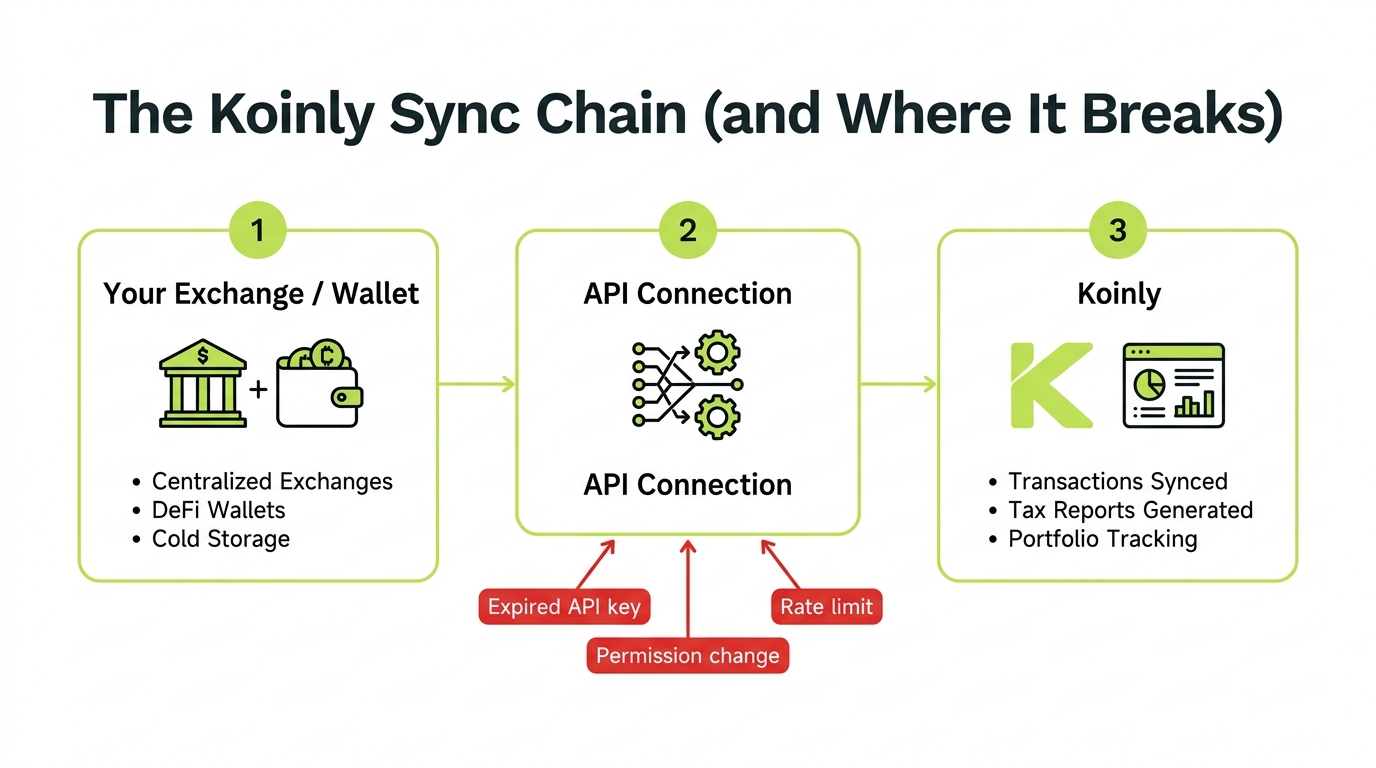
Fix it in this order:
- Re-authorize the API key. Delete the old connection in Koinly, then create a brand new read-only API key on the exchange and reconnect. Expired or revoked keys are the top cause.
- Check API permissions. The key must have read access. It should never need withdrawal access. If the exchange changed its API recently, the old key may no longer be valid.
- Fall back to CSV. If the API keeps failing, export your full transaction history as CSV from the exchange and import that instead. Our Koinly CSV import walkthrough shows the exact export steps exchange by exchange.
- Wait out rate limits. If you just hit sync several times in a row, the exchange may be throttling you. Wait an hour and retry once.
Problem 2: Your Koinly Tax Report Won’t Generate
A report that hangs, errors out, or produces obviously wrong totals is usually downstream of unresolved data problems.
Work through this checklist:
- Let active syncs finish. A report built mid-sync will be incomplete. Wait for every wallet to show as fully synced.
- Clear the warnings first. Missing cost basis and negative balances block a clean report. Resolve those on the transactions page, then regenerate.
- Be patient with large accounts. Tens of thousands of transactions can take several minutes to compile. A slow report is not always a failed one.
- Re-check your settings. Confirm the tax year, home country, and cost basis method are set correctly before you generate.
If the report generates but the cost basis looks wrong, that is a separate, very common issue. See our full walkthrough: Koinly Cost Basis Wrong? How to Find and Fix It.
Problem 3: Wrong or Negative Balances
A negative balance is Koinly telling you it sees more coins leaving an account than it ever saw arrive.
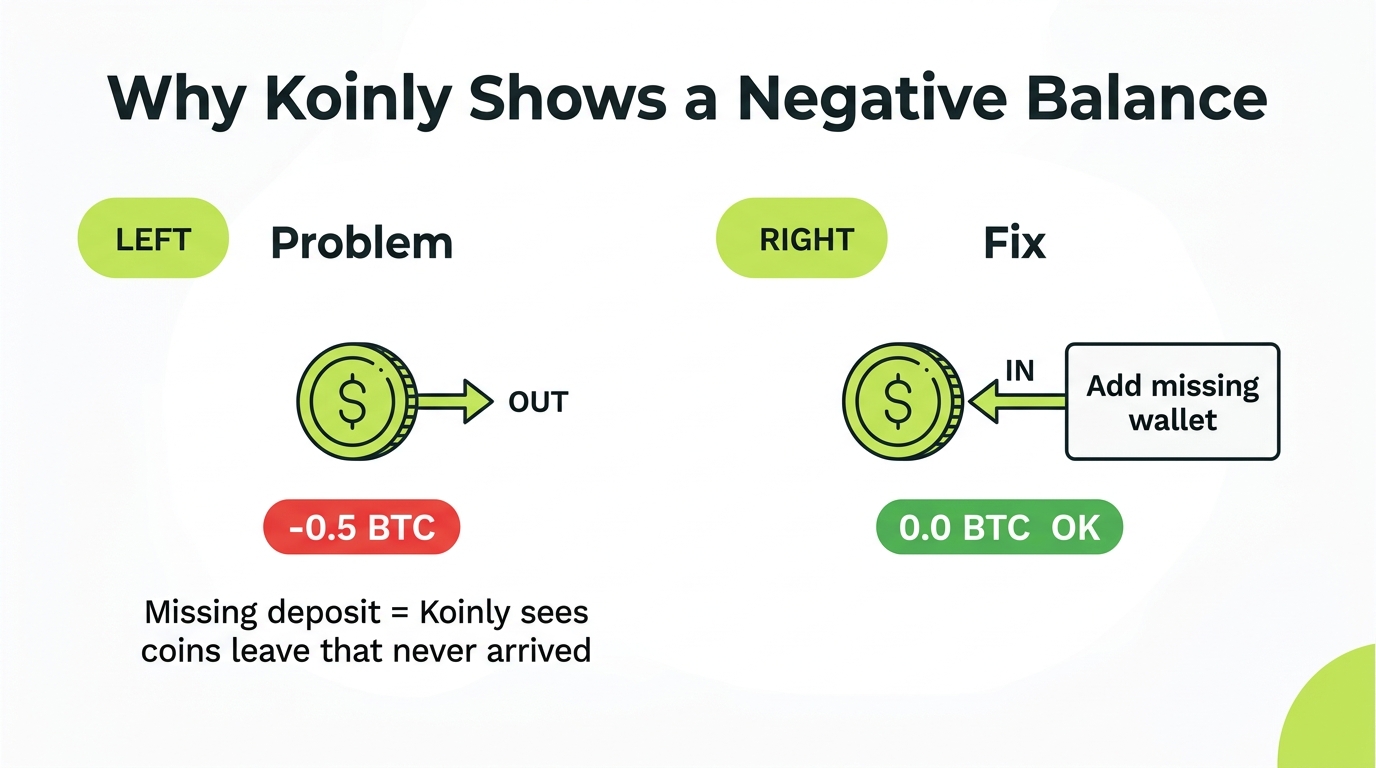
The cause is almost always one of these:
- A wallet or exchange is not connected, so the original deposit is invisible
- A transfer between your own wallets was not matched
- A sync pulled only part of the history
The fix is to add the missing source or match the transfer. Once Koinly can see where the coins came from, the negative balance resolves and your cost basis corrects at the same time.
Problem 4: Duplicate Transactions
If your totals look inflated and you see the same trade twice, you likely imported one account by two methods.
- Remove one of the duplicate sources (keep the API connection, drop the CSV, or vice versa)
- Use Koinly’s duplicate detection to merge or delete repeats
- Going forward, connect each account exactly one way
A client was convinced Koinly was “broken” because his gains looked twice as high as expected. He had connected Coinbase by API in January, then re-imported a Coinbase CSV in March to be safe. Every transaction existed twice. Deleting the CSV source cut his reported gains in half and matched reality. No bug, just a double import.
When the Software Isn’t the Problem
If you have re-synced, cleared every warning, removed duplicates, and the numbers still do not add up, the issue is usually the shape of your history, not Koinly itself. Common culprits:
- DeFi and LP activity that classifies inconsistently (see the Koinly DeFi import guide)
- Coins from exchanges that no longer exist
- Years of transactions stacked together with old gaps
- A 1099-DA that conflicts with your own records
At that point, more clicking rarely helps. A crypto tax CPA can reconcile the account, resolve the classification calls, and hand you a report you can actually file and defend. If a deadline is close, this is the faster path. Here is when to bring in a Koinly expert if you would rather not keep troubleshooting.
Key Takeaways
- Bottom line: “Koinly not working” is almost always a data or sync issue on your side, so check the status page once to rule out an outage, then look inward
- Start with the highest-yield fix: re-authorize expired API keys with a fresh read-only key, which clears most failed syncs
- Read the symptom as a map. A stuck report means unresolved warnings or a running sync, and a negative balance means a missing source or unmatched transfer
- Most duplicates are self-made from importing one account two ways, so commit to a single import method per account
- Decision point: when the data is genuinely clean and the numbers are still wrong, stop troubleshooting and let a crypto CPA close it out before the deadline
Frequently Asked Questions
Why is Koinly not syncing my exchange?
The most common reasons are an expired or revoked API key, a permissions change on the exchange, rate limiting during peak season, or the exchange temporarily disabling API access. Re-authorize the connection by deleting the old API link and creating a fresh read-only key on the exchange, then re-importing. If the exchange is down, wait and retry.
Why won't my Koinly tax report generate?
A report usually fails or stalls when there are unresolved errors in the data: missing cost basis, negative balances, or a sync still in progress. Clear the warnings on your transactions page first, let any active sync finish, then regenerate. Very large accounts can also take several minutes to build, so give it time before assuming it failed.
Why is my Koinly balance wrong or showing negative?
A negative balance means Koinly thinks you disposed of more of a coin than it knows you acquired. This points to a missing deposit, an unmatched transfer, or an incomplete sync from one of your wallets. Add the missing source or match the transfer and the balance corrects itself.
Is Koinly down right now?
If the whole site is unresponsive for you, check Koinly's official status page and their X account before troubleshooting your own account. If only your data looks wrong but the site loads, the issue is almost always a sync or import problem on your account, not an outage.
How do I fix duplicate transactions in Koinly?
Duplicates usually come from importing the same exchange twice, for example by both API and CSV. Remove one of the duplicate sources, or use Koinly's duplicate detection to merge them. Never connect the same account by two methods at once.
Should I get help if Koinly still won't work?
If you have re-synced, cleared warnings, and the numbers still look wrong, the problem is usually tangled transaction history rather than a software fault. A crypto CPA can reconcile the account and produce a correct, defensible report, which matters most when you are close to a filing deadline.