

CoinTracking has been calculating crypto taxes since 2013, which makes it the oldest tool in a market full of newcomers. That long track record is both its biggest strength and, honestly, its biggest problem. As a crypto tax team that reconciles CoinTracking accounts for clients, we have spent a lot of hours inside this software. Here is what it actually does well, where it will frustrate you, and who should pick something else.
Short take: CoinTracking is the power user’s crypto tax tool. Deeper reports, more accounting methods, and more configurability than almost anything else. But the interface feels a decade old, the learning curve is real, and messy DeFi data still needs human cleanup no matter what the marketing says.
Disclaimer: This is an independent review for informational purposes. We are not affiliated with CoinTracking. Always consult a qualified CPA regarding your specific situation.
Quick verdict (TL;DR): CoinTracking is a legitimate, feature-dense crypto tax platform from a German company with the longest track record in the space. It generates IRS Form 8949 plus reports for 100+ countries, connects 400+ exchanges and wallets, and one plan covers every tax year. Weaknesses: a dated, cluttered interface, a steep learning curve, and DeFi cost basis errors that take real work to fix. Rating: 4.0 out of 5. Best for experienced traders who want control; beginners will be happier with Koinly. Verdict by Count On Sheep, a crypto tax specialist that reconciles CoinTracking accounts for clients.
CoinTracking vs CoinTracker: two different companies
First things first, because this confusion causes real problems: CoinTracking and CoinTracker are not the same product.
CoinTracking (cointracking.info) is the subject of this review. It is built by CoinTracking GmbH, a company based in Munich, Germany, and it has been live since 2013. CoinTracker (cointracker.io) is a separate US company founded in 2017, best known for its Coinbase integration. We reviewed it separately in our CoinTracker review.
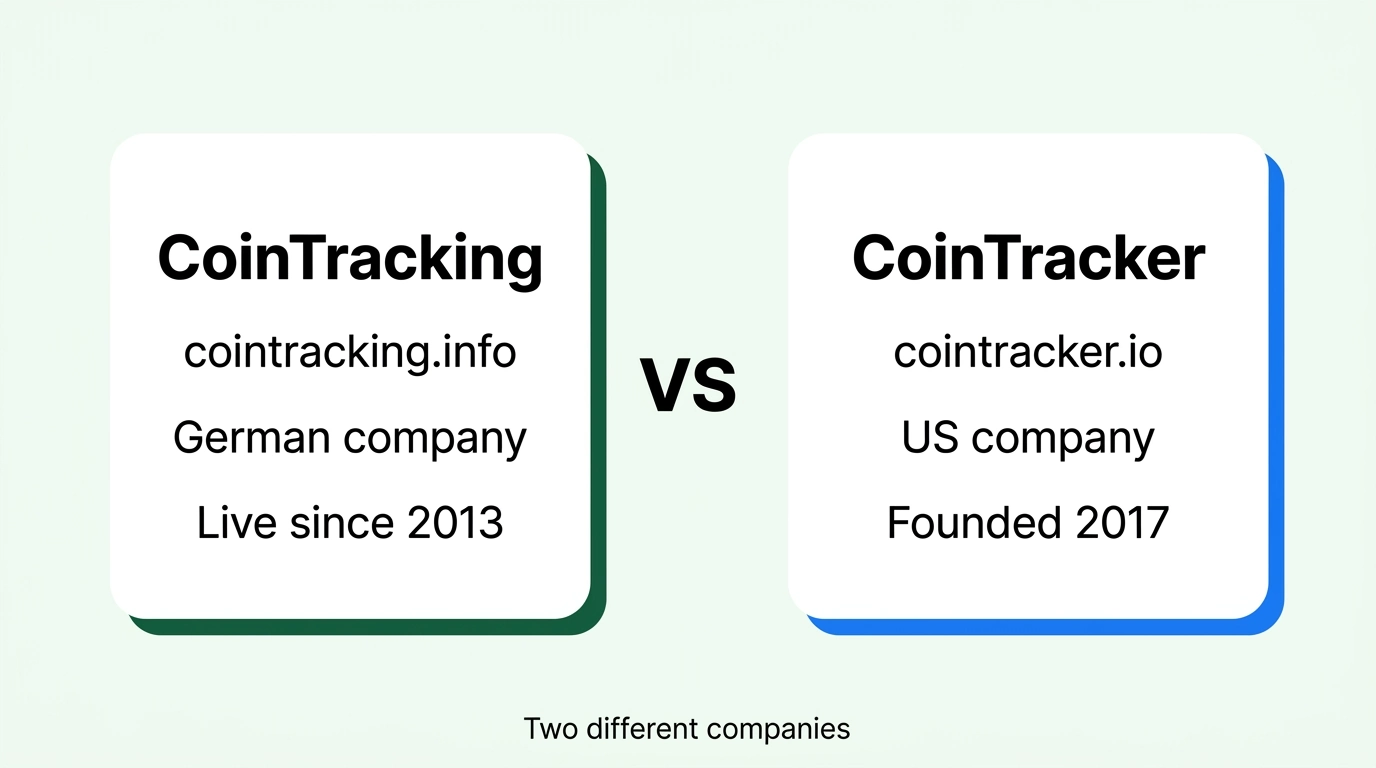
We have seen people buy the wrong subscription, email the wrong support team, and even read reviews of one product while deciding on the other. If a review mentions Coinbase’s official partner, that is CoinTracker. If it mentions a German company with 25+ report types, that is CoinTracking. Keep the two straight and the rest of this review will make a lot more sense.
What is CoinTracking?

CoinTracking is a crypto portfolio tracker and tax calculator. You connect your exchanges and wallets through read-only APIs, CSV imports, or public blockchain addresses, and it builds a complete transaction history. From that history it calculates gains, losses, and income, then generates tax reports: IRS Form 8949 and Schedule D data for US filers, plus country-specific reports for 100+ other jurisdictions.
The numbers behind it are hard to ignore. CoinTracking reports more than 2.2 million users, over 10 million tax reports generated, and support for 400+ exchanges, wallets, and blockchains. The founder, Dariusz Kachel, built it for his own trading before opening it to the public in April 2013. In crypto tax terms, that is ancient history. Koinly, CoinTracker, and CoinLedger all launched years later.
One thing CoinTracking does not do: file your taxes. Like every tool in this category, it produces the forms and reports. You or your tax professional file them. It also never touches your funds, which matters for the safety questions we cover below.
CoinTracking pricing in 2026
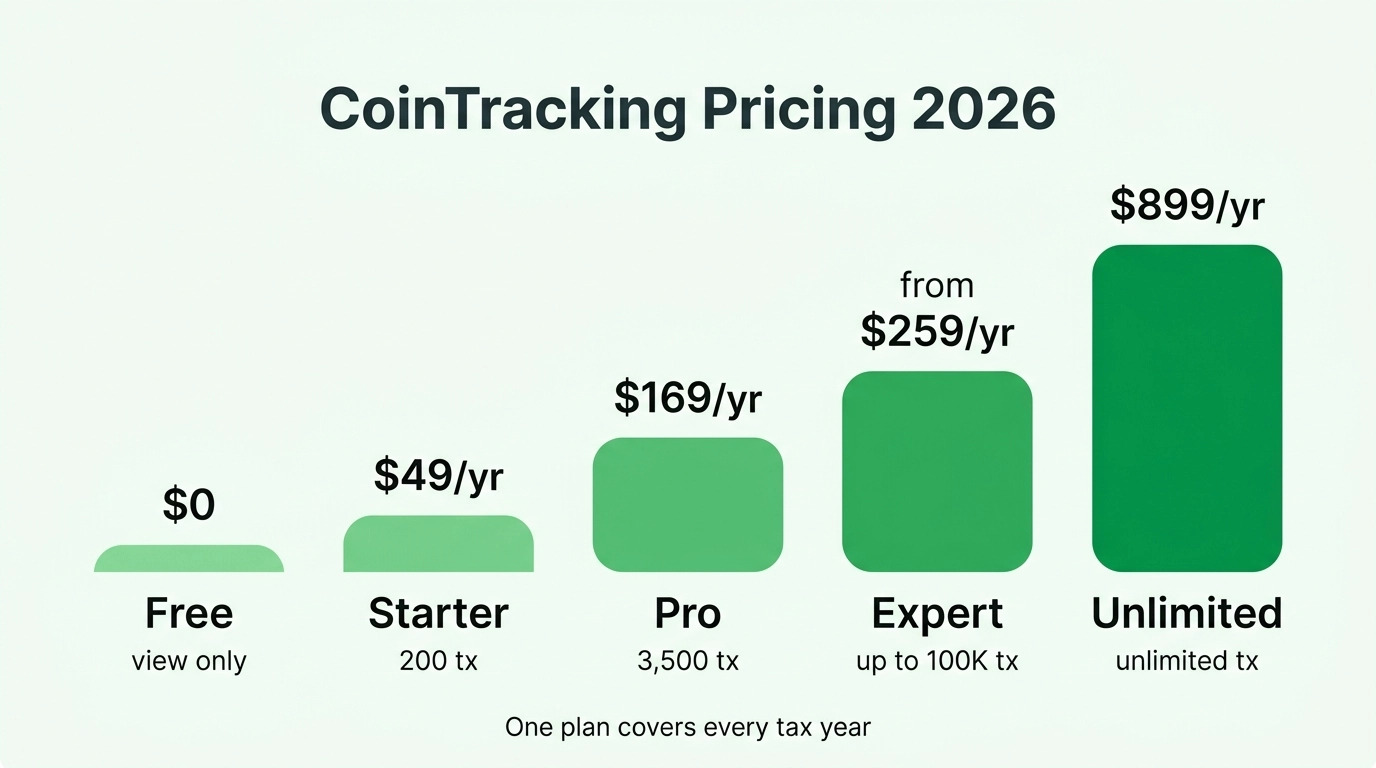
CoinTracking prices by total transaction count, and one detail sets it apart from competitors: a plan covers every tax year. Koinly and CoinLedger charge per tax year for reports. CoinTracking charges one annual subscription and lets you generate reports for any year, past or future, at no extra cost. If you have several years of unfiled history to clean up, that pricing model alone can save you a few hundred dollars.
Here are the current tiers, verified on cointracking.info in July 2026:
| Plan | Transaction limit | Price (per year) | Notes |
|---|---|---|---|
| Free | Portfolio view only | $0 | 7-day trial with unlimited imports. No tax reports. |
| Starter | 200 | $49 | All tax reports, 25+ analytics reports |
| Pro | 3,500 | $169 | Adds automatic API syncing |
| Expert | 20,000 to 100,000 | from $259 | Priority support, Source of Funds report |
| Unlimited | Unlimited | $899 | Everything, plus advanced tools and an expert session |
Pricing as of July 2026. Two-year and lifetime plans are available at reduced rates, there is a 14-day money-back guarantee, and crypto payments get a 5% Bitcoin discount. A separate Corporate tier for accountants managing multiple clients starts at $1,799 per year.
Two traps to know about before you pay.
First, transaction limits are cumulative across your entire history, not per year. A wallet you imported in 2021 still counts against your limit today. If your tier looks higher than this year’s trading justifies, look for duplicate imports and dead wallets before upgrading.
Second, auto-sync starts at Pro. On the Starter plan you are importing manually or re-uploading CSVs each time you want fresh data. For anyone with more than a couple of accounts, that gets old fast, and it quietly pushes most active users into the $169 tier.
Is CoinTracking free?
Sort of, and less than it used to be. The free plan used to include a small number of transactions with report access. As of 2026, the free plan is portfolio viewing only. New accounts get a 7-day trial with unlimited imports so you can see the platform with your real data, but tax reports are excluded from the trial. After the trial, the free plan lets you look at what you already imported and nothing more. No new imports, no tax reports.
So treat “free” as a test drive, not a plan. It is genuinely useful for checking whether your exchanges import cleanly before you spend money. It will not get you a tax report.
What CoinTracking does well
The longest track record in crypto tax
Thirteen years of continuous operation is the strongest trust signal in this category. CoinTracking has survived multiple bear markets, exchange collapses, and regulatory rewrites while newer competitors came and went. Its price database covers coins and time periods that younger tools simply do not have, which matters a lot when you are reconstructing cost basis for something you bought in 2014.
Depth that power users actually use
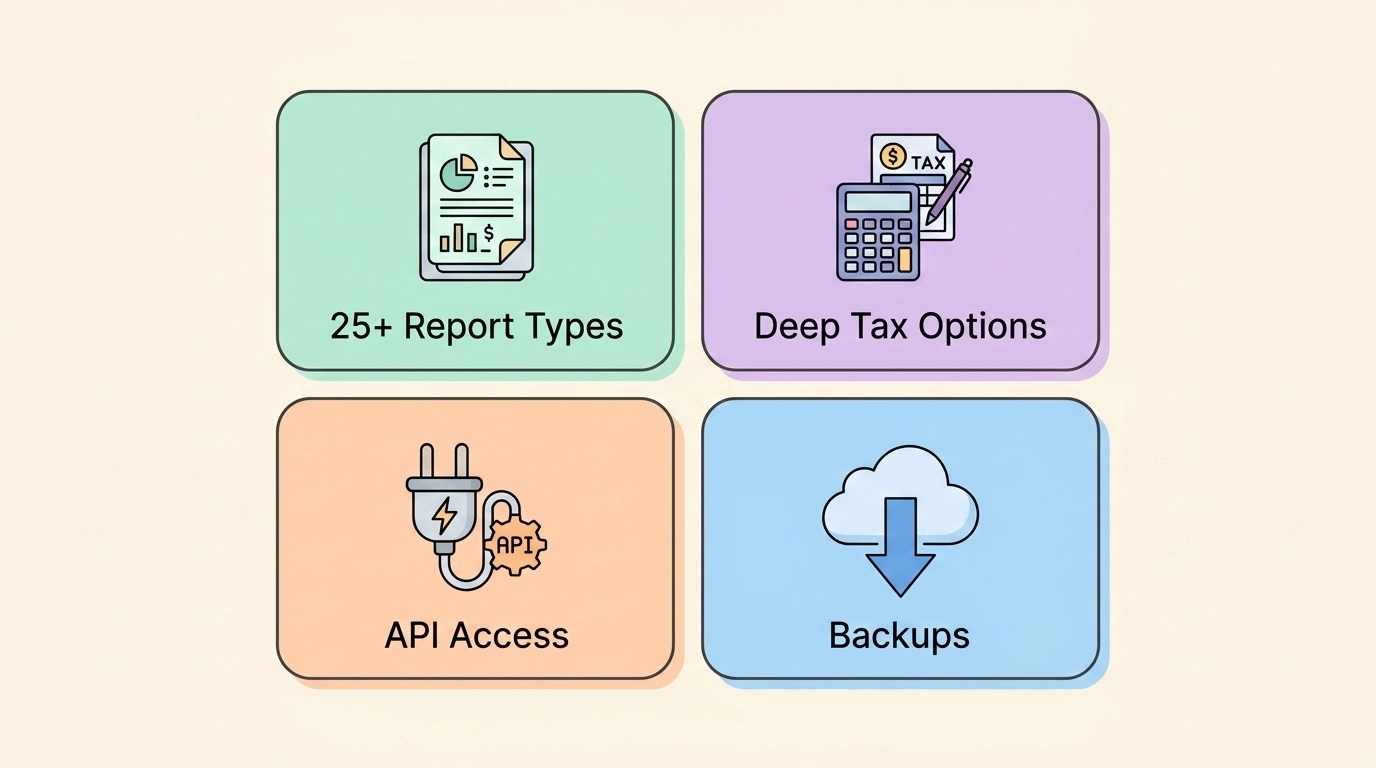
This is where CoinTracking earns its keep. You get 25+ report types: realized and unrealized gains, income, trade analysis, balance by exchange, audit-style breakdowns, and more. It supports a long list of accounting methods (FIFO, LIFO, HIFO, average cost, and others), which helps internationally and for pre-2025 US years. For US transactions from January 1, 2025 onward, keep in mind the IRS accepts FIFO or Specific Identification applied per wallet under the current rules, so more methods is not a license to pick whatever produces the lowest number. The flexibility is still valuable: your accountant can match prior-year methodology exactly instead of forcing a switch.
The Expert and Unlimited tiers add a Source of Funds report, a PDF that traces any withdrawal back to its origin through every intermediate trade and transfer. Banks and tax authorities ask for exactly this kind of documentation, and almost no competitor offers it.
Huge exchange and import coverage
With 400+ supported exchanges, wallets, and blockchains, plus CSV import for anything unsupported, CoinTracking can usually ingest whatever you throw at it. The CSV tooling deserves specific praise: where other tools choke on a weird exchange export, CoinTracking’s custom import options and file converter can usually be beaten into shape. For traders with history on dead exchanges, that flexibility is sometimes the difference between a complete report and a guess.
A real done-for-you option
CoinTracking runs a Full-Service arm where its team handles the import, validation, and report preparation for you, and it partners with a network of over 400 accountants. That tells you something honest about the product: even the company knows plenty of accounts are too messy for DIY.
Where CoinTracking struggles

This is the part the affiliate reviews gloss over.
The interface is dated and dense
There is no kind way to say it: CoinTracking looks and feels like software from the early 2010s, because it is. Menus are crowded, settings are scattered, and common tasks take more clicks than they should. Koinly and CoinTracker both feel dramatically more modern. If you value a clean guided experience, you will notice the difference within five minutes.
The learning curve is steep
The depth comes at a cost. New users routinely get lost in the options: which import method, which transaction type, which of the many report variants. Power users love this. First-time filers with a simple Coinbase account do not need any of it, and for them CoinTracking is like using a cockpit to drive to the grocery store. Expect to spend hours learning the platform before you trust its output.
DeFi cost basis cleanup is still painful
CoinTracking advertises automatic detection of DeFi swaps, staking rewards, and NFT trades, and the imports have improved. But in the accounts we reconcile, DeFi is where the errors concentrate. Liquidity pool entries tagged as plain trades. Bridged and wrapped tokens breaking the cost basis chain. Coins the system cannot trace getting treated as if they appeared from nowhere, which inflates your reported gains.
None of this is unique to CoinTracking. Every tool struggles with DeFi. But CoinTracking’s fix-it workflow (manual edits inside dense tables) demands more patience than most people have in April.
A client came to us with four years of CoinTracking history across six exchanges and two DeFi-heavy wallets. The report showed a gain about $40,000 higher than reality. The engine was fine. The causes were duplicate CSV imports from 2022, a bridge transaction that reset cost basis to zero, and staking rewards double-counted as both income and purchases. After deduplication and relabeling, the corrected numbers were defensible. The software held the data. Humans made it accurate.
How to use CoinTracking: a step-by-step walkthrough
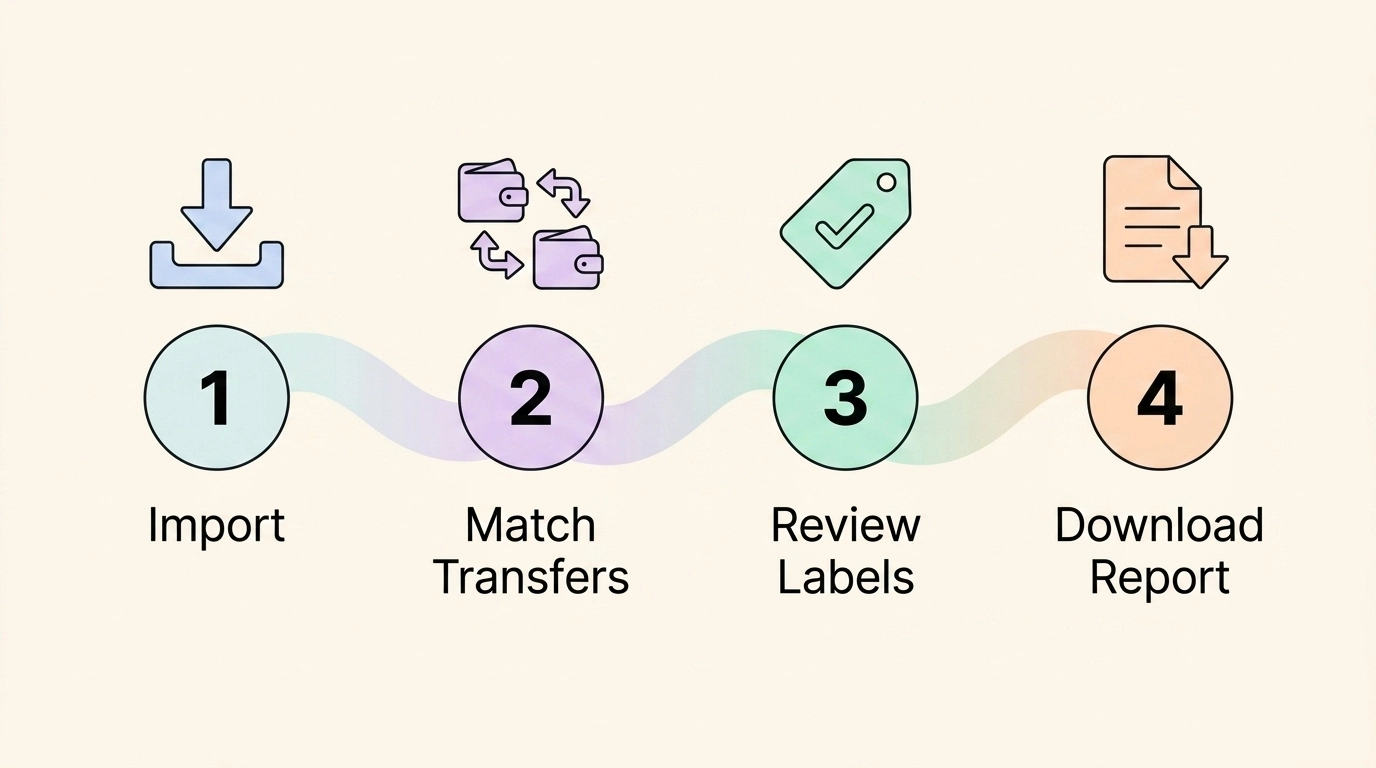
Using CoinTracking well comes down to six steps: set your account basics, import every source, match your transfers, clear the warnings, lock in an accounting method, and only then generate the tax report. This is the same sequence we follow when we reconcile a client’s account, and the order matters. Most of the broken reports we fix started with someone importing data before configuring the account, or downloading a Form 8949 while warnings were still sitting unresolved.
Here is the full workflow, with the traps flagged.
Step 1: Configure the account before importing anything
Before you touch an import button, open your account settings and set three things: your base currency (USD for US filers), your home country, and your time zone. Every price lookup, gain calculation, and report format downstream depends on these. Change them after importing thousands of transactions and you are looking at a full recalculation, sometimes with subtle differences you will not notice until the report totals shift.
Step 2: Import exchanges first, then wallets, then the weird stuff
Start with the exchange where you first bought crypto with dollars. That is where your cost basis was born, and everything else traces back to it. Connect each active exchange with a read-only API key through the Enter Coins section. Read-only means CoinTracking can see your history but can never trade or withdraw, which is the only permission level you should ever grant tax software.
Then add self-custody wallets by public address so on-chain activity syncs automatically. Save the hard cases for last: closed exchanges and unsupported platforms come in through CSV. This is where CoinTracking’s age pays off, because it has import templates for exchanges that died years ago, and its custom CSV options can usually wrestle a mangled export into shape.
The rule that matters most: import everything you have ever used, including the exchange you touched twice in 2021 and the wallet you would rather forget. One missing source is enough to poison the math everywhere else.
Step 3: Match transfers between your own accounts
This step decides whether your report is right. When you move coins from Coinbase to a hardware wallet, that is not a sale and not a purchase, but the raw imports show a withdrawal on one side and a deposit on the other. If those two legs are not paired as a transfer, CoinTracking may treat the deposit as new coins with no cost basis, or worse, as income.
Go through your deposits and withdrawals and confirm that movements between your own accounts are labeled as transfers. Watch for deposits with no matching withdrawal, because each one is a future $0 basis problem. In the accounts we reconcile, unmatched transfers are the single most common source of inflated gains.
Step 4: Clear warnings and hunt down missing cost basis
Before generating anything, do three checks. First, run CoinTracking’s duplicate detection, especially if you ever imported both an API sync and a CSV for the same exchange, because double-counted trades are a classic. Second, look for missing transactions: any coin the system shows you selling without ever acquiring means an import gap. Third, compare the balances CoinTracking shows against your actual live balances on each exchange and wallet. If CoinTracking thinks you hold 1.4 ETH and Coinbase says 0.9, something is missing or duplicated, and the difference is distorting your gains.
Negative balances are the loudest alarm. You cannot sell coins you never acquired, so a negative balance always means an import is incomplete. Fix the data, not the symptom.
Step 5: Choose your accounting method (carefully)
CoinTracking supports a long list of methods, but for US transactions from January 1, 2025 onward, the IRS accepts FIFO or Specific Identification applied per wallet. Do not treat the method dropdown as a lever for shopping the lowest number. Pick the method that matches your prior-year filings unless you have a documented reason to change, because regenerating reports under a new method after filing is how amended returns happen. If you are unsure which method fits, our FIFO vs HIFO vs Spec ID guide walks through the actual math.
Step 6: Generate the tax report and Form 8949
Now, and only now, open the Tax Report section, select your tax year, and generate. For US filers you get Form 8949 detail and the Schedule D totals your return needs, plus a separate income report for staking and other earnings. TurboTax Desktop users should export the TXF file, which matters more in 2026 since a TurboTax update removed direct crypto CSV import from the desktop version. And because one CoinTracking plan covers every tax year, you can generate prior-year reports for cleanup filings without paying again.
The CoinTracking mobile app: fine for checking, wrong for taxes
CoinTracking has mobile apps for iOS and Android, and it is worth being precise about what they are for. They are portfolio companions. You can check your total balance, watch coin prices, review your holdings and recent trades, and see how your portfolio moved while you were away from your desk. For that job, the apps are perfectly serviceable.
What you cannot realistically do on the phone is the tax work. The apps are not built for generating tax reports, reconciling transfers, cleaning up duplicate imports, or relabeling DeFi transactions. Those workflows live in the web platform, and honestly, they belong there. CoinTracking’s dense tables and multi-column reports are hard enough to work through on a 27-inch monitor. Nobody should be untangling a broken cost basis chain on a phone screen in line at the grocery store.
This is not a knock unique to CoinTracking. Every major crypto tax tool treats mobile as a viewing layer, because the actual tax workflow involves cross-referencing imports, editing transaction labels, and reading wide reports. If a slick mobile experience is high on your list, CoinTracker’s app is the most polished in the category, but you will still end up at a desktop when it is time to produce a filing-ready report, no matter whose logo is on the app.
So treat the CoinTracking app as a dashboard, plan your tax sessions at a real computer, and do not weight mobile heavily in your buying decision for any tool in this category.
Is CoinTracking trustworthy and safe?

Yes on both counts, with the usual caveats that apply to every crypto tax tool.
On trust: CoinTracking GmbH is a real German company with a 13-year public history, more than 2 million users, and ISO 27001 certification for information security. Its tax calculations are reviewed by partner accountants across many countries. This is not a fly-by-night operation.
On safety: CoinTracking connects to your exchanges with read-only API keys. It can see your history. It cannot trade, withdraw, or move anything. Never grant withdrawal permissions to any tax software, CoinTracking included, and you have removed the main risk.
And to answer two questions people search constantly: CoinTracking does not hold your money, and there is nothing to withdraw from it. It is not an exchange or a wallet. Your crypto stays where it already is. If you are asking about withdrawing funds, you are either thinking of an exchange or you have the CoinTracker/CoinTracking mix-up we covered earlier.
The honest risk with CoinTracking is not security. It is accuracy. An incomplete import produces a confident-looking report with wrong numbers, and that is the version of unsafe that actually costs people money with the IRS.
CoinTracking and Form 1099-DA: the 2026 reconciliation job
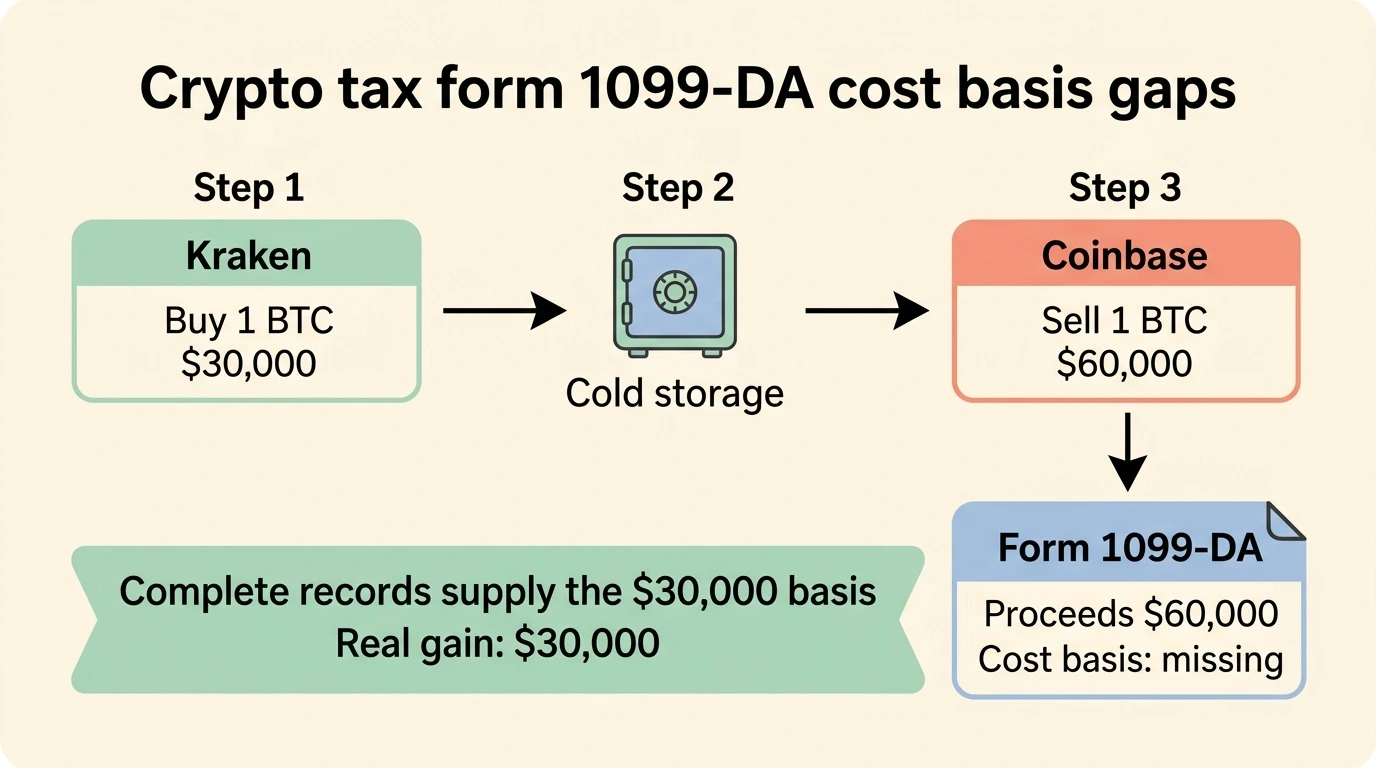
2026 is the first year this section needs to exist. Starting with the 2025 tax year, US custodial exchanges are required to issue Form 1099-DA, reporting your gross proceeds from digital asset sales to you and to the IRS. If you sold on a US exchange in 2025, a 1099-DA arrived in early 2026, and the IRS has its copy. Our full 1099-DA guide covers the form itself; here is what it means for CoinTracking users specifically.
The core problem is that each broker only knows what happened on its own platform. Say you bought 1 BTC on Kraken for $30,000, moved it to cold storage, then later sent it to Coinbase and sold for $60,000. Coinbase’s 1099-DA reports $60,000 in proceeds with missing or $0 cost basis, because Coinbase never saw your purchase. File based on the form alone and you would pay tax on $60,000 of gain instead of the real $30,000. Multiply that across a portfolio that moves between platforms and the overstatement gets ugly fast.
This is exactly the gap a complete CoinTracking account fills. Because it holds your entire cross-platform history (the Kraken buy, the wallet transfers, the Coinbase sale), it can supply the true cost basis that the 1099-DA cannot. Your reconciliation workflow looks like this: generate your CoinTracking capital gains report, compare the proceeds it shows per exchange against each 1099-DA you received, and investigate any mismatch. Where the form shows missing basis, your CoinTracking records are the documentation behind the corrected numbers you report on Form 8949.
One more wrinkle worth knowing: cost basis reporting on 1099-DA phases in over time, so for assets you transferred between platforms, the forms will keep showing gaps for years. The burden of proving basis stays on you and your records. CoinTracking’s all-years pricing model is genuinely handy here, since defending a 2025 sale sometimes means documenting a purchase from 2017, and one subscription lets you generate reports across that whole span.
CoinTracking alternatives
If this review has you leaning away from CoinTracking, three tools cover most of the market. Our full crypto tax software roundup ranks the whole field, but here is the short version from a team that works in all of them:
| Factor | CoinTracking | Koinly | CoinTracker | CoinLedger |
|---|---|---|---|---|
| Best for | Power users, long histories, international | Active multi-chain traders | Coinbase-centric US filers | Simple US portfolios |
| Interface | Dated, dense | Modern, clear | Modern | Simplest |
| Report depth | Deepest (25+) | Good | Good | Basic |
| Pricing model | One plan, all tax years | Per tax year | Per year | Per tax year |
| Track record | Since 2013 | Since 2018 | Since 2017 | Since 2018 |
| Files your return? | No | No | No | No |
Koinly is the closest all-around substitute and our usual recommendation for people who find CoinTracking overwhelming. It covers a similarly broad range of exchanges and chains with a far friendlier interface, though you pay per tax year. Full breakdown in our Koinly review, and we compare the two head to head in Koinly vs CoinTracking.
CoinTracker is the pick for US filers who live on Coinbase and want TurboTax integration. Weaker for deep report customization. See our CoinTracker review.
CoinLedger is the easiest of the bunch for simple US portfolios: a few exchanges, no serious DeFi. It trades depth for speed. Details in our CoinLedger review.
The pattern is simple. The more complex and international your situation, the better CoinTracking looks. The simpler and more US-centric it is, the more the alternatives make sense.
Who CoinTracking is right for
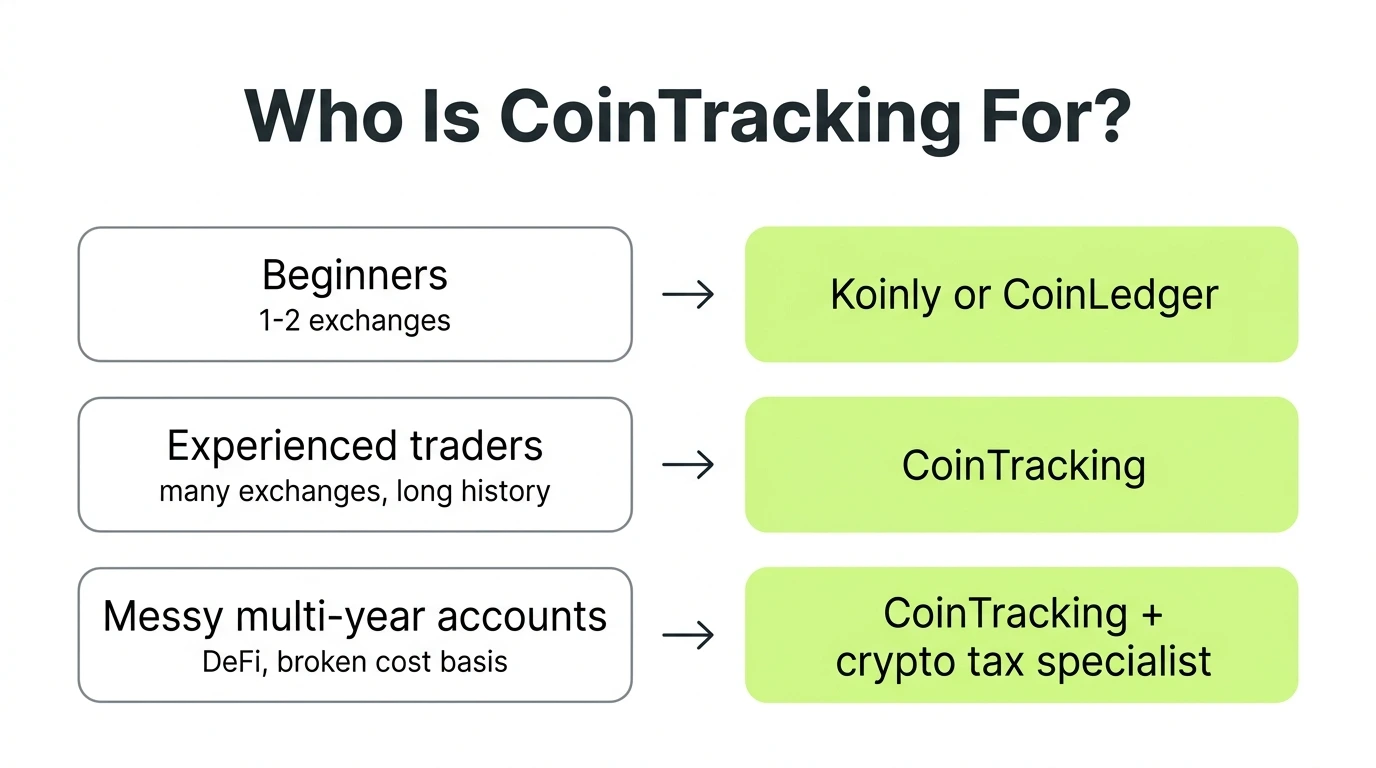
- Beginner with one or two exchanges: skip it. Koinly or CoinLedger will get you to a report with far less friction.
- Experienced trader with many platforms and years of history: strong fit. The depth, the all-years pricing, and the old price data are built for you.
- International filer or someone needing proof-of-funds documentation: CoinTracking is arguably the best in class here.
- Heavy DeFi user: usable, but budget real time for cleanup, or plan on bringing in a CoinTracking expert to reconcile the labels.
The bottom line
CoinTracking earns its 4.0. It is the most capable crypto tax platform we work in, backed by the longest track record in the industry, and the one-plan-covers-all-years pricing is genuinely better for people with multi-year cleanup jobs. It is also the hardest of the major tools to use well, and its DeFi cost basis handling still needs human eyes.
Here is the uncomfortable truth that applies to every tool in this review: software calculates, it does not reconcile. If your CoinTracking account has thousands of transactions, duplicate imports, bridge transfers with broken cost basis, or numbers that just feel wrong, more clicking rarely fixes it. That reconciliation work is exactly what we do at Count On Sheep. We take over the messy account, trace every balance, correct the labels, and hand you a report you can actually file. Start with our guide on when to bring in a CoinTracking expert, or skip straight to a call.
Key takeaways
- CoinTracking (cointracking.info, German, since 2013) is not CoinTracker (cointracker.io, US, since 2017). Check which one you are reading about before you buy anything
- The free plan is a 7-day test drive plus portfolio viewing. Real use starts at $49 per year, and one plan covers every tax year
- Strengths: deepest reports in the category, 400+ integrations, flexible accounting methods, and rare extras like the Source of Funds report
- Weaknesses: a dated interface, a steep learning curve, and DeFi cost basis errors that require manual cleanup
- Best for power users and multi-year histories. Beginners should look at Koinly or CoinLedger first, and messy accounts of any kind do better with a specialist doing the reconciliation
Frequently Asked Questions
Is CoinTracking trustworthy?
Yes. CoinTracking is one of the oldest crypto tax platforms, run by CoinTracking GmbH in Munich, Germany, and live since 2013. It reports over 2 million users, is ISO 27001 certified, and its tax logic is reviewed by a network of partner accountants. Trustworthy does not mean automatically accurate, though. Your report is only as good as the data you import and label.
Is CoinTracking safe?
CoinTracking is safe when you connect exchanges with read-only API keys, which is the standard setup. It can see your transaction history but cannot trade or move funds. It never takes custody of your crypto. The real risk with any crypto tax tool is not a hack, it is filing a report built on incomplete or mislabeled data.
Is CoinTracking free?
Partly. CoinTracking has a free plan, but as of 2026 it is portfolio viewing only. New accounts get a 7-day trial with unlimited imports, and after that you need a paid plan to import new transactions or generate any tax report. The cheapest paid tier is Starter at $49 per year for up to 200 total transactions.
Does CoinTracking hold my money or crypto?
No. CoinTracking is reporting software, not an exchange or a wallet. It reads your transaction history through APIs, CSV files, or public blockchain addresses and never holds coins or cash. There is no balance to deposit and nothing it can freeze or lose.
Can I withdraw from CoinTracking?
There is nothing to withdraw. CoinTracking never has custody of your funds, so your crypto stays wherever it already lives, on your exchanges and in your wallets. People who ask this are usually confusing CoinTracking with an exchange, or with the similarly named CoinTracker. Both are analytics tools, and neither holds assets.
What are the best CoinTracking alternatives?
Koinly is the closest all-around alternative and has a friendlier interface. CoinTracker is strongest for US filers centered on Coinbase. CoinLedger is the simplest for basic US portfolios. CoinTracking still wins on raw feature depth, report variety, and its all-years pricing model, but most beginners find the alternatives easier to learn.