

The best crypto tax software in 2026 is Koinly for most investors, CoinTracker for Coinbase-centric portfolios, and CoinLedger for TurboTax filers who want the shortest path from import to filing. That is the short answer. The longer answer depends on where your transactions live, how deep you are into DeFi, and how messy your history is.
Here is our bias, stated up front: Count On Sheep is a done-for-you crypto tax reconciliation service. A large share of our clients arrive after weeks inside one of the tools below, staring at a gain number they know is wrong. So we know these platforms the way a mechanic knows engines: mostly from what breaks. That makes this a different kind of roundup. We will tell you what each tool genuinely does well, what it quietly cannot do, and how to tell when your situation has outgrown software entirely.

Disclaimer: This guide is for informational purposes only and is not tax advice. Always consult a qualified CPA about your specific situation.
Affiliate disclosure: the YouTube description of the video above includes a Koinly affiliate link, and Count On Sheep may earn a commission if you sign up through it.
Best Crypto Tax Software 2026: Quick Comparison
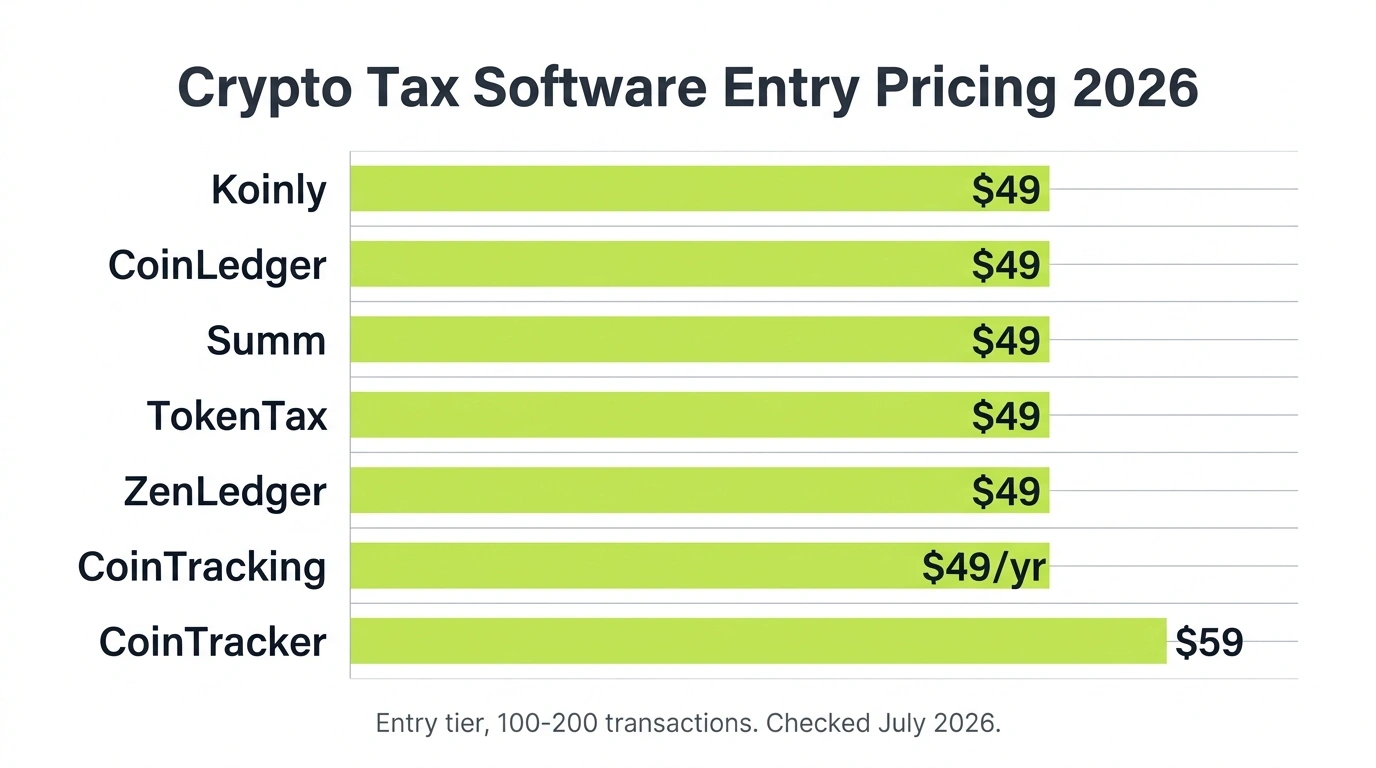
Every tool here follows the same basic model: free to import and preview, paid to download a tax report, with price driven by transaction count.
| Software | Best for | Entry price | Top standard tier | Free tier |
|---|---|---|---|---|
| Koinly | Most investors, multi-chain | $49 (100 tx) | $279+ (10,000 tx) | Tracking + gains preview |
| CoinTracker | Coinbase users | $59 (100 tx) | $599 to $1,999 (10,000 to 250,000 tx) | Tracking + tax summary |
| CoinLedger | TurboTax filers, simple US portfolios | $49 (100 tx) | $199+ (3,000+ tx) | Tracking + import |
| CoinTracking | High-volume traders who want deep reports | $49/yr (200 tx) | $899/yr (unlimited) | Portfolio view (200 tx) |
| ZenLedger | US filers who want phone support | $49 (100 tx) | $399 (15,000 tx) | Tracking preview |
| Summ | Newer tool; one exchange, low volume | $49 (100 tx) | $499 (100,000 tx) | Import + preview |
| TokenTax | Legacy option, basics only | $49 (100 tx) | $3,499 VIP (30,000 tx) | None |
Prices are per tax year (CoinTracking bills as an annual subscription) and were checked in July 2026. Vendors change tiers often, so confirm on the pricing page before you buy.
One pattern worth noticing: entry pricing is nearly identical across the board. The real differences show up in coverage, DeFi handling, and what happens when your data is not clean. That is what the rest of this guide covers.
Features, Limitations, and Accuracy Side by Side
Pricing is where these tools look alike; feature depth is where they split apart. The table below is the detail behind the quick comparison: how many exchanges and chains each tool connects to, how it handles DeFi and per-wallet cost basis, its single biggest limitation, and an accuracy rating. That rating is our own, based on how clean each tool’s exports arrive when a Count On Sheep reconciliation starts from them, not a lab score. It reflects output quality on real, messy client data.
| Software | Supported exchanges & chains | DeFi / NFT handling | Per-wallet basis (2025+) | Biggest limitation | Accuracy rating |
|---|---|---|---|---|---|
| Koinly | 800+ exchanges, wallets & blockchains | Broad auto-labeling, needs manual review | Yes, FIFO / HIFO / Spec ID | Cumulative transaction count inflates tiers | 4.5 / 5 |
| CoinTracker | 500+ integrations, official Coinbase partner | Basic DeFi, strong on centralized exchanges | Yes | DeFi reconciliation weaker than Koinly | 4 / 5 |
| CoinLedger | 500+ exchanges & wallets, US-focused | Light DeFi depth, clean NFT basics | Yes | Thin coverage for heavy on-chain activity | 4 / 5 |
| CoinTracking | 300+ exchanges, 25+ report types | Deep manual controls, limited auto-sync | Yes, highly configurable | Steep learning curve, dated interface | 4 / 5 |
| ZenLedger | 400+ exchanges & wallets, US-focused | DeFi & NFT support, trails Koinly | Yes | Rarely the best answer for any one use case | 3.5 / 5 |
| Summ | Broad connectors, newer & less proven | Aggressive auto-labeling, experimental | Yes, cumulative count like Koinly | Unreliable at high volume, short track record | 3 / 5 |
| TokenTax | Thinner exchange & chain coverage | Basics only, trails every tool above | Partial | Upper tiers cost service money for software | 2.5 / 5 |
Read the accuracy column carefully: no tool scores a perfect 5, and that is deliberate. Every one of them produces correct math on complete data and wrong math on incomplete data. The rating reflects how forgiving each tool is when your history has gaps, how visibly it flags missing cost basis, and how often its raw export needs hand cleanup before it becomes a defensible crypto tax report. The gap between a 4.5 and a 2.5 is mostly about how loudly the software warns you before it fills in a $0 basis and moves on.
How We Evaluated These Tools
We did not sign up for seven free trials and screenshot the dashboards. Our evaluation comes from the other direction: Count On Sheep reconciles crypto tax data professionally, and much of that work starts with an export from one of these platforms. We see which tools produce clean Form 8949 totals, which ones bury errors, and which error messages actually mean something.
The criteria that matter, in order:
- Coverage. Does it connect to the exchanges, wallets, and chains you actually used? A tool that misses one wallet gives you wrong numbers everywhere.
- Cost basis handling. Can it track basis per wallet (required since January 1, 2025 under Rev. Proc. 2024-28) and support FIFO, HIFO, and Spec ID correctly?
- DeFi and NFT labeling. Staking, liquidity pools, bridges, and wrapped tokens are where every tool starts guessing.
- Error visibility. Good software tells you when basis is missing. Bad software silently fills in $0 and moves on.
- Price honesty. Transaction tiers sound simple until you learn some tools count your entire history, not just this year.
Notice what is not on that list: interface polish. A pretty dashboard showing wrong numbers is worse than an ugly one showing right ones.
1. Koinly: Best Overall for Most Investors

Koinly wins the top spot for the same reason it has held it for years: coverage. It connects to 800+ exchanges, wallets, and blockchains, supports flexible cost basis methods including HIFO and Spec ID, and generates Form 8949, Schedule D, and international reports for 20+ countries.
Pricing: Free portfolio tracking. Tax reports run $49 (Newbie, 100 transactions), $99 (Hodler, 1,000), from $199 (Trader, 3,000), and $279+ (Pro, 10,000). One-time charge per tax year.
The trap to know about: Koinly counts transactions cumulatively across your entire history, not per year. A wallet you imported in 2021 still counts against your tier today. If your price looks too high, the cause is usually duplicate imports or a stale wallet, not this year’s trading. Clean those up before you pay.
Where it struggles: DeFi auto-labeling needs manual review, negative balance warnings confuse almost everyone, and large histories mean real cleanup work. We wrote a full Koinly review for 2026 covering accuracy, the per-wallet rule, and who it fits, plus a beginner walkthrough of how to use Koinly if you decide to start there.
Verdict: If you have activity spread across many platforms and you are willing to review labels, Koinly is the strongest single choice in 2026.
2. CoinTracker: Best for Coinbase Users
CoinTracker is the official Coinbase tax partner, and that integration is its whole pitch. If your crypto life happens mostly on Coinbase with a bit of Kraken or Gemini on the side, CoinTracker syncs it cleanly, computes gains accurately, and exports straight into TurboTax or H&R Block. It is a legitimate, SOC 2 Type II compliant platform with 500+ integrations; the question was never legitimacy, it was fit.
Pricing: Free tracking. Paid tiers run $59 (Base, 100 transactions), $199 (Prime, 1,000), and $599 (Ultra, 10,000), with plus versions at higher limits up to $1,999. A Full Service tier starts at $3,499 and includes up to about 15 hours of reconciliation help, though it still does not file your return.
Where it struggles: DeFi reconciliation is weaker than Koinly’s, and missing wallets produce the same $0 basis problem as everywhere else. Our CoinTracker review digs into the accuracy question, and if you are torn between the top two, the Koinly vs CoinTracker comparison settles it by use case.
Verdict: The best pick for Coinbase-first portfolios. Look elsewhere if you are deep in DeFi or spread across a dozen chains.
3. CoinLedger: Best for TurboTax Filers
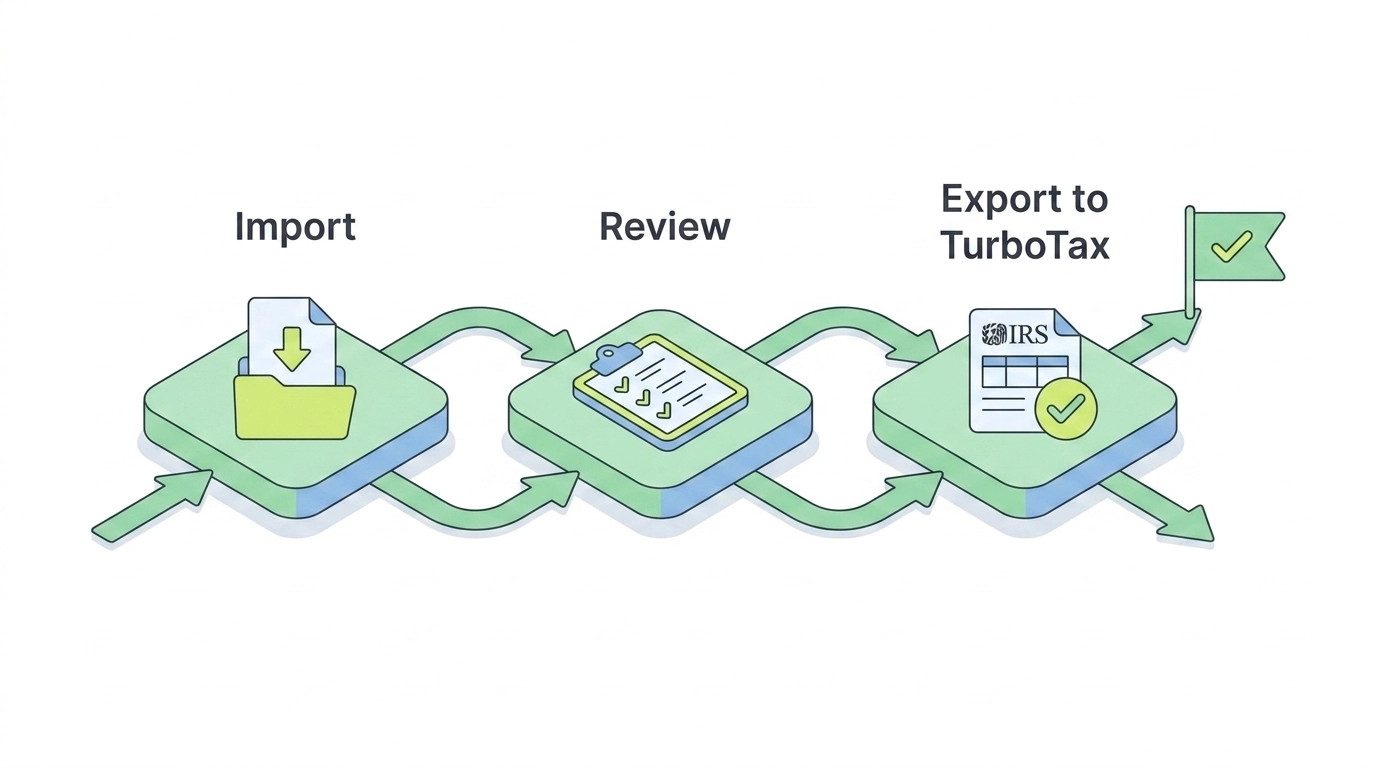
CoinLedger (formerly CryptoTrader.Tax) is the simplest of the big three. Import, review, download, done. Its TurboTax integration is the smoothest in the category, which makes it the default answer for US filers who want their crypto totals inside TurboTax with minimum friction. It is free to import and preview; you pay only to download the report, with a 14-day money-back guarantee.
Pricing: $49 (Hobbyist, 100 transactions), $99 (Investor, 1,000), $199+ (Pro, 3,000+), with extra transaction packs available in-app.
Where it struggles: DeFi depth is lighter than Koinly’s, and closed exchanges mean CSV work just like everywhere else. Our full CoinLedger review covers the details, and the head-to-heads with Koinly and CoinTracker show where it wins and loses.
Verdict: Best for straightforward US portfolios headed into TurboTax. Simple is a feature here, not a limitation.
4. CoinTracking: Best for High-Volume Traders
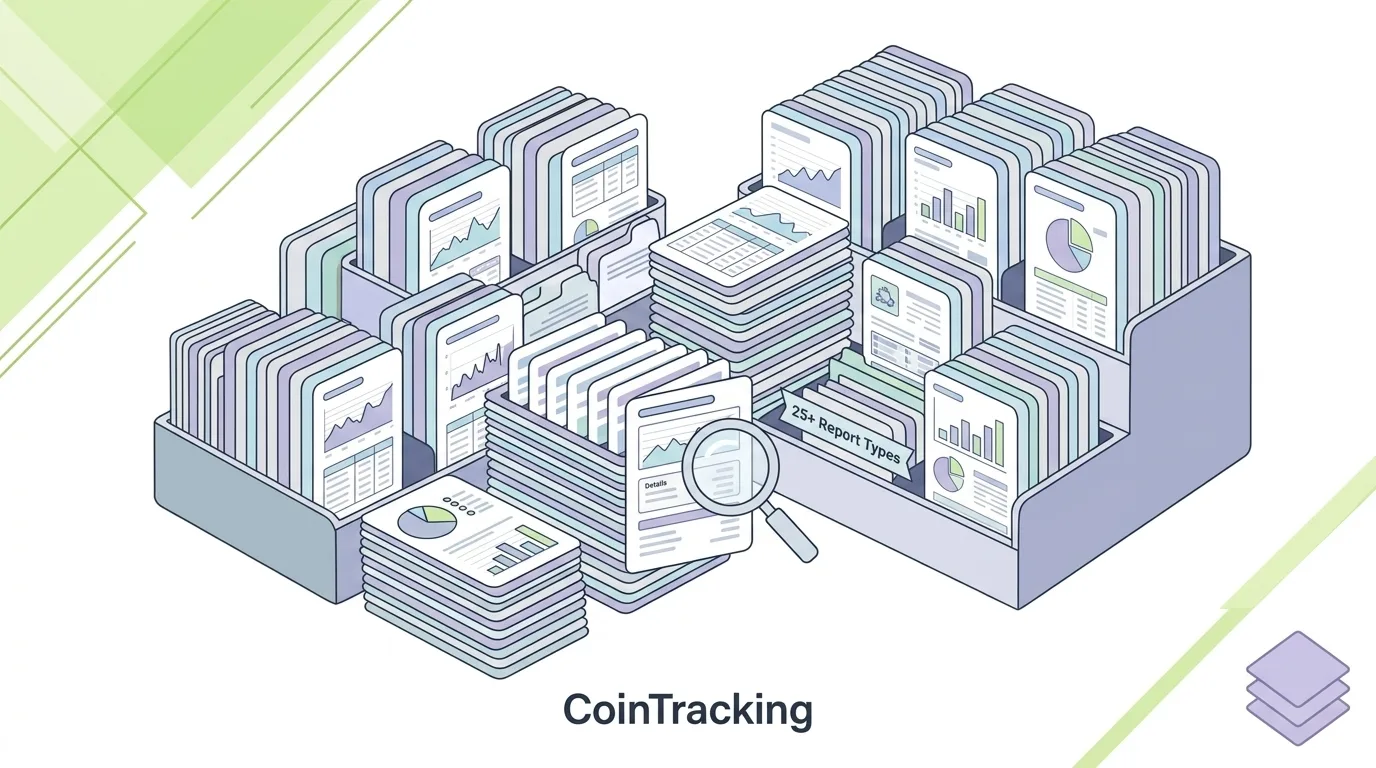
CoinTracking is the oldest tool on this list (running since 2012) and it shows, in both directions. The interface feels dated, but the reporting depth is unmatched: 25+ report types, granular tax options, backups, API access, and controls that serious traders actually use. It is the only tool here priced as a true annual subscription rather than a per-year report purchase.
Pricing: Free portfolio view up to 200 transactions. Paid plans run $49/year (Starter, 200 transactions), $169/year (Pro, 3,500), $259/year (Expert), and $899/year (Unlimited).
Where it struggles: The learning curve is real. Casual investors will find it overwhelming, and the auto-sync options at lower tiers are limited compared to competitors. Our full CoinTracking review covers the depth, the dated interface, and who it actually fits, and the Koinly vs CoinTracking comparison settles the head-to-head by use case.
Verdict: Built for people who trade a lot and want to see everything. Overkill for a buy-and-hold portfolio.
5. ZenLedger: Solid US-Focused Alternative

ZenLedger rounds out the list as a capable US-focused tool with TurboTax integration, tax-loss harvesting reports, and DeFi and NFT support. Its differentiator has long been support: it is one of the few crypto tax platforms where getting a human on the phone is realistic.
Pricing: $49 (Silver, 100 transactions), $199 (Gold, 5,000), $399 (Platinum, 15,000) per tax year.
Where it struggles: Coverage and DeFi depth trail Koinly, and nothing about it clearly beats the tools above for a specific use case. It is a fine tool that rarely ends up the best answer.
Verdict: A reasonable pick for US filers who value support access, but most people are better served by one of the first four.
6. Summ: New and Experimental, Best for Small Simple Portfolios

Summ is the newest name in this roundup, a fresh rebrand of Crypto Tax Calculator, and it still feels like a product finding its footing. The pitch is aggressive auto-categorization of on-chain activity: DeFi protocols, NFT trades, bridges, smart contract interactions. In practice that automation is ambitious but experimental, and we would not trust its output without a line-by-line review.
Where it genuinely works: one exchange and a wallet or two with low transaction volume. At that scale the imports are quick, the previews are clean, and the $49 tier covers the whole job. One subscription covering every tax year back to 2013 is a nice touch for small multi-year cleanups.
Pricing: $49 (Rookie, 100 transactions), $99 (Hobbyist, 1,000), $249 (Investor, 10,000), $499 (Trader, 100,000) per year. Like Koinly, transaction limits are cumulative across your history.
Where it struggles: Volume and track record. Categorization that looks clever on fifty transactions gets unreliable on five thousand, complex liquidity pool entries and exits still need human eyes, and the platform is too new for us to have seen many of its exports survive a heavy filing season. Higher tiers get expensive fast.
Verdict: Worth an experiment if your entire footprint is one exchange and a couple of wallets with light activity. For anything heavier, the established tools at the top of this list are the safer bet.
7. TokenTax: A Legacy Name That Has Fallen Behind

TokenTax is one of the older names in crypto tax software, and in 2026 it reads that way. The core calculator still handles the basics: connect exchanges by API, import wallets, generate Form 8949. But exchange and chain coverage is thinner than Koinly’s, DeFi handling trails every tool ranked above it, and the product has not kept pace with how on-chain activity actually looks today.
Pricing: $49 (Basic, 100 transactions), $199 (Premium, 5,000), $1,999 (Pro, 20,000), $3,499 (VIP, 30,000).
Where it struggles: The jump from $199 to $1,999 is steep, and the upper tiers ask service-level money for software that the cheaper tools above simply outperform. There is no use case in this roundup where TokenTax is the best answer.
Verdict: Hard to recommend in 2026. Koinly, CoinTracker, or CoinLedger does everything TokenTax’s software does, better and for less.
What About TurboTax?
TurboTax deserves its own section because it is the most common point of confusion we see. TurboTax files crypto taxes. It does not calculate them.
If all your activity happened on one exchange, TurboTax can import that data directly and you may not need anything else. The moment you add a second exchange or a self-custody wallet, TurboTax has no way to know your cost basis across platforms. You need crypto tax software (or a reconciliation service) to produce the gains, then TurboTax puts them on Form 8949 and Schedule D and files.
So the real workflow for most people is two tools: Koinly or CoinLedger to compute, TurboTax to file. Our TurboTax crypto guide walks through the import step by step, including which TurboTax version you need.
How Crypto Tax Software Actually Works (And Why It Breaks)
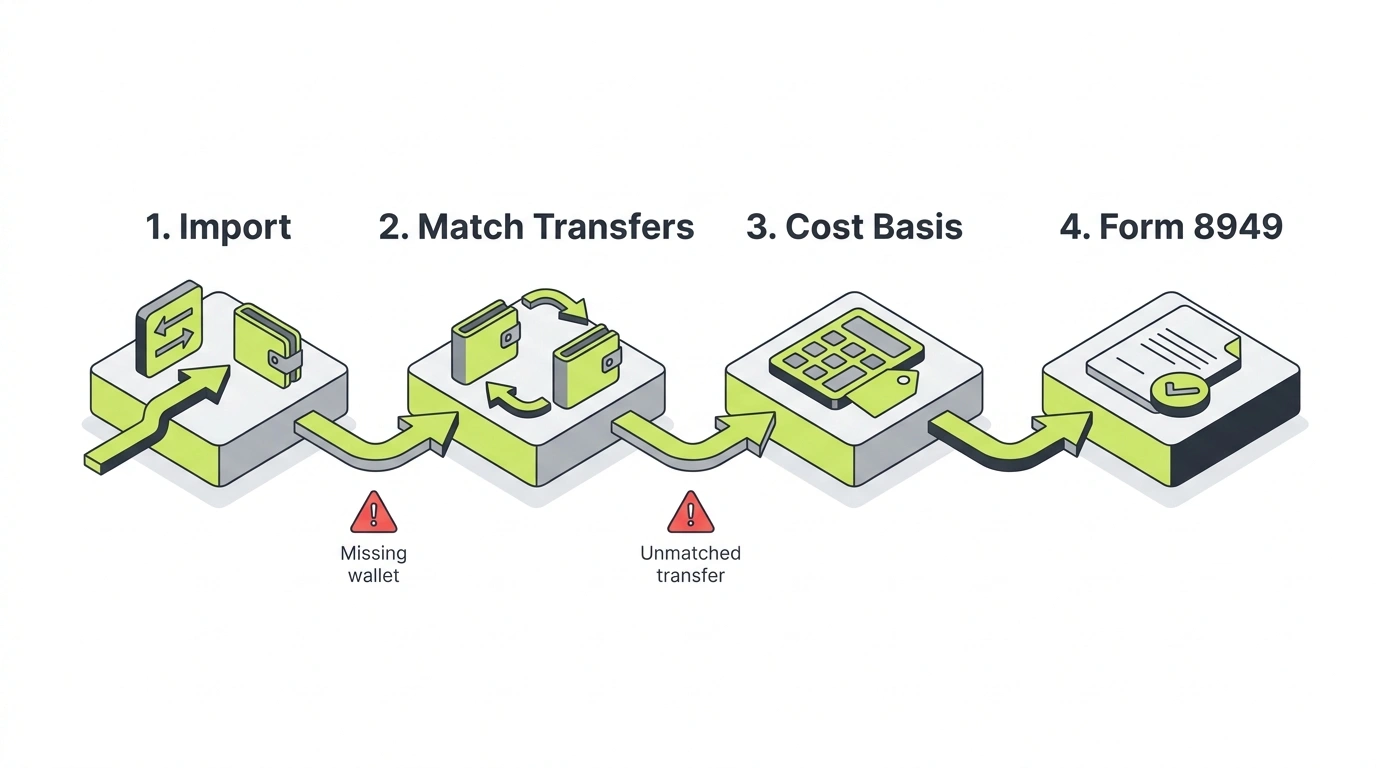
Every tool on this list runs the same four-step pipeline: import your transactions, match transfers between your own accounts, apply a cost basis method, and generate Form 8949 totals. The math in step three and four is essentially solved. Steps one and two are where every tool breaks, because they depend entirely on your data being complete.
Here is the failure mode with real numbers. Say you bought 1 ETH on Coinbase for $2,400, moved it to a MetaMask wallet, then later sold it through a DEX for $3,100. Your actual gain is $700. But if MetaMask is not connected to your tax software, the tool sees a $3,100 sale with no purchase behind it, assigns $0 cost basis, and reports a $3,100 gain. You just quadrupled your taxable gain by forgetting one wallet connection.
Multiply that by dozens of transfers, a couple of closed exchanges, and three years of DeFi activity, and you get the situation half our clients are in when they call.
Two 2026-specific pressures make this worse. First, Form 1099-DA means the IRS now receives broker-reported proceeds directly, so mismatches between your return and the 1099-DA are visible. Second, the per-wallet cost basis rules under Rev. Proc. 2024-28 ended universal basis tracking as of January 1, 2025, and old universal-method data does not migrate itself.
How to Choose: A 60-Second Decision Framework
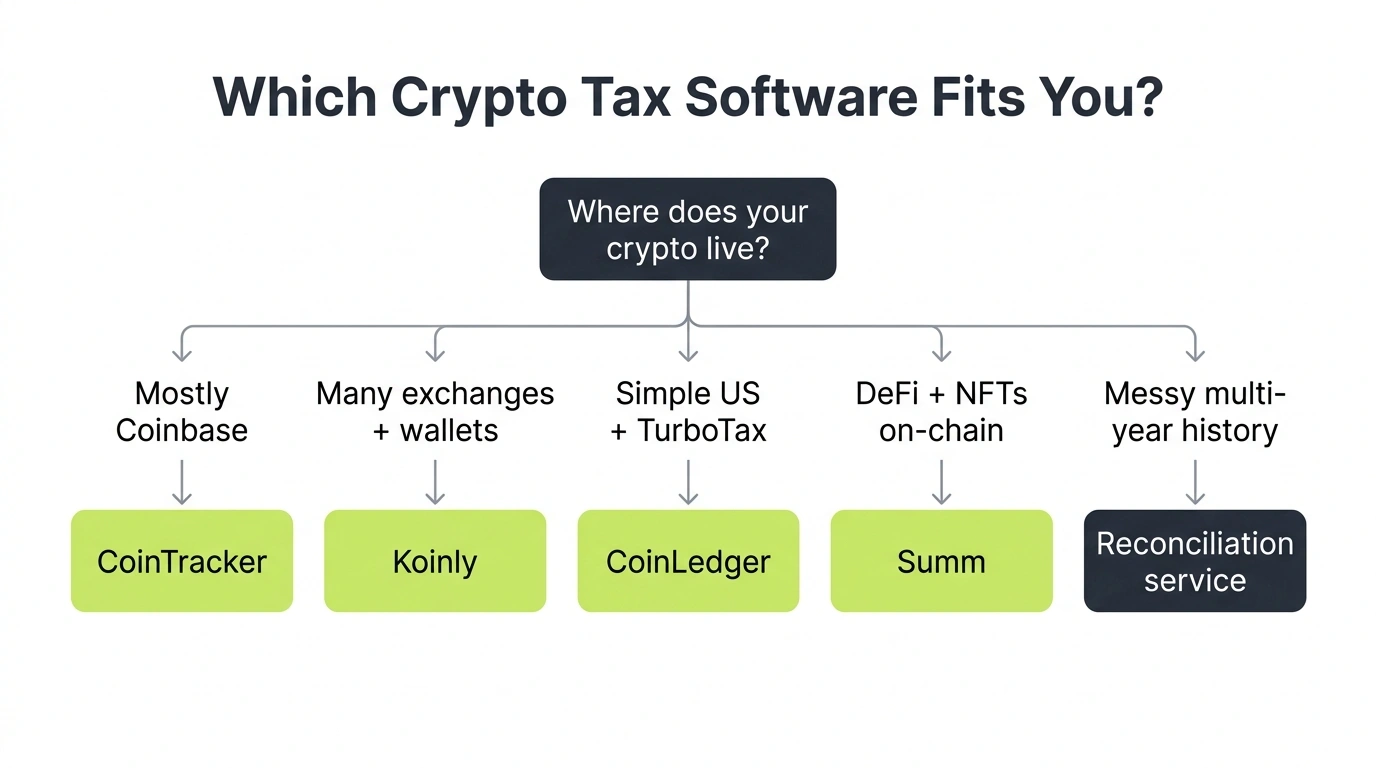
Match your situation to the tool, not the other way around:
- Everything on Coinbase, maybe one other exchange: CoinTracker. The native integration earns its keep.
- Multiple exchanges and wallets, some DeFi: Koinly. Best coverage-to-price ratio in the category.
- Simple US portfolio, filing with TurboTax: CoinLedger. Shortest path from import to filed.
- DeFi, NFTs, and on-chain everything: Koinly, with a manual review pass. Deepest coverage of the established tools.
- One exchange and a wallet or two, low volume: Summ is a cheap experiment at that scale, though Koinly covers the same ground with a longer track record.
- Thousands of trades and you want deep reports: CoinTracking. Bring patience for the interface.
- You want a human handling the messy parts: that is not a software tier, that is reconciliation. Skip ahead two sections.
- Multiple unfiled years, missing wallets, numbers you do not trust: stop shopping for software. Read the next section.
How Form 1099-DA Changes Software Choice in 2026
Form 1099-DA raises the bar for what crypto tax software has to do in 2026. Starting with the 2025 tax year, US custodial exchanges report your gross proceeds to the IRS on Form 1099-DA, which means the IRS now sees a broker’s version of your crypto activity before you file. Your software’s job is no longer just calculating gains. It has to produce numbers you can reconcile against those forms.
Here is the problem baked into the form: each 1099-DA covers one broker. Coinbase reports what happened on Coinbase, Kraken reports Kraken, and neither knows what you paid for coins you transferred in from somewhere else. Those transferred assets show up with missing or $0 cost basis, and cost basis reporting phases in over several years, so the gaps are not going away soon. If you have ever moved crypto between platforms (and almost everyone has), the broker-reported numbers overstate your gains by default.
That changes what to prioritize when choosing a tool:
- Complete cross-platform history is now the whole game. The only defensible answer to a 1099-DA basis gap is your own record of the original purchase, held in software that tracks every exchange and wallet you have ever used. A tool that covers six of your seven sources cannot reconcile anything.
- Per-wallet basis tracking is mandatory, not optional. The per-wallet rules under Rev. Proc. 2024-28 apply from January 1, 2025, and broker reporting is built around the same per-account view. Confirm your tool’s settings actually apply per-wallet basis for 2025 and later.
- Look for proceeds-level reporting you can compare. You want reports that break out proceeds by exchange, so you can line them up against each 1099-DA and explain every difference on Form 8949 before the IRS asks.
All seven tools in this roundup maintain full transaction histories, which is the raw material reconciliation needs, and the major players all advertise 1099-DA support in some form. Treat those claims as a starting point. The marketing says “1099-DA ready,” but the readiness that matters is yours: every wallet connected, transfers matched, and basis traceable back to the original buy. A tool cannot reconcile a form against data you never gave it.
And if your 1099-DA arrived showing proceeds you cannot match to anything your software produces, that is not a software shopping problem. It is a reconciliation problem, which brings us to the next section.
When Software Is Not Enough
Crypto tax software is built on one assumption: your data is complete and mostly clean. When that assumption holds, the tools above are excellent. When it does not, no tier upgrade fixes it, because the problem is not computation. It is reconstruction.
You have outgrown software when any of these sound familiar:
- Cost basis warnings you cannot resolve, or gains that are obviously inflated
- Transfers between your own wallets showing up as taxable sales
- DeFi transactions labeled wrong in ways that change your income
- An exchange you used has shut down and taken its records with it
- Multiple years of unfiled or misfiled returns
- A 1099-DA that does not match anything the software produces
A client came to us after three months inside two different tax tools. Four exchanges, two of them closed, six wallets, and heavy DeFi activity across two chains. Koinly showed a $210,000 gain for the year; he was fairly sure the real number was a fraction of that. The software was not wrong, exactly. It was doing honest math on incomplete data: two missing wallets and a dead exchange’s records meant huge $0 basis positions. We rebuilt the history transaction by transaction, recovered basis from chain data and old statements, and the reconciled gain came to $38,000. Same trades, same math, complete data.
That gap, $210,000 versus $38,000, is why “just buy the bigger plan” is the wrong move for messy situations. The software was never the problem.
This is the work Count On Sheep does. We are not another app, and we are not a CPA firm. We are a done-for-you crypto tax reconciliation service: we take your full history across every exchange, wallet, and chain, rebuild it, fix the labels, recover the missing basis, and deliver reconciled, defensible Form 8949 and Schedule D numbers ready for filing. Many clients arrive specifically from Koinly and CoinTracker cleanup situations, and plenty keep using their software afterward, just with clean data underneath it.
If you are mid-struggle with a specific tool, we also have targeted help guides for Koinly, CoinTracker, and CoinTracking, and our full crypto tax guide for 2026 covers the rules behind all of this. And if you would rather have a crypto tax accountant look at your specific situation directly, that is where to start.
Key Takeaways
- Koinly is the best crypto tax software for most investors in 2026; CoinTracker wins for Coinbase users and CoinLedger for TurboTax filers
- All seven tools price by transaction count from about $49, and none of them file your return
- Free tiers cover tracking and previews only; a downloadable tax report always costs money
- Free crypto tax software is not enough once you have unmatched transfers, dead exchanges, or a 1099-DA mismatch; that is a reconciliation job, not a paid upgrade
- Every tool breaks the same way: missing wallets create $0 cost basis and inflated gains
- TurboTax files crypto taxes but does not calculate them; most people need both a tax tool and a filing tool
- When the data is messy (missing wallets, dead exchanges, multiple years), reconciliation beats another software subscription
Frequently Asked Questions
Which crypto tax software is the best in 2026?
Koinly is the best crypto tax software for most people in 2026 because of its coverage (800+ exchanges, wallets, and blockchains), flexible cost basis methods, and fair pricing that starts at $49 per tax year. CoinTracker is the better pick if your portfolio lives mostly on Coinbase, and CoinLedger is the simplest path if you file with TurboTax. The right answer depends on where your transactions actually live.
What is the best free crypto tax software?
No major crypto tax software gives you a downloadable tax report for free. Koinly, CoinTracker, CoinLedger, and Summ all offer free tiers, but those cover portfolio tracking and a gains preview only. The free tier is still useful: connect everything, review the numbers, and only pay for the report once the data looks right. Budget $49 as the realistic minimum for a filed-ready report.
Can TurboTax do my crypto taxes?
TurboTax can file crypto taxes, but it does not reconcile them. It accepts imports from exchanges and from crypto tax software like Koinly or CoinLedger, then puts the totals on Form 8949 and Schedule D. If you used more than one exchange or any self-custody wallet, you still need a crypto tax tool (or a human) to calculate the gains before TurboTax can file them.
Is crypto tax software accurate?
Crypto tax software is accurate when two things are true: every wallet and exchange is connected, and transfers between your own accounts are matched correctly. Miss a wallet and the software assigns $0 cost basis, which inflates your gains. Mislabel a DeFi transaction and your income is wrong. The math engine is fine; the data going into it is where accuracy breaks.
Do I still need crypto tax software if my exchange sends a 1099-DA?
Yes, in most cases. Form 1099-DA reports what one broker saw, and it can show missing or incomplete cost basis for coins you transferred in from elsewhere. Software (or a reconciliation service) is how you prove your real cost basis across every platform so you do not overpay tax on the 1099-DA's incomplete numbers.
When should I use a crypto tax service instead of software?
Use a done-for-you service when software keeps producing numbers you cannot trust: missing cost basis warnings, phantom gains from unmatched transfers, mislabeled DeFi, closed exchanges, or multiple unfiled years. Software is built for clean data. A reconciliation service like Count On Sheep rebuilds messy histories transaction by transaction, then hands you defensible Form 8949 totals.