

CoinLedger is one of the most popular crypto tax tools in the US, and most people still use maybe a third of what it can do. They connect two exchanges, stare at a gains number that looks wrong, and either pay for a report they do not trust or give up and hire someone. This guide fixes that. It walks through the entire CoinLedger workflow for 2026: what it costs, how to set it up, how to import from every exchange and wallet you have touched, how to find and fix the errors that distort your numbers, and how to turn the result into a filed tax return.
What Is CoinLedger?
CoinLedger is US-focused crypto tax software that imports your transaction history from exchanges, wallets, and blockchains, calculates your capital gains and income, and generates the forms you need to file, including Form 8949 and Schedule D. It also doubles as a free portfolio tracker, which is how most people first try it.
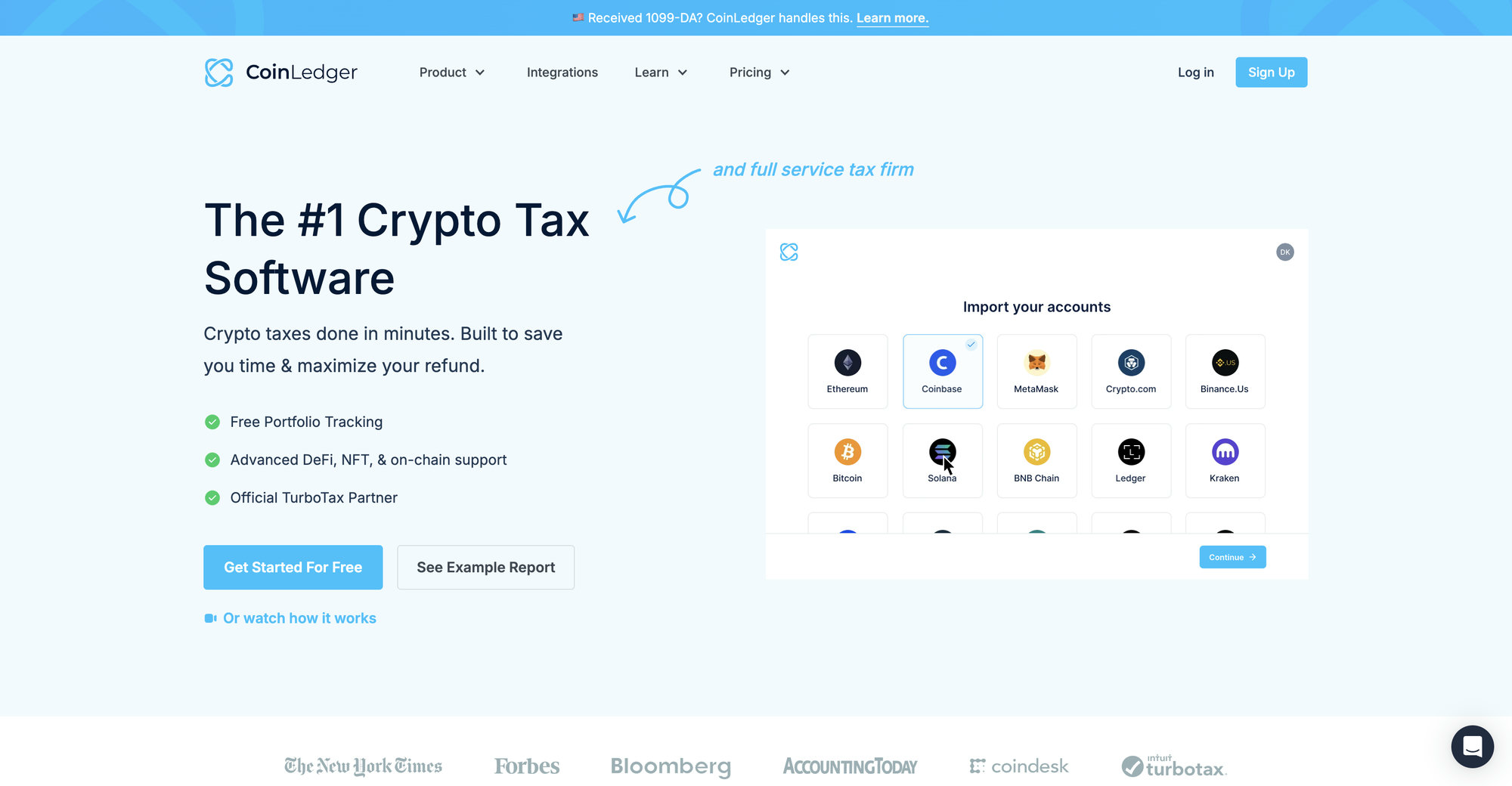
From CryptoTrader.Tax to CoinLedger
The company started in 2018 as CryptoTrader.Tax, built by David Kemmerer, Lucas Wyland, and Mitchell Cookson after their own high-volume trading left them with a tax reporting mess no tool could handle. In February 2022 it rebranded to CoinLedger alongside a funding round, broadening from pure tax reporting into portfolio tracking. If you see old reviews or Reddit threads mentioning CryptoTrader.Tax, it is the same product and the same team. The rebrand matters for one practical reason: some older exchange help docs still reference the CryptoTrader.Tax name in their export instructions, and they work identically.
Who CoinLedger Is For
CoinLedger fits US filers best. Its report formats, cost basis logic, and filing integrations are built around IRS forms, and its TurboTax partnership is a headline feature. It works well for:
- Investors with activity on major US exchanges like Coinbase, Kraken, and Gemini
- Traders who need Form 8949 output that ties to what their exchanges report
- People filing through TurboTax, TaxAct, TaxSlayer, or H&R Block
- Anyone who wants a free look at their gains before committing money
It is a weaker fit for heavy DeFi users on non-EVM chains, people with years of tangled multi-platform history, and anyone who wants a person, not a dashboard, to take responsibility for the numbers. We cover those cases near the end, and our standalone CoinLedger review goes deeper on strengths and weaknesses.
CoinLedger by the Numbers
As of 2026, CoinLedger reports over 700,000 users, more than 1,000 exchange, wallet, and blockchain integrations, historical data support for over 20,000 cryptocurrencies, and a 4.7 rating on Trustpilot across 1,200+ reviews. It is an official TurboTax partner. None of that guarantees your report will be right, but it does mean you are not betting your tax return on an abandoned side project.
How CoinLedger Works
CoinLedger follows a four-stage pipeline: import your data, classify your transactions, calculate gains and income, then generate reports. Understanding the pipeline matters because every bad number in the final report traces back to a specific stage, almost always the first one.
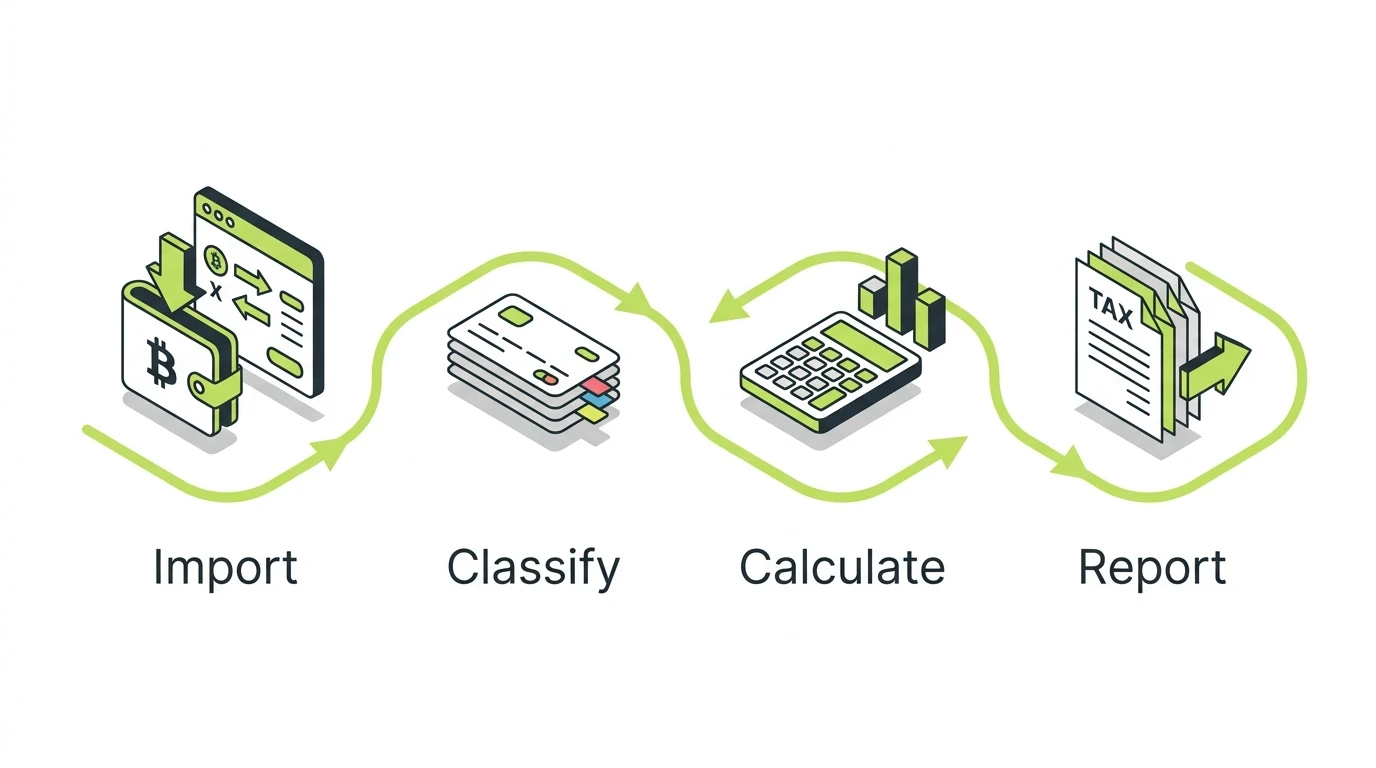
Here is what each stage does:
- Import. You connect exchanges by API, wallets by public address, and everything else by CSV. CoinLedger pulls in every buy, sell, trade, transfer, and reward it can see.
- Classify. The software labels each transaction: purchase, sale, swap, transfer between your own accounts, staking income, and so on. Most labels are automatic. Some need your help.
- Calculate. Using your chosen cost basis method, CoinLedger matches every disposal against an acquisition and computes the gain or loss, separated into short-term and long-term.
- Report. It generates Form 8949, a Schedule D summary, an income report, an audit trail, and export files for tax software.
The quality of stage 4 is entirely determined by stages 1 and 2. A perfect calculation engine fed incomplete data produces confident, precise, wrong numbers. Keep that in mind every time a total surprises you.
CoinLedger does not know what you did. It knows what you imported. The difference between those two is where every bad crypto tax number comes from.
How Much Does CoinLedger Cost?
Portfolio tracking is free forever, and tax reports are a one-time purchase per tax year, priced by transaction count: $49 for up to 100 transactions, $99 for up to 1,000, and $199 and up for 3,000 or more. There is no subscription. You pay once per tax year you want a report for, and reports are available for any year from 2010 through 2025.
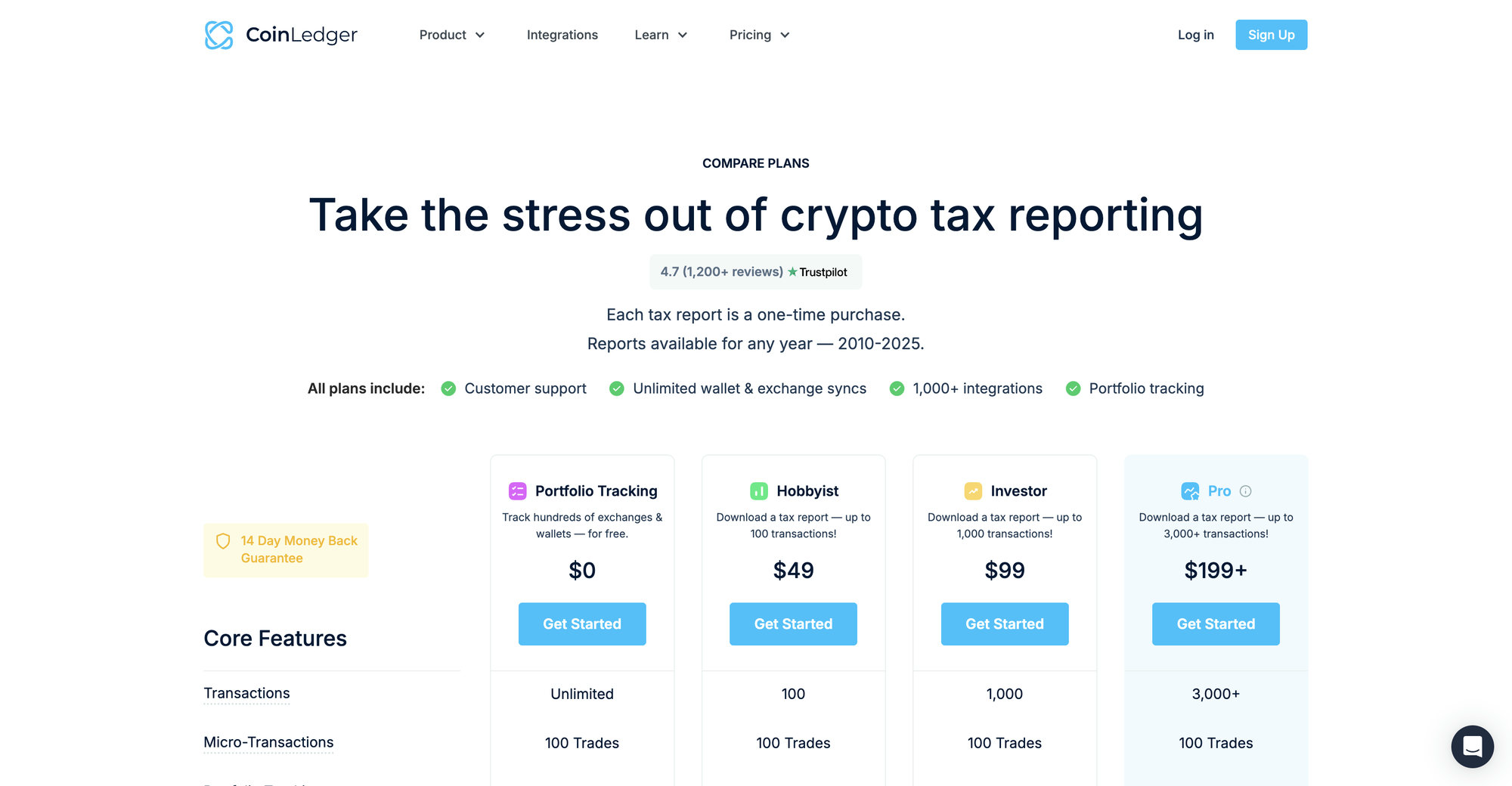
The 2026 Pricing Tiers
| Plan | Price | Transaction limit | What you get |
|---|---|---|---|
| Portfolio Tracking | $0 | Unlimited imports | Full import, portfolio tracking, capital gains preview |
| Hobbyist | $49 | Up to 100 | Downloadable tax reports for one tax year |
| Investor | $99 | Up to 1,000 | Same reports, higher transaction ceiling |
| Pro | $199+ | 3,000+ | Same reports; buy additional transactions in-app as needed |
| Unlimited | $499 | 10,000+ | Highest tier for very active accounts |
Every paid tier includes the same report package: Form 8949, capital gains report, income report, audit trail report, international reports, and the tax software export files. You are paying for transaction volume, not features. All plans include unlimited revisions, so you can fix data and re-run the report as many times as you need without paying again, and there is a 14-day money-back guarantee.
How Transaction Counting Works
Your tier is assigned automatically based on how many transactions you import for that tax year. Two things trip people up:
- Staking rewards, interest payments, and other micro-transactions count toward your total. Someone with daily staking payouts can blow past 1,000 transactions without ever placing a trade.
- If you buy a tier and later import more data that pushes you over its limit, you pay the difference to the next tier, not the full price again.
Pricing Example
Is the Free Plan Actually Useful?
Yes, and this is the single best thing about CoinLedger’s model. You can connect every account, import everything, and see your estimated gains before paying a cent. Use that. If the preview number looks insane, do not pay for the report. A wrong preview means your data has gaps, and the sections below show you how to close them before you spend money memorializing bad numbers.
Setting Up Your CoinLedger Account
Setup takes about five minutes: create the account, confirm your country and base currency, and check your cost basis settings before you import anything. Doing the settings first matters because your cost basis method affects every calculation that follows.
Here is the sequence that saves rework later:
- Sign up at coinledger.io with an email address. No credit card is needed for the free tier.
- Set your home country to the United States and your base currency to USD. This drives which tax forms CoinLedger generates and which rules it applies.
- Open the tax settings and confirm your cost basis method. FIFO is the default and the safest choice for most filers. More on the alternatives in the cost basis section below.
- Check the per-wallet tracking setting. New US accounts created after November 4, 2025 have per-wallet cost basis tracking on by default, which matches current IRS rules. If you have an older account, opt in.
- Only then start importing.
How To Import Your Transactions Into CoinLedger
CoinLedger imports data three ways: read-only API connections for exchanges, public address sync for wallets and blockchains, and CSV uploads for everything else. Your goal is complete coverage: every exchange, every wallet, every chain, every year, including platforms you no longer use and exchanges that no longer exist.

API Import (Exchanges)
For most centralized exchanges, you generate a read-only API key on the exchange, paste it into CoinLedger, and the software pulls your history automatically. Read-only means the key can see your transactions but cannot trade or withdraw. This is the best method where available because it captures everything the exchange knows, updates when you re-sync, and avoids the formatting problems CSVs are famous for. Some platforms, including Coinbase, use a direct account connection instead, where you log in and authorize access with a couple of clicks.
Public Address Sync (Wallets and Chains)
For on-chain activity, you paste your public wallet address and CoinLedger reads the blockchain directly. It sees every transaction that address has ever made: swaps, transfers, NFT trades, incoming airdrops. You never share a private key or seed phrase, and any tool that asks for one is a scam, full stop. Add every address you have used, including old wallets you have abandoned, because the assets that passed through them carry cost basis your current wallets inherited.
CSV Import (Everything Else)
For platforms with no live connection, export a transaction history CSV from the platform and upload it. This is also your path for dead exchanges: if you traded on FTX, Voyager, Celsius, or any platform that shut down, dig up old CSV exports or email statements, because that history holds the cost basis for coins you still own. CoinLedger also provides a custom CSV template for manually building a file when nothing else works.
The Completeness Rule
Whatever mix of methods you use, the rule is the same: connect everything. CoinLedger calculates gains by matching each sale against the purchase history it can see. Any platform you skip is a hole in that history, and every coin that came from the hole shows up with zero cost basis, which inflates your gains. This is the single most important idea in this entire guide.
Exchange-by-Exchange Import Overview
Every major exchange follows one of the same three import patterns, and CoinLedger’s help center has step-by-step articles for more than 200 platforms. Here is the quick map for the exchanges US filers actually use.

Coinbase
Direct account connection: click connect, log in, authorize. CoinLedger pulls trades, conversions, staking rewards, and transfers. Two catches. First, Coinbase Wallet is a separate self-custody app and needs its own connection by public address. Second, if you used the retired Coinbase Pro, that history may need a separate import. Our full Coinbase tax guide covers the exchange’s own reporting quirks, including why its 1099-DA proceeds look so large.
Kraken
API import. Generate a read-only key in Kraken’s security settings, paste it in, sync. Kraken’s data quality is good, and its history goes back far enough for most users. If you traded on Kraken before 2019, double-check the earliest transactions arrived.
Binance.US
API import, with a caveat: Binance.US has changed its API and export formats several times over the years, so older history sometimes needs a supplemental CSV. If your Binance.US balances in CoinLedger do not match the app, the gap is usually in a year the API no longer returns.
Gemini, Crypto.com, and KuCoin
All three support API import. Crypto.com users should watch for the app versus exchange split: the consumer app and the (now retired for US users) exchange had separate histories and separate exports. KuCoin users who never completed KYC should export CSVs now, while the account is still accessible.
Dead Platforms: FTX, Voyager, Celsius, BlockFi
No API exists, so CSV is your only option. Use old export files, emailed statements, or bankruptcy claim documentation to reconstruct what you bought and what you got back. This history matters more than people think: coins recovered from bankruptcy distributions carry cost basis that affects every later sale.
Importing Wallets, Chains, and DeFi Activity
Self-custody and on-chain activity import by public address, and this is where CoinLedger’s automation is strongest on Ethereum and other EVM chains and weakest on everything else. Set your expectations accordingly.
MetaMask, Phantom, and Hardware Wallets
MetaMask imports by pasting each account address, and CoinLedger reads the Ethereum and EVM-chain history behind it. Phantom does the same for Solana. Ledger and Trezor are not separate ecosystems for tax purposes: a hardware wallet is just a secure keyholder for addresses on Bitcoin, Ethereum, or other chains, so you import the addresses it controls, not the device itself.
Which Chains Work Best
Ethereum, Base, Polygon, Arbitrum, Optimism, and other EVM chains have the most mature support. Standard swaps, transfers, and liquidity actions on these chains classify automatically most of the time. Solana support is real but rougher: complex Solana DeFi programs often import as uncategorized transactions you have to label by hand. Bitcoin, being simple, imports cleanly.
DeFi: What Automates and What Does Not
Simple DeFi automates well: token swaps on Uniswap-style DEXs, sending and receiving, basic staking. The hard cases are liquidity pool entries and exits, vault deposits that issue receipt tokens, wrapped and bridged assets, and rebasing tokens. CoinLedger sometimes reads a vault deposit as a taxable swap because you technically received a different token, and correcting that classification changes your tax. If DeFi is a big part of your year, budget real review time, and read our NFT and DeFi tax guide for how these events are actually taxed.
NFTs
CoinLedger imports NFT buys, sells, and mints on supported chains and treats them as property disposals like any other crypto. Valuation for illiquid NFTs and mint-cost handling can need manual adjustment, especially for collections that airdropped tokens to holders.
Staking Rewards
Staking rewards import as income at fair market value when received, which matches IRS treatment under Revenue Ruling 2023-14. Each reward also establishes cost basis for the tokens received, so when you sell them later, only the change since receipt is a capital gain. The tax logic is automatic once the rewards import; the thing to verify is that they all did. Our crypto income tax guide covers the rules in depth.
Transfer Matching: How CoinLedger Connects Your Accounts
Transfer matching is CoinLedger pairing a withdrawal from one of your accounts with the deposit into another, so the move is treated as a non-taxable transfer instead of a sale and a mystery deposit. When it works, cost basis flows silently from account to account. When it fails, your numbers break in two directions at once.
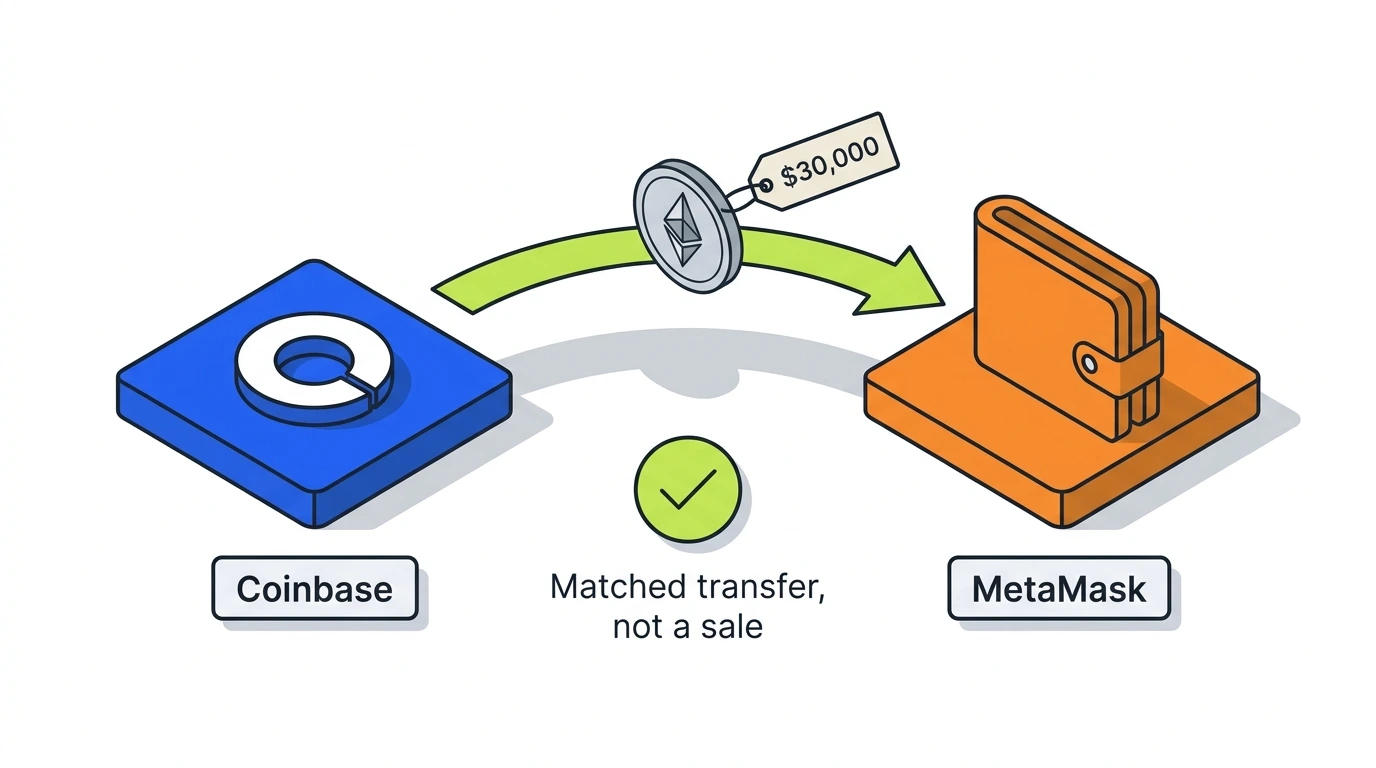
Here is the failure mode. You withdraw 1 ETH from Coinbase to MetaMask. If CoinLedger cannot match the two sides, it may read the withdrawal as a disposal (creating a taxable gain that never happened) and the deposit as an acquisition with unknown cost (creating a zero-basis time bomb for when you sell). One unmatched transfer, two errors.
Matching fails for predictable reasons:
- One side of the transfer is on a platform you never connected
- Timestamps differ across platforms and the amounts differ by a network fee, so the software is not confident they are the same move
- The transfer passed through an intermediate address you did not add
The fix is usually adding the missing platform. For stubborn cases, CoinLedger lets you manually mark a withdrawal and deposit as a matched transfer. After every big import session, scan your transfers and confirm the ins and outs pair up.
CoinLedger Cost Basis Settings Explained
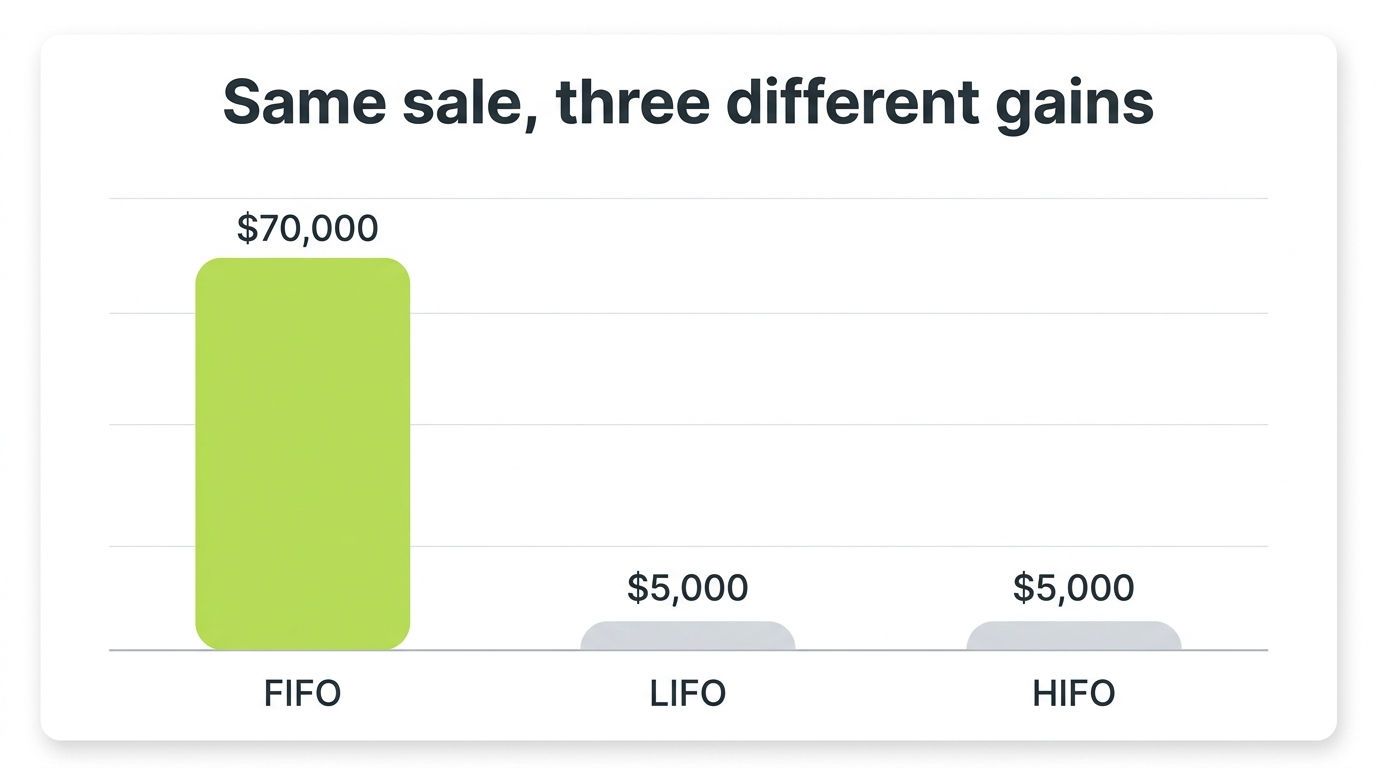
CoinLedger supports FIFO, LIFO, and HIFO cost basis methods (plus Adjusted Cost Basis for Canadian filers), and since January 1, 2025, it tracks basis per wallet to comply with IRS Revenue Procedure 2024-28. These settings decide how much tax you pay on identical trading activity, so they are worth ten minutes of your attention.
The Methods
FIFO (first in, first out) sells your oldest coins first. It is the IRS default, the simplest to defend, and often the best for long-term holders because old lots qualify for long-term rates. LIFO sells the newest first. HIFO sells the highest-cost lots first, which minimizes current-year gains. HIFO and LIFO are forms of specific identification, which the IRS permits only if your records identify exactly which units you sold. CoinLedger’s audit trail report is what backs that up.
Same Sale, Three Different Gains
For a deeper treatment of when each method wins, see our FIFO vs HIFO vs Spec ID guide.
Per-Wallet Tracking and Rev. Proc. 2024-28
Through 2024, most software tracked basis universally, treating all your coins as one big pool. That ended on January 1, 2025. Under Rev. Proc. 2024-28, basis must be tracked per wallet and per account, which aligns your records with the 1099-DA forms brokers now file.
CoinLedger handled the transition by reallocating each user’s unused basis to specific wallets as of January 1, 2025, using a lowest-cost-to-highest-value-wallet allocation by default, with an alternative allocation available in tax settings. It also generates an inventory snapshot report documenting the allocation, which is your evidence for the IRS safe harbor. If you used CoinLedger before the transition and never looked at this, open your tax settings and confirm the allocation happened. If you switched tools mid-transition, make sure the allocation is consistent across both, because a mismatch here is an audit finding waiting to be made.
Can You Change Methods?
You select the method per tax year in settings, and CoinLedger recalculates instantly, which makes it easy to compare outcomes before you finalize. Be consistent year over year and keep the audit trail report for any year you use something other than FIFO. Flipping methods opportunistically without documentation is the kind of pattern that looks bad under examination.
Reviewing and Fixing Errors in CoinLedger
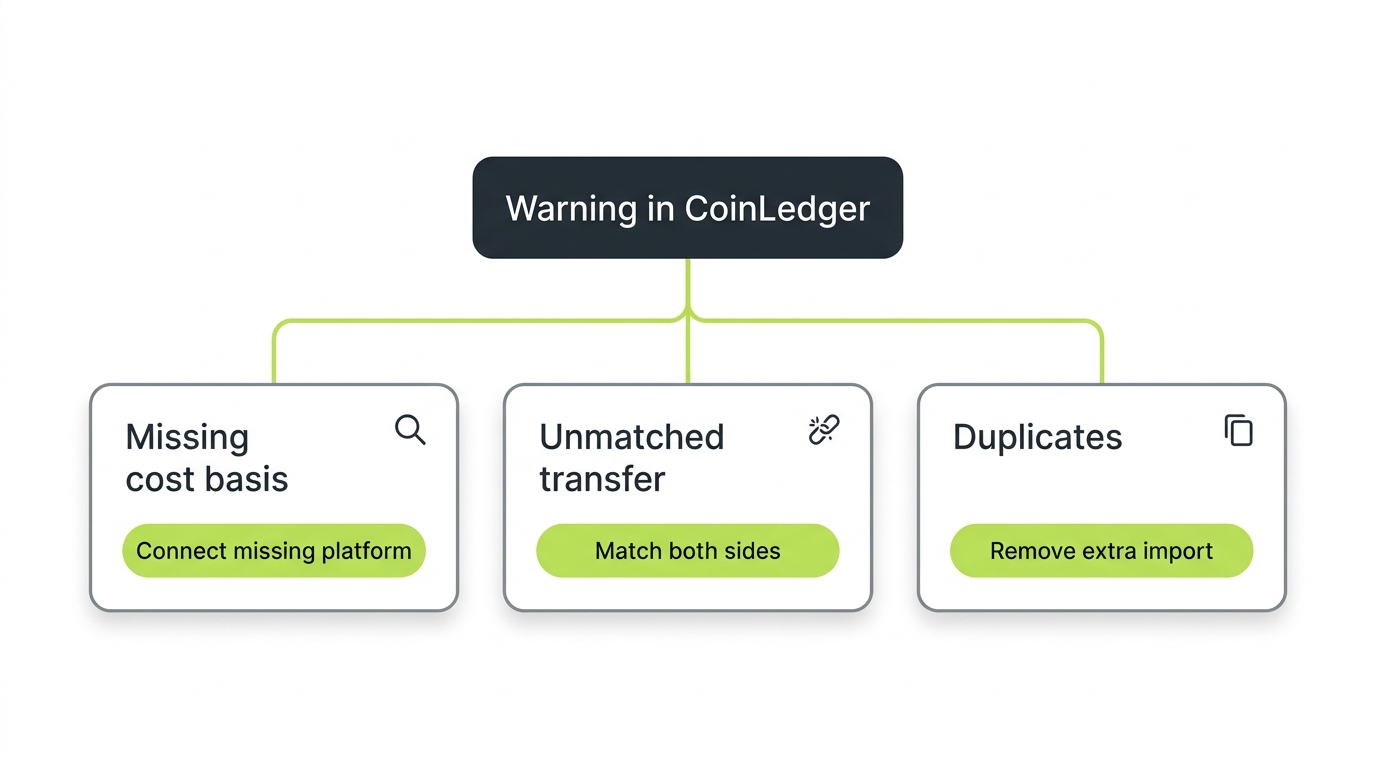
Before you pay for a report, work through CoinLedger’s warnings, because the three big error types (missing cost basis, unmatched transfers, and duplicates) each have a specific cause and a specific fix. This review step is the difference between a report you can defend and a report that happens to have your name on it.
Missing Cost Basis Warnings
This warning means CoinLedger saw you sell something it never saw you buy. Ninety percent of the time, the acquisition lives on a platform you have not connected: an old exchange, a forgotten wallet, a dead platform whose CSV is sitting in your email. Connect the source and the warning resolves itself. For genuinely unrecoverable history, you can enter the acquisition manually with your best documented estimate. What you should not do is ignore it, because unresolved missing basis is treated as zero basis, and zero basis means the entire sale price is taxed as gain.
The $12,000 Warning
Unmatched Transfers
Covered above, but as an error-fixing workflow: filter your transactions to withdrawals and deposits, look for one-sided moves, and either connect the missing platform or manually match the pair. Watch for network fees making the amounts differ slightly. A 0.5 BTC withdrawal that arrives as 0.4996 BTC is the same transfer.
Duplicate Transactions
Duplicates come from importing the same history twice, usually API plus CSV for the same exchange and period. Symptoms: balances roughly double reality, or trades appear twice at the same timestamp. CoinLedger flags overlapping imports, and the cleanest fix is to pick one source of truth per platform per period and delete the other import entirely, rather than deleting individual rows and hoping you caught them all.
Negative Balance Errors
If CoinLedger says you sold more of a coin than you owned, the cause is upstream: a missing acquisition, a dropped deposit, or an unmatched transfer. Negative balances are a symptom, never the disease. Trace the coin backward in time until you find the gap.
Generating Your CoinLedger Tax Reports
Once your data is clean, CoinLedger generates the full report package in minutes: Form 8949, a capital gains summary for Schedule D, an income report, an audit trail, and export files for tax software. This is the moment you actually pay, and only for the tax years you need.

What Each Report Is For
- Form 8949 lists every disposal with dates, proceeds, basis, and gain or loss. This is the form the IRS actually wants, and under the per-wallet rules your disposals are organized to tie out by account.
- The capital gains report summarizes short-term and long-term totals, which feed Schedule D.
- The income report totals staking, interest, airdrops, and other ordinary income at fair market value on receipt, which belongs on Schedule 1 or Schedule C depending on your situation.
- The audit trail report documents every calculation behind every number. Download it, keep it for every year you file, and thank yourself later. It is your specific-identification evidence and your audit defense.
Before You Download
Run one last sanity pass: do the balances match your real accounts, are the warnings resolved, does the gain number pass the smell test against what you remember of your year? Unlimited revisions mean you can fix and regenerate freely, but the version you file is the one that counts.
Filing With TurboTax, TaxAct, and Other Software
CoinLedger exports directly into TurboTax Online, TurboTax Desktop, TaxAct, TaxSlayer, and H&R Block Desktop, so you never retype transactions by hand. The TurboTax integration is the most polished, which is no accident given the official partnership.
The TurboTax Workflow
- In CoinLedger, generate your report and download the TurboTax Online export file.
- In TurboTax, go to the investment income section and choose to import from a crypto tax service, selecting CoinLedger.
- Upload the file. TurboTax ingests your Form 8949 data as aggregated totals with the detail attached.
- Report your crypto income (staking, rewards) separately in TurboTax’s income section using CoinLedger’s income report numbers.
- Answer the digital asset question on Form 1040 honestly. It is yes.
TurboTax Desktop uses a TXF file instead of the online format; CoinLedger provides both. For the other platforms, the flow is the same shape: download the platform-specific export, import it in the filing software, add income separately. If your filer of choice supports none of the formats, the universal fallback is attaching the PDF Form 8949 and entering summary totals, which every filing platform and human preparer accepts. Full walkthrough in our TurboTax crypto guide.
If You Use a Human Preparer
Hand them the Form 8949 PDF, the income report, and the audit trail. That package is exactly what a preparer needs, and it is dramatically better than handing them exchange CSVs and an apology.
CoinLedger and Form 1099-DA
Starting with the 2025 tax year, US exchanges issue Form 1099-DA reporting your gross proceeds to the IRS, and CoinLedger’s job is to supply the half the form leaves out: your cost basis. Understanding how these two fit together prevents the most common panic of the 2026 filing season.
The 1099-DA reports what you sold for, not what you gained. For 2025, basis reporting is still phasing in, and no exchange can ever know the basis of coins you bought elsewhere and transferred in. So the IRS receives a big proceeds number with incomplete basis attached, and your return has to tell the rest of the story. That means your CoinLedger-generated Form 8949 needs to reconcile against the proceeds your exchanges reported: same disposals, real basis, actual gain.
Practical implications:
- Do not file from the 1099-DA alone. Treated as-is, missing basis becomes zero basis and you overpay, sometimes massively.
- Do not ignore the 1099-DA either. The IRS matches reported proceeds against returns, and unexplained mismatches generate CP2000 notices.
- If your CoinLedger proceeds for an exchange differ wildly from that exchange’s 1099-DA, find out why before filing. Common causes: duplicate imports, missing months, or transfers misread as sales.
Our Form 1099-DA explainer covers the form box by box.
The 1099-DA tells the IRS what you sold for. CoinLedger calculates what you actually made. Your return is where those two stories have to agree.
CoinLedger vs the Alternatives
CoinLedger’s main competitors are Koinly and CoinTracker, and the honest answer is that all three total your transactions well and none of them fixes bad data for you. The differences are in coverage, pricing, and workflow.
Quick orientation:
- CoinLedger vs Koinly: Koinly supports more chains and international tax formats, which helps heavy DeFi and non-US users. CoinLedger’s TurboTax flow and report simplicity win for straightforward US filings. Full breakdown: CoinLedger vs Koinly.
- CoinLedger vs CoinTracker: CoinTracker emphasizes always-on portfolio tracking and has deep Coinbase integration. CoinLedger’s one-time pricing is easier to swallow than a subscription for many filers. Full breakdown: CoinLedger vs CoinTracker.
If you are choosing from scratch, our best crypto tax software guide compares the whole field. One thing switching tools will not do: fix wrong numbers. Gains that look wrong in CoinLedger will look wrong in Koinly too, because the problem is missing data, and the data follows you.
When To Bring In a Professional
CoinLedger is the right tool when your data is importable and your history is reasonably clean. It stops being enough when the reconciliation work, the part before the software can do its job, is bigger than the calculation.
Signals that you have crossed that line:
- Years of history across many platforms, some dead, with no prior reconciliation
- A gains preview that is obviously wrong and does not improve after connecting everything you can remember
- Heavy DeFi on chains where half your transactions import as uncategorized
- Thousands in phantom gains from missing basis you cannot document
- A 1099-DA that does not reconcile to anything and a filing deadline getting close
- IRS letters already in hand
This is exactly the work Count On Sheep does. We are a done-for-you crypto tax reconciliation service: we take your complete history across every exchange, wallet, and chain, trace cost basis across every transfer, fix the classifications software gets wrong, and deliver a clean, defensible, filing-ready picture your tax preparer can use with confidence. You stay out of the CSV mines. If your CoinLedger numbers do not add up and you are done fighting them, talk to us.
CoinLedger FAQ
The most common CoinLedger questions, answered directly. For anything specific to your history, get a professional set of eyes on your actual data.
Related Reading
- CoinLedger Review 2026: Is This Crypto Tax Tool Worth It?
- CoinLedger vs Koinly 2026
- CoinLedger vs CoinTracker 2026
- Best Crypto Tax Software 2026
- The Complete Crypto Tax Guide 2026
- How to File Crypto Taxes with Form 8949 and Schedule D
- Form 1099-DA Explained (2026)
- Per-Wallet Crypto Cost Basis and Rev. Proc. 2024-28
- FIFO vs HIFO vs Spec ID for Crypto Taxes
- Crypto Income Tax: Staking, Mining and Airdrops (2026)
- TurboTax Crypto Taxes (2026)
Official IRS Resources
- IRS: Digital Assets
- IRS Notice 2014-21 (crypto treated as property)
- IRS Revenue Procedure 2024-28 (per-wallet basis allocation)
- IRS Revenue Ruling 2023-14 (staking income)
- IRS: About Form 8949
- IRS: About Form 1099-DA
Frequently Asked Questions
How does CoinLedger work?
CoinLedger imports your transaction history from exchanges, wallets, and blockchains through read-only API connections, public wallet addresses, and CSV files. It then classifies each transaction, calculates your capital gains and income using your chosen cost basis method, and generates tax reports including Form 8949, a Schedule D summary, and an income report. Importing and previewing your numbers is free. You pay a one-time fee per tax year to download the finished report.
How much does CoinLedger cost?
Portfolio tracking is free with unlimited imports. Tax reports are a one-time purchase per tax year based on transaction count: Hobbyist is $49 for up to 100 transactions, Investor is $99 for up to 1,000, and Pro starts at $199 for 3,000 or more, with additional transactions purchasable in-app. Accounts with 10,000 or more transactions fall into an Unlimited tier at $499. Every paid plan carries a 14-day money-back guarantee.
Is CoinLedger legit and safe to use?
Yes. CoinLedger is an established US crypto tax platform, formerly known as CryptoTrader.Tax, used by more than 700,000 investors. It connects to exchanges through read-only API keys that cannot move your funds, and it reads on-chain wallets through public addresses only. It never asks for your private keys. As with any tax tool, the accuracy of the output depends on connecting every account and reviewing the imported data.
Does CoinLedger work with Coinbase?
Yes. Coinbase is one of CoinLedger's core integrations, with a direct account connection that pulls your trades, conversions, rewards, and transfers automatically. You can also upload a Coinbase CSV export instead. Remember that Coinbase Wallet, the self-custody app, is a separate connection from the Coinbase exchange, and both need to be added if you use both.
How do I import my crypto data into CoinLedger?
Three ways. Connect exchanges through read-only API keys or a direct account link, sync wallets and blockchains by pasting your public wallet address, or upload CSV transaction history files for platforms without a live connection, including dead exchanges. CoinLedger also accepts a custom CSV template for anything it cannot import automatically. Connect every platform you have ever used, not just the active ones, or your cost basis will have holes.
Does CoinLedger report to the IRS?
No. CoinLedger is tax software, not a broker, so it does not report your activity to the IRS. Your exchanges do that. Starting with the 2025 tax year, US exchanges issue Form 1099-DA reporting your gross proceeds to the IRS. CoinLedger's job is the other half: calculating the cost basis those forms leave out so your Form 8949 shows real gains instead of raw proceeds.
Which is better, CoinLedger or CoinTracker?
It depends on your activity. CoinLedger is known for straightforward pricing, a clean report workflow, and strong TurboTax integration, which suits US filers with mostly exchange-based activity. CoinTracker leans harder into ongoing portfolio tracking and has deep Coinbase ties. For heavy DeFi and multi-chain histories, both need manual cleanup. Our full comparison breaks down where each one wins.
Is CoinLedger free?
Partly. You can create an account, connect unlimited wallets and exchanges, import your full history, and preview your capital gains for free. The paid part is downloading the tax report. That free preview is genuinely useful: you see roughly what you owe before spending anything, and you only pay when you are ready to file.