

Koinly is the most widely used crypto tax calculator in the world, and most people still use maybe a third of it. They connect two exchanges, download a report, and file numbers that are quietly wrong. This guide covers the whole machine: what Koinly is, what it costs in 2026, how to set it up correctly under the new per-wallet IRS rules, how to import from every kind of platform, how to fix the errors that inflate your tax bill, and how to file what comes out the other end.
We reconcile Koinly accounts for a living at Count On Sheep, so this is written from the repair shop, not the showroom. You will see the mistakes we fix most often and how to avoid them the first time.
Start Here: What Kind of Koinly User Are You?
Not everyone needs all fourteen sections of this guide. Find your situation and jump to what matters.
Brand New to Koinly
You have never used crypto tax software and want the fastest correct path to a report.
Start with How Koinly Works, then the setup section →Deciding Whether to Pay
You want to know what Koinly costs and whether it beats the alternatives.
Jump to Pricing, then the alternatives comparison →Mid-Import and Stuck
API errors, missing transactions, or balances that do not match your exchange.
Jump to Reviewing and Fixing Errors →DeFi and NFT Heavy
Liquidity pools, staking, bridges, and NFT trades across multiple chains.
Jump to DeFi, NFTs, Staking, and Margin →Worried About the IRS
You got a 1099-DA, your numbers look wrong, or you have unfiled years.
Jump to Cost Basis and the Per-Wallet Rule →Ready to Hand It Off
You want the report done for you, correctly, without spending your weekends in the Ledgers page.
Jump to When to Bring In a Professional →What Is Koinly and Who Is It For?
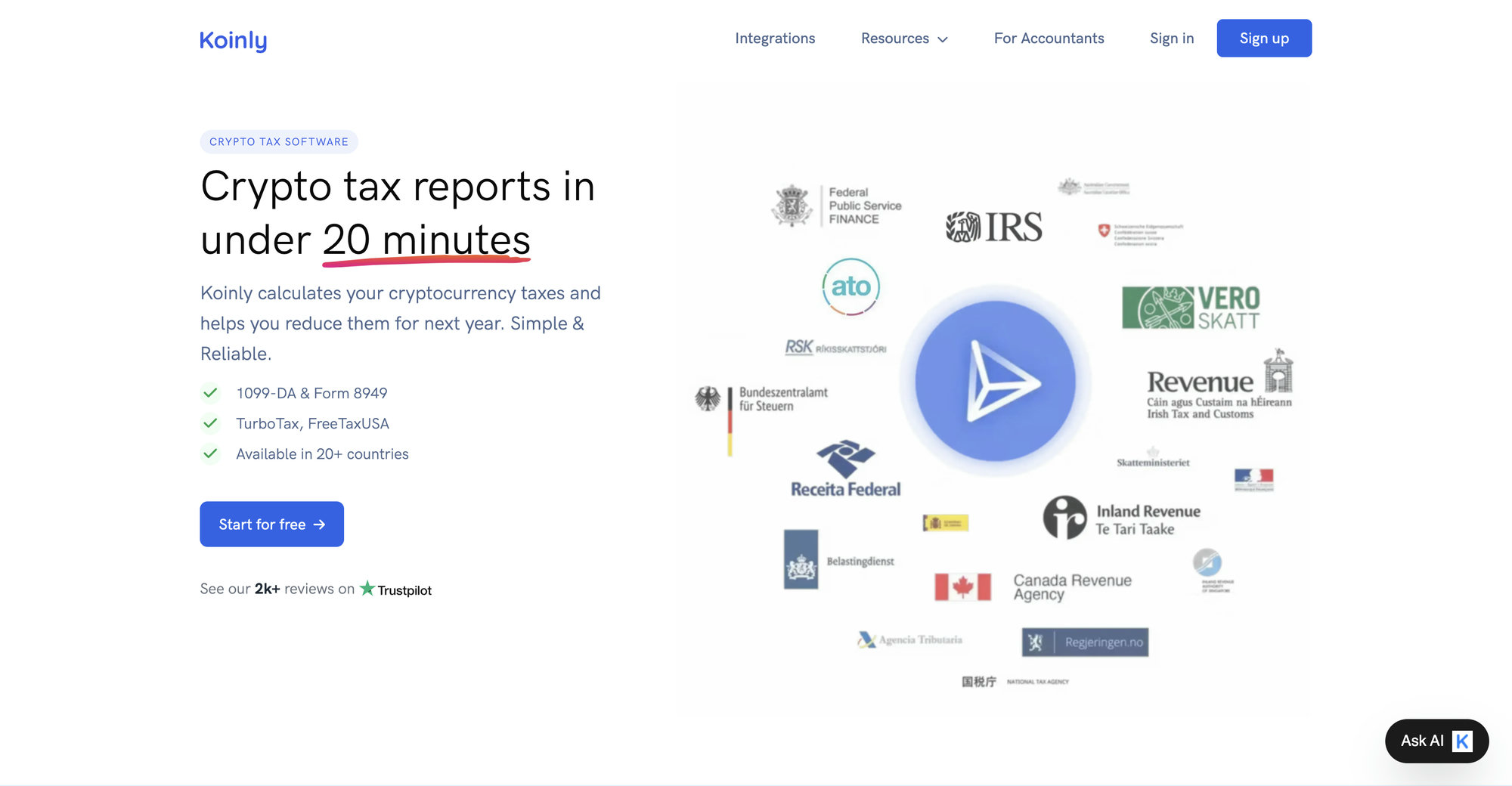
Koinly is crypto tax software that imports your transaction history from exchanges, wallets, and blockchains, then calculates the capital gains, losses, and income you need to report. It supports over 1,000 direct integrations, more than 7,200 DeFi protocols, and 20,000+ cryptocurrencies, with tax reports for the US and 20+ other countries. It does not file your taxes. It produces the numbers that you, your tax software, or your accountant files.
Think of it as a specialized accounting ledger for crypto. Every deposit, withdrawal, trade, and reward across your entire crypto life gets pulled into one place. Koinly fetches the historical market price for each event, figures out which movements were transfers between your own accounts, and runs the gain and loss math on everything that counts as a disposal.
Who it fits best:
- Multi-platform traders. If your history spans Coinbase, Kraken, a MetaMask wallet, and a Ledger, Koinly’s breadth is the main reason to pick it.
- International filers. Koinly generates localized reports for the US, Canada, the UK, Australia, Germany, and other countries, which most US-centric competitors do not.
- DeFi users who are willing to review. Koinly imports on-chain activity better than most tools, but it needs a human to check the labels. More on that below.
Who it fits less well: someone with five trades on one exchange (you may not need software at all), and someone with thousands of unlabeled DeFi transactions who expects push-button accuracy (no software delivers that, Koinly included). For a deeper independent assessment, read our full Koinly review for 2026.
How Koinly Works: The Four-Step Pipeline
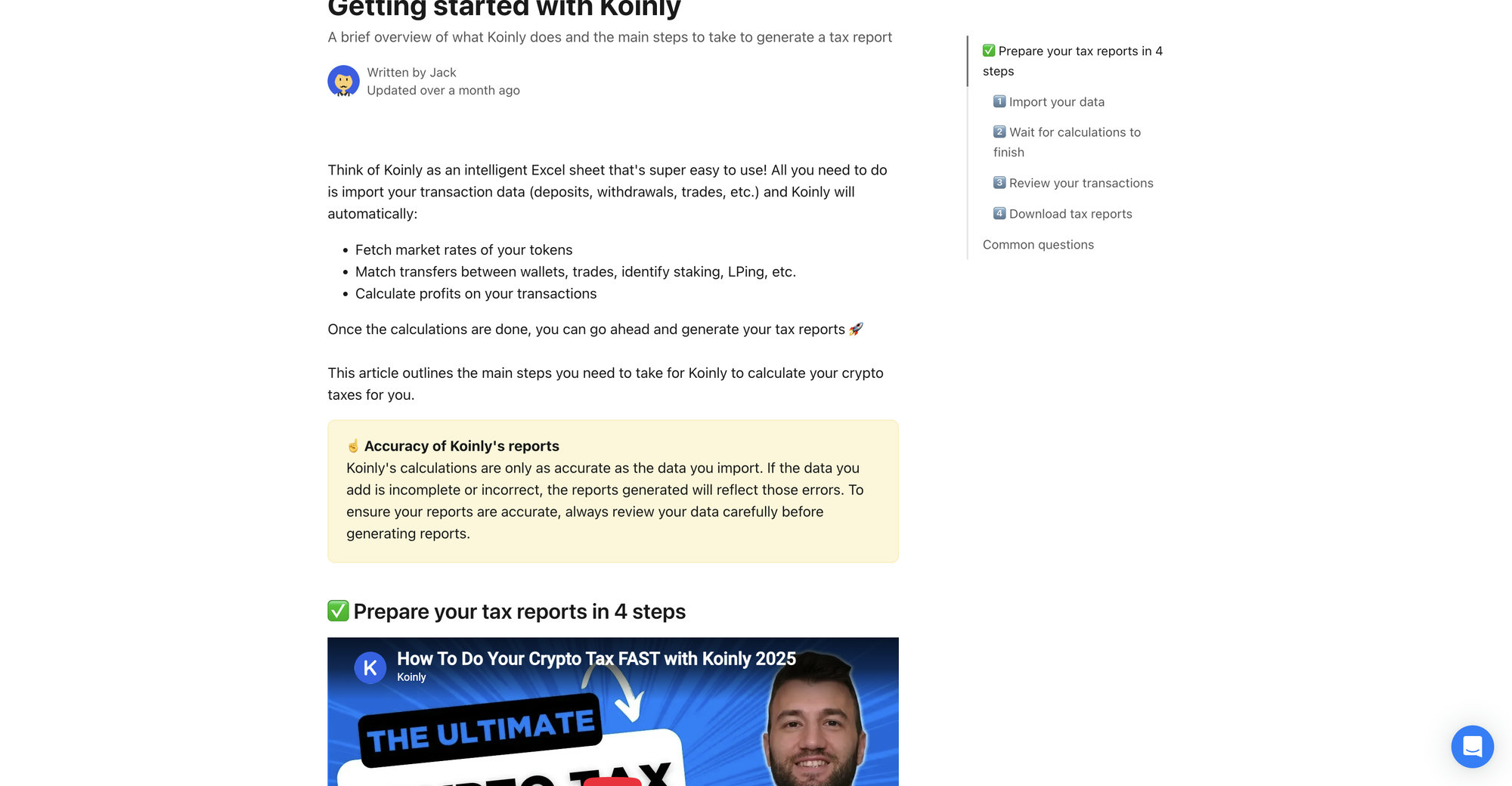
Koinly’s entire workflow is four steps: import your data, let it calculate, review the results, download your reports. Everything else in this guide is detail hanging off that spine.
Step 1: Import
You add every exchange account, wallet, and blockchain address you have ever used. Koinly calls all of these “wallets” internally. Each one connects by API, by public address, or by CSV file upload.
Step 2: Calculate
Koinly processes the imported data. It matches transfers between your own wallets so they are not taxed as sales, merges large orders that exchanges split into many small fills, fetches the market value of every reward and deposit, flags special activity like staking and liquidity provision, and computes a gain or loss on each disposal. You will see an “Updating” indicator while this runs.
Step 3: Review
This is the step people skip, and it is the step that separates a right report from a wrong one. You check that end balances in Koinly match what your exchanges and wallets actually hold, and you resolve the warnings Koinly raises, especially “Missing purchase history.”
Step 4: Download
The Tax Reports page shows your capital gains and income summary for any year free of charge. Downloading the actual reports (Form 8949, Schedule D, TurboTax exports, and the rest) requires a paid plan for that tax year. Reports are unlimited once you pay, so you can fix data and regenerate as many times as you need.
If you want a slower, hand-held version of this pipeline, we wrote two companion tutorials: How to Use Koinly walks the full process click by click, and Koinly for Beginners gets a first-timer to a finished report in about 30 minutes. There is also Learn Koinly Step by Step if you prefer a structured lesson format from connect to filing.
Koinly’s four steps are simple. The accuracy of your tax return lives entirely inside step three.
Koinly Pricing in 2026: Every Plan Explained
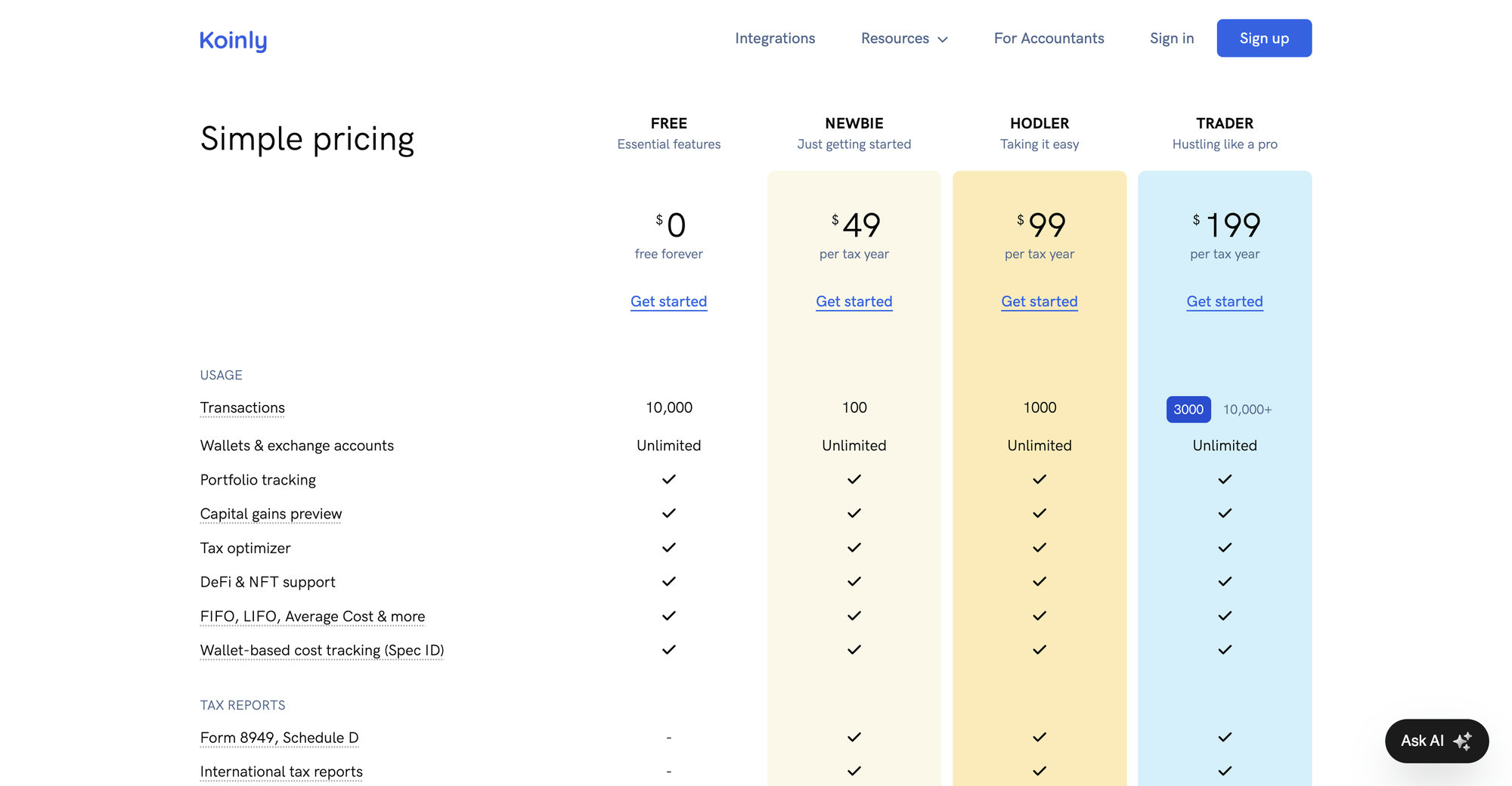
Koinly’s model is simple: tracking is free, reports cost money, and the price depends on your transaction count. Plans are a one-time charge per tax year, not a subscription.
| Plan | Price per tax year | Transaction limit | What you get |
|---|---|---|---|
| Free | $0 | Up to 10,000 tracked | Portfolio tracking, capital gains preview, tax optimizer, DeFi and NFT support. No report downloads. |
| Newbie | $49 | 100 | Form 8949, Schedule D, international reports, audit report, TurboTax and TaxAct export |
| Hodler | $99 | 1,000 | Everything in Newbie |
| Trader | from $199 | 3,000 | Everything in Hodler plus priority support, scaling to about $279 for 10,000 |
| Beyond 10,000 | add-on packs | up to 100,000 | Additional 1,000-transaction packages purchased in-app |
Prices from koinly.io/pricing as of July 2026. Koinly accepts credit and debit cards plus crypto (BTC, ETH, DAI, USDC).
Three pricing details that surprise people:
Transactions count across your whole history. Koinly tallies every transaction in your account, not just the year you are paying for. A wallet you imported in 2021 still counts against your tier today. If your quoted tier looks too high, the cause is usually duplicates or an old wallet, not this year’s trading.
The free plan is a genuine working tier. You can connect everything, watch the gains math update live, and see every warning Koinly raises without paying a cent. You only pay at the moment you need a downloadable report.
Every plan includes the same calculation engine. Newbie and Trader run identical math. You are paying for transaction capacity, not accuracy.
Setting Up Your Koinly Account the Right Way
A Koinly account takes two minutes to create and about five minutes to configure correctly. Those five minutes decide whether your numbers mean anything, so here is the exact checklist.
1. Set your home country and base currency. Country selection controls which tax rules and report formats Koinly applies. US users get IRS-style capital gains treatment and Form 8949 output. Set this before importing anything.
2. Confirm your cost basis method. For US filers the default is FIFO, which is also the IRS default. You can select HIFO or Spec ID if you keep the records to support it. Do not change methods casually between years; pick deliberately and stay consistent. The full trade-offs live in the cost basis section below.
3. Turn on wallet-based cost tracking. This is the big one for 2025 and later. The IRS now requires cost basis to be tracked per wallet and per account rather than pooled universally. Koinly’s wallet-based cost tracking setting applies this. If your account predates 2025, confirm the setting is active for tax years 2025 onward, because accounts still configured for universal pooling will produce non-compliant numbers.
4. Check the tax year dates. US tax years follow the calendar year, and Koinly’s default handles this. Filers in countries like the UK and Australia need the local year boundaries, which Koinly sets from your country.
5. Leave the advanced toggles alone until you understand them. Settings like treating transfers as disposals or realizing gains on liquidity exist for specific jurisdictions and edge cases. Flipping them experimentally is a common way people break a clean account.
Importing Your Data: API vs CSV
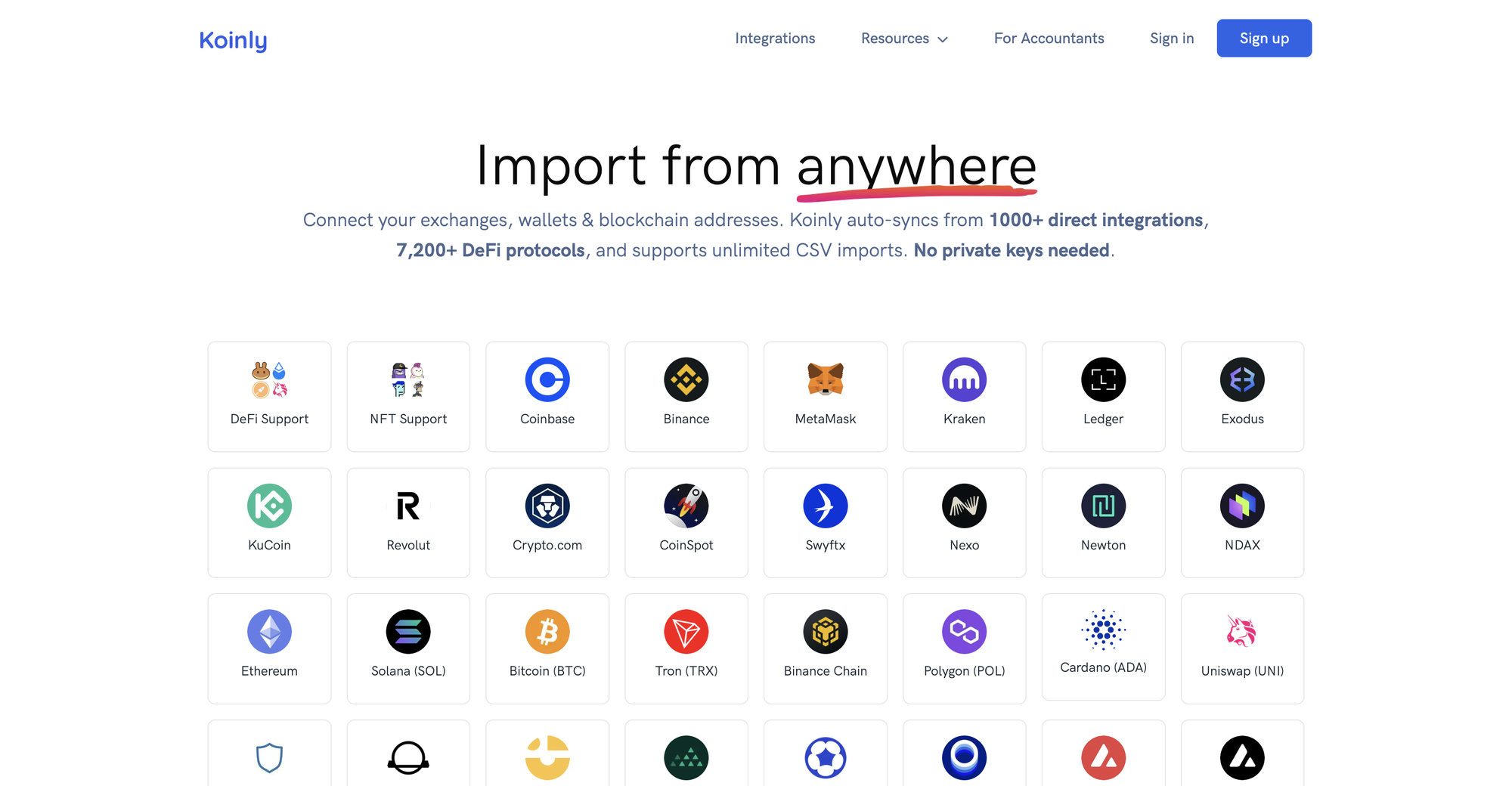
Koinly gives you two ways to get exchange data in: a live API connection or a CSV file export. Choosing right per platform saves hours.
When to use API
API is the default choice for major exchanges. You generate a read-only API key on the exchange, paste it into Koinly, and Koinly pulls your history automatically and keeps syncing new activity. Read-only means the key cannot trade or withdraw. Use API for Coinbase, Kraken, Binance.US, Gemini, KuCoin, and most large platforms.
API strengths: automatic updates, no manual file handling, fewer formatting errors. API weaknesses: some exchanges expose incomplete history through their API (old trades, certain reward types, and fiat events are common gaps), and a revoked or expired key silently stops syncing.
When to use CSV
CSV is the right tool when the API is incomplete, when the exchange is dead, or when you need history the API no longer serves. You export a transaction file from the exchange and upload it. Koinly accepts native formats from hundreds of platforms plus its own custom template for anything unsupported.
CSV strengths: complete control, works for closed platforms and odd assets. CSV weaknesses: one-time snapshots that go stale, and the classic double-import mistake, where someone uploads a CSV on top of an existing API connection and doubles every transaction.
Exchange-by-exchange quick reference
| Platform | Best method | Watch out for |
|---|---|---|
| Coinbase | API | Coinbase Pro history is separate and must be added as its own wallet |
| Kraken | API | Staking rewards sometimes need a re-sync to appear |
| Binance.US | API + CSV | API history gaps for older years; fill with CSV |
| Gemini | API | Earn program history may need CSV backfill |
| KuCoin | API | Multiple sub-accounts each need their own connection |
| Crypto.com | CSV | The app export is the reliable path; API coverage is partial |
| Closed exchanges (FTX, Voyager, Celsius) | CSV | Use your saved exports; Koinly’s custom template covers the rest |
For the full file-by-file process, including how to clean malformed exports before upload, follow our Koinly CSV import walkthrough. And if a connection that used to work starts failing, the Koinly API connection error fix guide covers expired keys, permission problems, and rate-limit stalls one symptom at a time.
Wallet and Blockchain Imports
Exchanges are half your history. The other half lives on-chain, and Koinly handles it with public addresses, no private keys required.
EVM chains sync automatically. Paste one Ethereum address and Koinly can pull activity across Ethereum, Polygon, Arbitrum, Optimism, Base, BNB Chain, Avalanche, and other EVM networks tied to that address. Tokens, gas fees, and contract interactions come along.
Non-EVM chains are supported directly. Solana, Bitcoin, Cardano, Polkadot, Cosmos, and 200+ other blockchains each have their own integration. Add the address for each chain you used.
Bitcoin wallets support xPub keys. For hardware and HD wallets like Ledger and Trezor, import the extended public key (xPub, yPub, or zPub) instead of individual addresses. One xPub covers every receiving address the wallet ever generated, which is the only reliable way to capture a Bitcoin wallet’s full history.
Mobile and browser wallets are just addresses. MetaMask, Phantom, Trust Wallet, and similar apps do not hold your history anywhere special. The chain does. Import the addresses and Koinly reads the chain.
Two on-chain traps worth knowing. First, spam tokens: airdropped junk lands in every active EVM wallet, and while Koinly’s spam detection catches most of it, review what it flagged before filing. Second, forgotten wallets: an address you used for three transactions in 2022 still matters, because if coins flowed through it, skipping it breaks the chain of cost basis for everything downstream.
The Forgotten Wallet
DeFi, NFTs, Staking, and Margin on Koinly
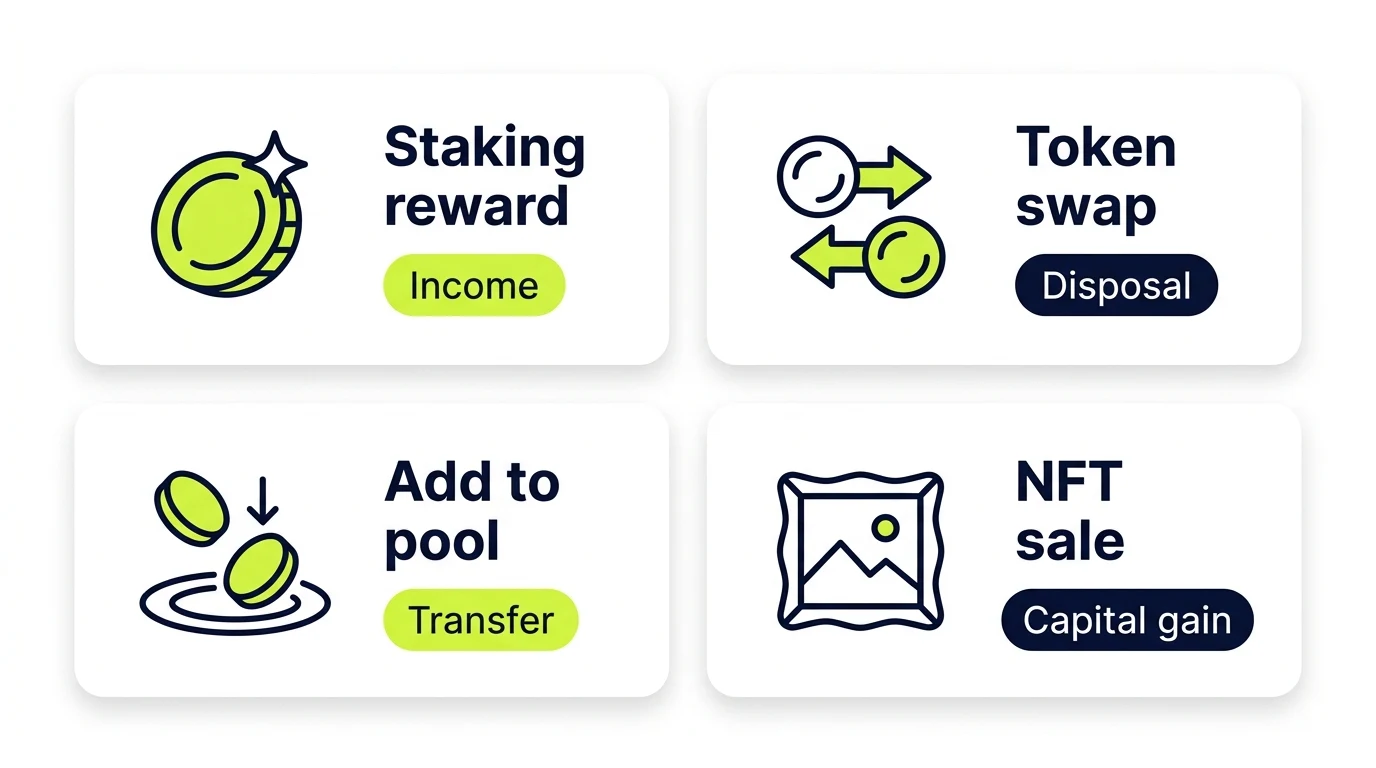
Koinly imports on-chain DeFi activity across 7,200+ protocols, which puts it near the top of the market. Importing is not the same as classifying correctly, though, and this is the area where every crypto tax tool needs human review. Here is how Koinly treats each activity type and where it goes wrong.
Staking
Staking rewards are tagged as reward income at fair market value when received, which matches IRS treatment under Revenue Ruling 2023-14. That value becomes the cost basis for the reward tokens, and selling them later produces a separate capital gain or loss. Koinly identifies most staking flows automatically on major chains. Watch for rewards that import as plain deposits, because an untagged deposit is invisible to your income total.
Liquidity pools
Sending tokens into a pool and receiving an LP token back is the classic ambiguity. Koinly handles major protocols automatically and offers “Add to Pool” and “Remove from Pool” tags that treat the movement as a transfer rather than a taxable swap. For less common protocols, the default import often looks like a crypto-to-crypto trade, which realizes gains you may not have intended to realize. Every pool entry and exit deserves a manual look.
NFTs
NFT buys, sales, and mints import on supported chains. A sale is a disposal with capital gain or loss, a mint’s cost becomes basis, and royalty income is income. Valuation gaps are common with thin markets, so expect to fill in some prices by hand.
Margin, futures, and lending
Realized profit and loss from margin and futures positions imports from exchanges that report it, and Koinly tags collateral movements as transfers rather than disposals. Loan interest can be tagged as an expense, and liquidations register as disposals. Records from derivatives platforms are the least standardized of any import type, so reconcile these against the exchange’s own statements.
Bridges and wrapping
Bridging an asset between chains and wrapping a token are transfers of your own property in substance, but they frequently import as two unlinked events: an asset vanishing on one chain and appearing on another. Unlinked, the arrival side gets $0 basis. Koinly usually needs your help matching these pairs.
The label-by-label repair process, including screenshots of each fix, is in our Koinly DeFi import guide. If your on-chain activity is heavy, budget real time here. This is where Koinly reports go from roughly right to actually right.
Transfer Matching: How Koinly Links Your Wallets
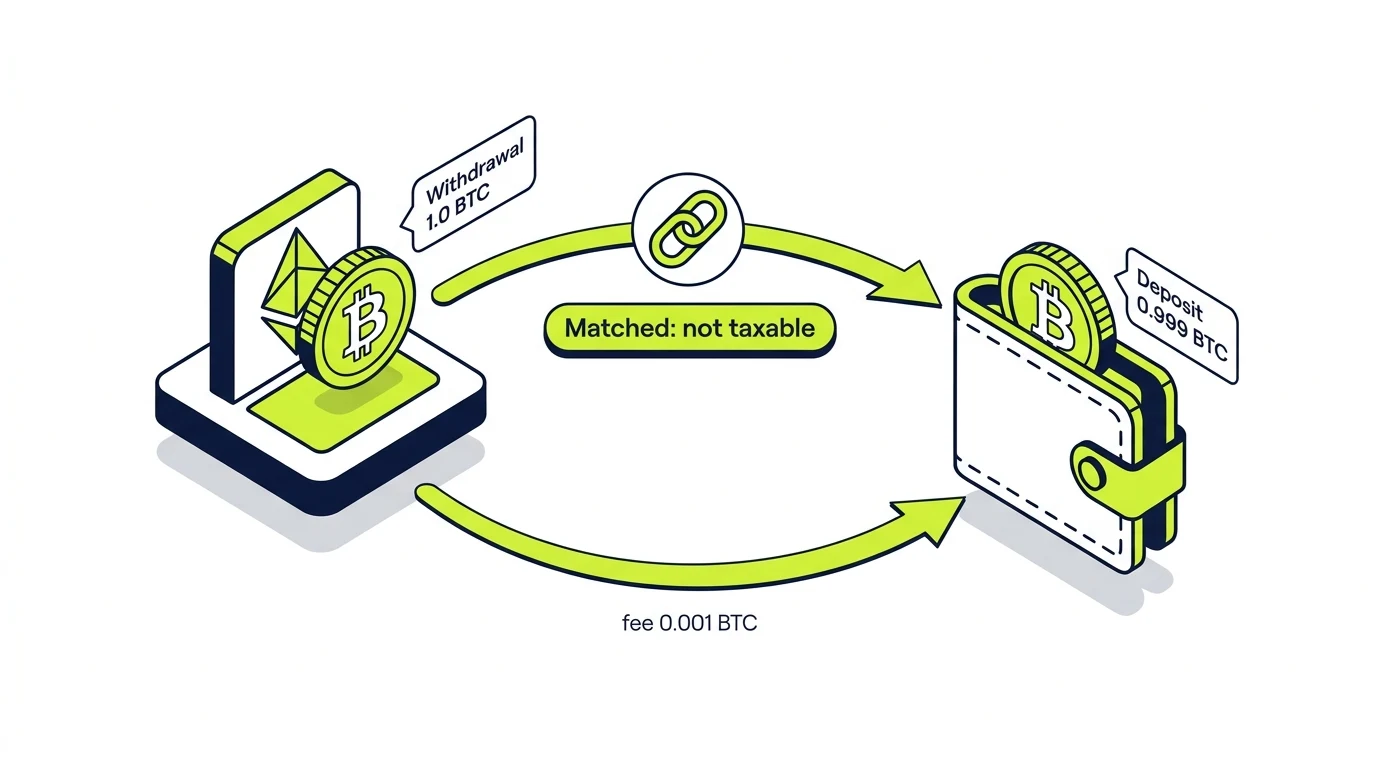
Moving crypto between your own accounts is not a sale, and transfer matching is how Koinly knows the difference. When it sees a withdrawal from one of your wallets and a matching deposit to another, it merges them into a single transfer: same currency, deposit shortly after the withdrawal, and amounts that line up within a small tolerance for network fees.
When matching works, cost basis rides along with the asset from wallet to wallet, which is exactly what the tax math needs. When it fails, the consequences are ugly in both directions:
- An unmatched withdrawal looks like you sent crypto away, which some settings treat as a disposal.
- An unmatched deposit looks like crypto from nowhere, which means $0 cost basis and a phantom gain when you sell.
Matching fails for predictable reasons: the receiving wallet was never added to Koinly, a CSV import lacked timestamps precise enough to pair the two sides, an exchange batch-processed the withdrawal hours later, or the amounts differ by more than the fee tolerance. The fix is almost always the same sequence. Add the missing wallet first. Then use Koinly’s manual merge on any pair it still cannot see, selecting the withdrawal and deposit and marking them as one transfer.
One more quiet benefit: under the per-wallet basis rules, transfers are the mechanism that moves basis between wallets on your books. Sloppy transfer matching used to risk phantom gains. Now it also corrupts the per-wallet basis map the IRS expects you to maintain.
Cost Basis Settings: FIFO, HIFO, Spec ID, and the Per-Wallet Rule
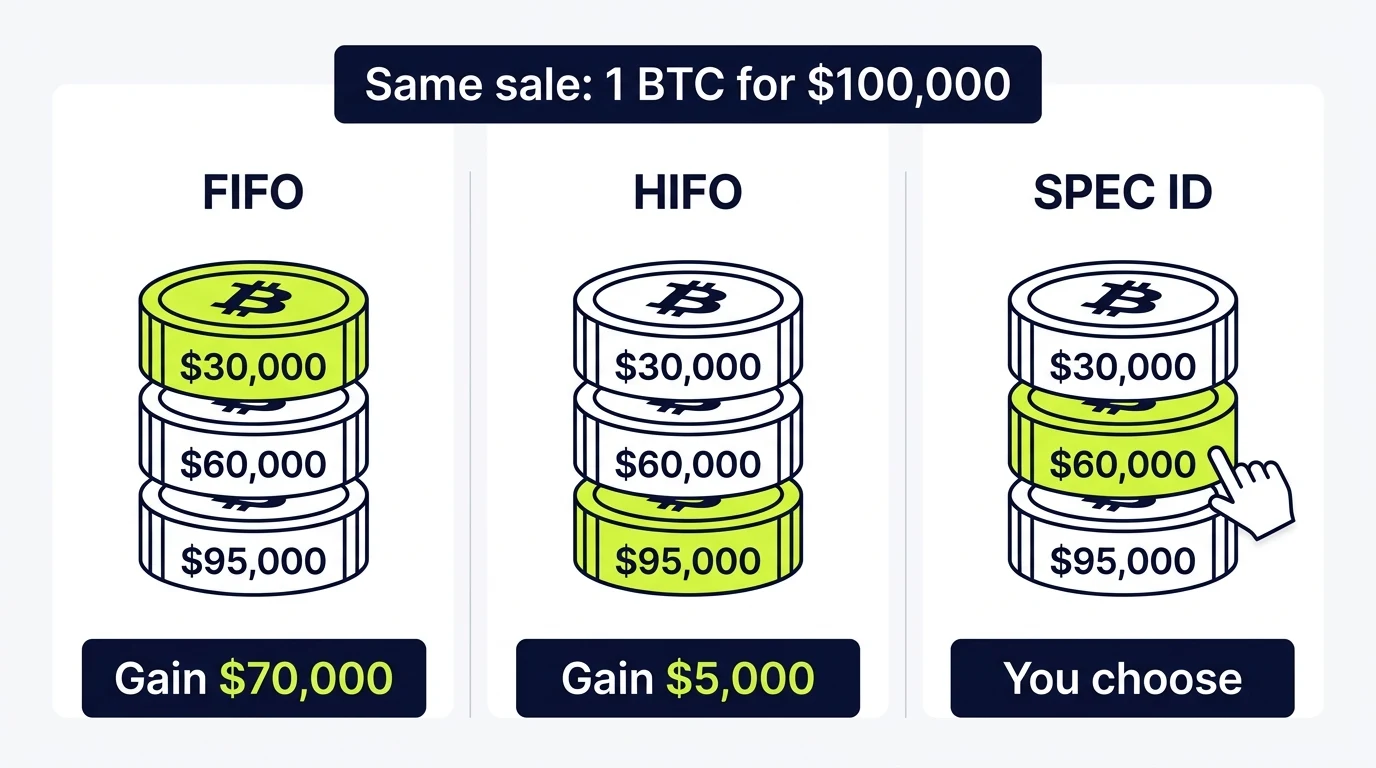
Cost basis method determines which purchase lots you are treated as selling, and Koinly supports the full menu: FIFO, LIFO, HIFO, average cost for countries that use it, and Specific Identification through wallet-based tracking.
The methods in plain English
FIFO (First In, First Out) sells your oldest coins first. It is the IRS default and the simplest to defend. In a market that has risen over your holding period, it usually produces the largest gains, though often long-term ones taxed at lower rates.
HIFO (Highest In, First Out) sells your most expensive coins first, which minimizes the current year’s gain. The IRS permits it as a form of specific identification, provided your records can identify the exact lots. Koinly’s transaction-level records are what make that defensible.
LIFO (Last In, First Out) sells the newest coins first. Occasionally useful, more often a middle option that gets picked by accident.
Spec ID means choosing the specific lot you sold, trade by trade. Maximum control, maximum recordkeeping burden. In Koinly’s world this operates through wallet-based cost tracking.
A worked example
You bought 1 BTC at $30,000 in 2022, 1 BTC at $60,000 in 2024, and 1 BTC at $95,000 in early 2025. In December 2025 you sell 1 BTC for $100,000.
| Method | Lot sold | Taxable gain |
|---|---|---|
| FIFO | The $30,000 coin | $70,000 |
| HIFO | The $95,000 coin | $5,000 |
| LIFO | The $95,000 coin | $5,000 |
Same sale, $65,000 of difference in reported gain. The FIFO gain is long-term while the HIFO gain is short-term, so the rate applied differs too. There is no universally better method, only a better method for your holdings, horizon, and bracket. Our FIFO vs HIFO vs Spec ID breakdown runs the full decision tree.
The per-wallet rule changed the game
Starting January 1, 2025, Rev. Proc. 2024-28 requires basis to be tracked per wallet and per account. The old universal method, where all your coins shared one pooled basis regardless of location, is finished. Two practical consequences inside Koinly:
- Wallet-based cost tracking must be on for 2025 and later. Koinly built the setting specifically for this rule.
- The safe harbor allocation was a one-time event. Taxpayers had to reasonably allocate their unused basis across wallets as of January 1, 2025, locked in by the filing of the 2025 return. If your allocation was never deliberately made, your basis map may rest on defaults nobody chose. That is worth a professional’s review before it hardens into every future year’s numbers.
The full rule, with allocation examples, is in our per-wallet cost basis guide to Rev. Proc. 2024-28.
Reviewing and Fixing Errors Before You File
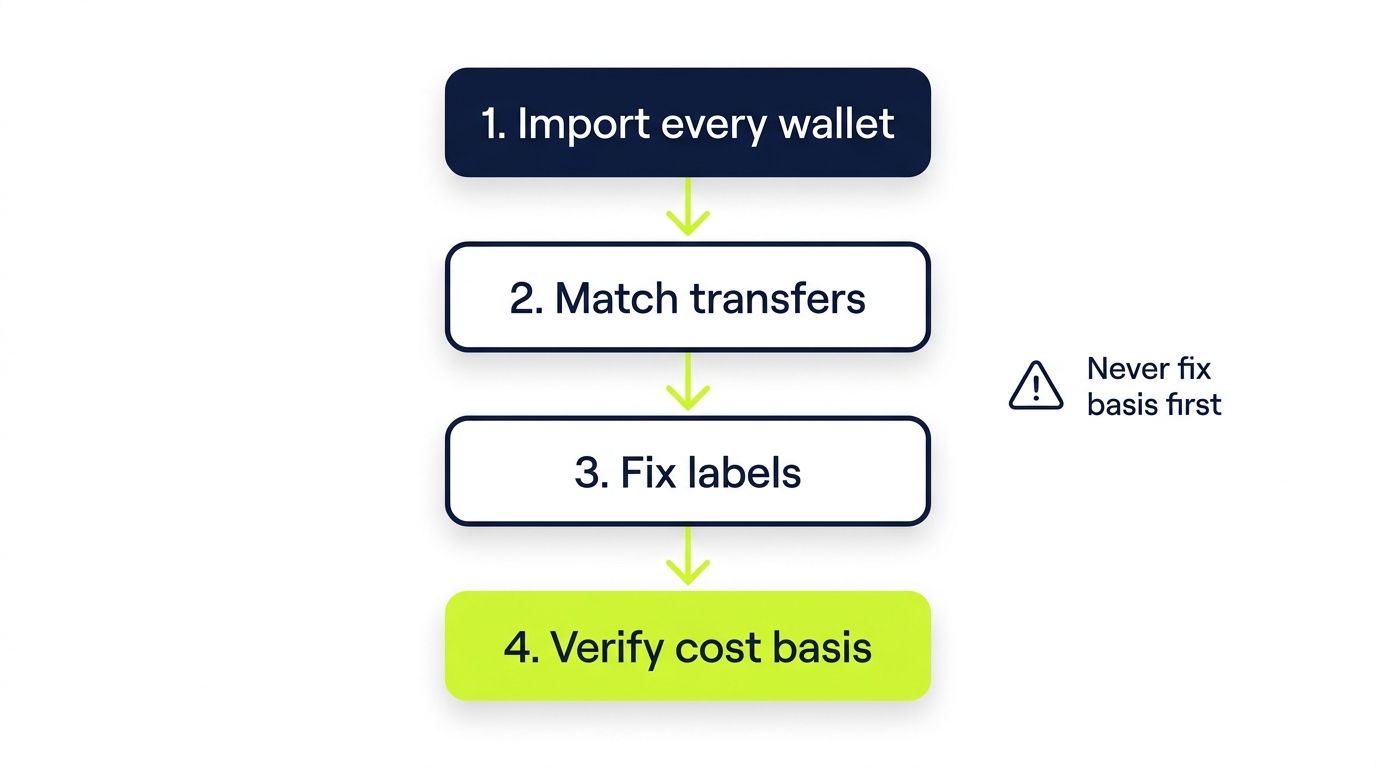
Every Koinly problem we are hired to fix falls into one of five families. Here is each one, what causes it, and the repair order that actually works.
Missing purchase history and $0 cost basis
Koinly’s most consequential warning. When a sale traces back to coins Koinly never saw you acquire, it assumes you paid nothing, and the entire sale becomes gain. Causes: a wallet you never imported, an exchange CSV that started mid-history, an airdrop or gift that arrived untagged. Fix: find where the asset actually came from and import that source. The step-by-step hunt is in Koinly missing transactions: why they vanish and how to fix it.
Negative balance warnings
Koinly thinks you sold more of an asset than you ever held, which is physically impossible and always means missing data. The Ledgers page shows the exact moment a balance goes below zero, which points at the gap. Usual suspects: a missing deposit, an unmatched transfer, or fees recorded by the exchange but absent from the import. Full walkthrough: Koinly negative balance warning fixes.
API and sync failures
Connections break quietly: keys expire, exchanges rotate API versions, rate limits stall large accounts mid-sync. Symptoms range from a wallet stuck on “Updating” to months of missing trades. Triage steps live in the Koinly API connection error guide, and for the broader class of app problems (login, report generation, page errors) there is Koinly not working: sync, login and report fixes.
Duplicates
The same transactions imported twice, usually API plus CSV on one account, sometimes a re-uploaded file. Duplicates inflate your transaction count (and your Koinly bill) and double-count gains. Fix: delete the affected wallet and re-import through a single method rather than hand-deleting hundreds of rows.
Wrong cost basis
The subtlest family, because nothing looks broken. The report generates, the numbers just do not match reality. Causes stack: any of the above errors, the wrong method selected, per-wallet settings misapplied, or a bad safe-harbor allocation. Diagnosis order matters, and it is the reverse of what most people try: fix imports first, then transfers, then labels, and only then judge the basis numbers. We wrote the full diagnostic at Koinly cost basis wrong? How to find and fix it.
Report generated on broken data
Three exchanges connected, two old wallets missing, 61 unmatched deposits carrying $0 basis, and a duplicate CSV import on top of a live API connection. The report generated without complaint. It was also wrong by a factor of nearly four.
Same account, complete data
Missing wallets imported, transfers matched, duplicates purged, DeFi labels corrected. Same trades, same year, same software. The difference was never the calculation engine. It was the inputs.
Generating Your Tax Reports
Once your data is clean, report generation is the easy part. Open the Tax Reports page, confirm the tax year, and pick your documents. What US filers get:
- Form 8949: every disposal listed with dates, proceeds, basis, and gain or loss, separated short-term and long-term. This is the core document.
- Schedule D: the summary totals that flow from Form 8949 to your 1040.
- Complete Tax Report: a PDF containing your full capital gains, income, gifts, and closing positions. Useful as the master record you keep.
- Income report: staking, rewards, airdrops, and other ordinary income listed separately, which is what you need for the income lines of your return.
- TurboTax and TaxAct exports: formatted files those platforms ingest directly.
- Comprehensive audit report: transaction-level detail designed for examiners and accountants.
Reports are unlimited on a paid plan. Fix data, regenerate, repeat. The report is a projection of your dataset, never a snapshot frozen at purchase time.
Before you download, run this pre-flight list. Every item takes a minute and each one catches real failures:
- Warnings resolved or consciously dismissed, not ignored.
- End balances in Koinly within rounding distance of actual balances on each platform.
- The tax year selector on the year you are filing.
- Cost basis method and wallet-based tracking confirmed in settings.
- Income total sanity-checked against what you know you earned.
Filing With Koinly: TurboTax, TaxAct, and Form 8949
Koinly ends where filing begins. Three paths take its output to a submitted return.
TurboTax
Koinly produces a TurboTax Online export you upload inside TurboTax’s crypto section, plus a TXF file for TurboTax Desktop. The import fills your 8949 entries automatically. Watch one thing: import your Koinly file instead of also connecting exchanges directly to TurboTax, or you will duplicate the very transactions Koinly already reconciled. Our TurboTax crypto guide covers the whole flow, including the aggregation limits for very high transaction counts.
TaxAct and other software
TaxAct has its own Koinly export format. FreeTaxUSA and most other platforms accept either a CSV import or summary totals with the 8949 attached.
Filing by mail or through an accountant
Print the Koinly-generated Form 8949 and Schedule D, attach them to your return, done. Accountants can also receive your reports directly through Koinly’s sharing, which beats emailing PDFs. The mechanics of the forms themselves, including what goes in each column and how summary reporting works, are in how to file crypto taxes with Form 8949 and Schedule D.
The 1099-DA reality check
From the 2025 tax year forward, US brokers send Form 1099-DA reporting your gross proceeds to the IRS. For 2025, proceeds only; basis reporting phases in for covered assets acquired from 2026. The IRS matching computers now compare your filed return against broker-reported proceeds. Koinly’s job in this world is to make your 8949 tie to those reported proceeds while showing your true basis, so the match succeeds and the gain is real. If your 1099-DA and your Koinly report disagree, resolve it before filing, not after the notice arrives. Background on the form: Form 1099-DA explained.
Koinly vs the Alternatives
Short version: Koinly wins on breadth and international coverage, and every serious alternative has a niche where it beats Koinly. We keep full head-to-head comparisons updated separately, so this is the routing table rather than the whole argument.
| If you are… | Consider | Full comparison |
|---|---|---|
| A Coinbase-centric US filer | CoinTracker | Koinly vs CoinTracker comparison |
| A data-control power user in the EU | CoinTracking | Koinly vs CoinTracking |
| A simple US portfolio wanting the easiest UX | CoinLedger | CoinLedger vs Koinly |
| Comparing the whole field | All seven major tools | Best crypto tax software roundup |
One thing no comparison changes: none of these tools files your return, and all of them inherit the same garbage-in problem. The tool matters less than the completeness of what you feed it.
When to Bring In a Professional
Koinly alone is enough when your activity is simple and fully traceable: a few exchanges, no DeFi, every wallet connected, warnings at zero. Plenty of filers are in that group, and this guide plus the spoke tutorials will carry them to a clean report.
You have outgrown DIY when any of these is true:
- Warnings will not clear no matter what you import, or clearing one creates two more.
- Your history spans years of unreconciled activity, dead exchanges, or lost records.
- DeFi, NFT, or margin activity is heavy enough that label review would take you days.
- Your 1099-DA conflicts with your Koinly numbers and you cannot find why.
- The per-wallet transition left your 2025 basis allocation in a state nobody deliberately chose.
- An IRS letter is already on the table, which raises the stakes of every number.
At that point the question is not whether Koinly works. It is whether your time and confidence are better spent elsewhere. Our guide to when to bring in a Koinly expert maps the decision in detail, and if you want the entire thing lifted off your plate, the done-for-you Koinly tax filing service explains how a full hand-off works.
Software calculates. It does not investigate. The moment your crypto history needs investigation, you need a human who does this every day.
Where Count On Sheep Fits
Count On Sheep is a done-for-you crypto tax reconciliation service. We work inside Koinly (and the other major tools) every day, untangling exactly the problems this guide describes: missing wallets, broken transfer chains, mislabeled DeFi, $0 basis phantom gains, and per-wallet allocations that were never deliberately made.
What that looks like in practice:
- We connect and verify your complete history across every exchange, wallet, and chain.
- We match transfers so basis follows every asset, and we document the trail.
- We correct DeFi and income labels so your gains and income are what actually happened.
- We reconcile your records against any 1099-DA so your Form 8949 ties to what the IRS was told.
- We deliver a clean, defensible report that you or your tax preparer can file with confidence.
We are not a CPA firm and we do not prepare your Form 1040. We are the reconciliation layer that makes the numbers on it right. If your Koinly account is fighting you, or you would simply rather not spend your March inside the Ledgers page, book a call and hand it over.
Koinly Guide FAQ
The questions below cover what people ask most about Koinly. For anything specific to your own history, get a professional review before you file.
Related Reading
- Koinly Review 2026: A Crypto Tax Specialist’s Honest Take
- How to Use Koinly: Complete Step-by-Step Tutorial
- Koinly for Beginners: Your First Tax Report in 30 Minutes
- Learn Koinly: Step-by-Step From Connect to Filing
- Koinly CSV Import Walkthrough
- Koinly DeFi Import Guide
- Koinly API Connection Error Fixes
- Koinly Cost Basis Wrong? How to Fix It
- Koinly Missing Transactions Fix
- Koinly Negative Balance Warning Fix
- Koinly Not Working? Sync, Login and Report Fixes
- When to Bring In a Koinly Expert
- Koinly Tax Filing Service: Done-For-You Crypto Taxes
- Koinly vs CoinTracker comparison for 2026
- Koinly vs CoinTracking 2026
- CoinLedger vs Koinly 2026
- Best Crypto Tax Software in 2026
Official IRS Resources
- IRS: Digital Assets
- IRS: About Form 8949
- IRS: About Schedule D (Form 1040)
- IRS: About Form 1099-DA
- Rev. Proc. 2024-28 (per-wallet basis allocation)
- Revenue Ruling 2023-14 (staking rewards)
Frequently Asked Questions
How does Koinly work?
Koinly imports your transaction history from exchanges, wallets, and blockchains through API connections or CSV files. It then fetches historical market prices, matches transfers between your own wallets, classifies activity like staking and DeFi, and calculates a capital gain or loss on every disposal. When the data is complete, you download tax reports such as Form 8949 and Schedule D.
How much does Koinly cost per year?
Koinly's portfolio tracking is free forever. Tax report downloads require a paid plan priced per tax year by transaction count: Newbie is $49 for up to 100 transactions, Hodler is $99 for up to 1,000, and Trader starts at $199 for up to 3,000, with higher tiers for 10,000 or more. Plans are a one-time charge per tax year, not a recurring subscription.
Does Koinly report to the IRS?
No. Koinly is calculation software, not a broker or exchange, so it does not send your data to the IRS or any tax authority. It generates the reports you or your accountant file. Your exchanges are a different story: US brokers now report your gross proceeds to the IRS on Form 1099-DA, which is exactly why your own records need to be accurate.
Can you trust Koinly with your data?
Koinly uses read-only API connections that cannot move or withdraw funds, and it never asks for private keys. The company holds SOC 2 and ISO 27001 certifications and is GDPR compliant. The bigger trust question is accuracy, and that depends on you: Koinly's math is reliable only when every wallet is connected and transfers are matched.
Is Koinly easy to set up and use?
Yes, for standard activity. Connecting an exchange takes a few minutes with an API key, and public wallet addresses sync automatically. A simple portfolio can produce a finished report in under an hour. Complexity comes from DeFi labeling, missing wallets, and old unreconciled history, which is where most users need the error-fixing workflow or professional help.
Can you withdraw money from Koinly?
No, because Koinly never holds your money or your crypto. It connects to your accounts with read-only access purely to read transaction history. There is nothing to deposit or withdraw. If a service claiming to be Koinly asks you to transfer funds, it is a scam.
Do I still need Koinly if my exchange sends a 1099-DA?
In most cases, yes. For the 2025 tax year the 1099-DA reports gross proceeds, and basis reporting only begins for covered assets acquired on the same broker starting in 2026. Anything you transferred in from another exchange or wallet shows missing basis, and the IRS form cannot see your full history. Koinly is the tool that assembles that complete history so your reported gain is real.